iPhone 5 Battery Replacement in Al Khobar
iPhone 5 Battery Replacement in Al Khobar for a phone that dies by noon or won't hold a charge. We test the battery free and explain what we find. You decide before any work starts.
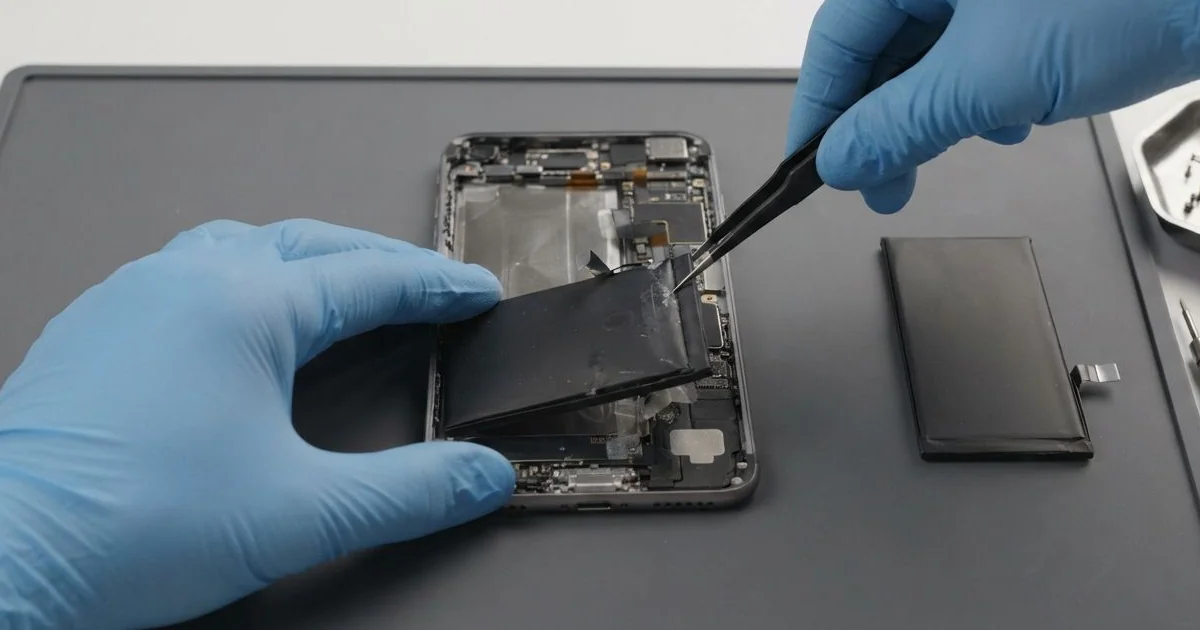
iPhone 5 Battery Replacement in Al Khobar brings back a full day of use to a tired phone. We give the old battery a free test, then fit a new battery on fresh adhesive. We check charging and power before closing, and most jobs are done the same day.
An iPhone 5 battery draining fast is the usual sign. The phone shows full in the morning and is nearly empty after a few calls. Some phones jump from a high number straight to zero and switch off.
This phone's settings don't show a battery health reading. So many owners just guess, or blame the old software. A quick test on our tester gives a clear answer in a few minutes.
It's better not to wait. A worn battery can swell over time and push the screen up from inside. It also runs hot while charging, and that heat is hard on the board around it.
Not every drain needs a new part. A weak cable, a dirty port or an app stuck in the background can all look like a bad battery. We test those first, and an iPhone 5 battery replacement only goes ahead when the battery itself is worn.
How Kabayan Center Replaces an iPhone 5 Battery
We fix these battery problems on this phone.
- Fast drain, even with the screen off
- Sudden shutdowns with charge still showing
- A battery number that jumps up and down
- A phone that only works while plugged in
- A screen lifting at one side from a swollen battery
- Heat on the back while charging or in long calls
Here is what an iPhone 5 battery replacement looks like on our bench:
- We test the battery free on our tester and check charging with our own cable.
- We tell you what it needs, and you decide before any work starts.
- We remove the two tiny screws beside the Lightning port and lift the screen with a suction cup.
- We take off the small metal cover over the battery plug and disconnect it first.
- We pull the old battery's plastic tab slowly, warming the glue so the cell doesn't bend.
- We fit the new battery on fresh adhesive, connect it and test power and charging.
- We close the screen, refit the screws and let you check the phone yourself.
Need it for a newer model too? Our phone battery replacement service covers other phones with the same care. Customers drive to our King Fahd Road shop from Dammam and Dhahran as well.
Why an iPhone 5 Battery Gives Up: 3 Real Cases
Living on a power bank in a trouser pocket
A customer came in holding the phone and a power bank tied together with a rubber band. "It dies unless this thing is plugged in," they said. The pair had lived in a trouser pocket for a long time.
The customer, a courier who works long shifts, had searched for iPhone Battery Replacement in Al Khobar. Charging in a warm pocket keeps a battery hot for hours. Over time, that heat wears out the cells inside.
Our tester showed the battery had lost most of its strength. We did the iPhone 5 battery replacement and ran a long test away from the charger. It held well, with no sudden drops.
But the cable still wobbled in the port. Constant plugging in a pocket had packed lint deep inside and bent one pin a little. We did a charging port repair to clean it and fit a new port cable.
The phone now runs a full shift without the power bank. The courier keeps the power bank in a bag now, not a tight pocket.
A short cable for top-ups in the van also helps. It stops the plug from bending at the port while driving.
A summer in the glove box
This one starts in a parked car. A teacher kept an old iPhone 5 in the glove box as an emergency phone. It stayed there through a long, hot summer.
When the teacher finally needed it, the screen had lifted at the top. A thin crack ran from the corner where the glass had been pushed. "I didn't even drop it," the teacher said.
Inside a closed car, the glove box gets far hotter than the air outside. The old battery had swollen and pressed the screen out of its frame.
A swollen battery should come out at once, even if the phone still turns on. We removed it carefully and fitted a new one, and the phone powered up fine.
The cracked glass was a different job. The teacher wanted only the battery done for now and planned a phone screen replacement later. We sealed the screen back down, but the crack stayed.
So the phone works and is safe again, though it still looks worn. The teacher now keeps the spare phone in the house, not the car.
Dropped in a bucket while washing the car
We often see this in the weekend car-wash routine. A phone slipped out of a shirt pocket into a bucket of soapy water. It was pulled out in seconds, dried with a towel and put on charge right away.
After that, the battery number made no sense. It showed half full, then died within minutes. The owner had looked up mobile repair in Al Khobar, sure the battery was the only problem.
We opened the phone and found soap marks and a white crust near the battery plug. Charging while wet had started rust on the contacts. The power had pushed the soapy water along the metal.
A new battery alone would not fix that, because the rust would keep spreading. We did a water damage repair first, cleaning the board and the plug.
Then we fitted the new battery and tested it for a long while. The number dropped smoothly, the way it should. The phone stayed cool on the charger too.
This phone has no water seal at all. Next time, the owner will switch it off and bring it in before charging.
How to Keep Your iPhone 5 Battery Healthy
- Keep the phone out of hot cars, glove boxes and sunny windows.
- Charge on a table, not in a pocket or under a pillow.
- Unplug when it's full, and try not to run it down to zero.
- Use a good cable that fits firmly, since a loose one heats the port.
- Switch the phone off and keep it unplugged if it ever gets wet.
- Get phone repair in Al Khobar quickly if the screen starts to lift.
Related services
- Motherboard repair for a phone that still won't power on with a new battery
Questions about this repair
Ask us anything else on WhatsApp
we answer during shop hours.