iPhone 5 Charging Port Repair in Al Khobar
iPhone 5 Charging Port Repair in Al Khobar for a cable that wobbles, falls out or does nothing at all. We look at the port free and show you what we see. You decide before any work starts, and nothing on your phone is wiped.
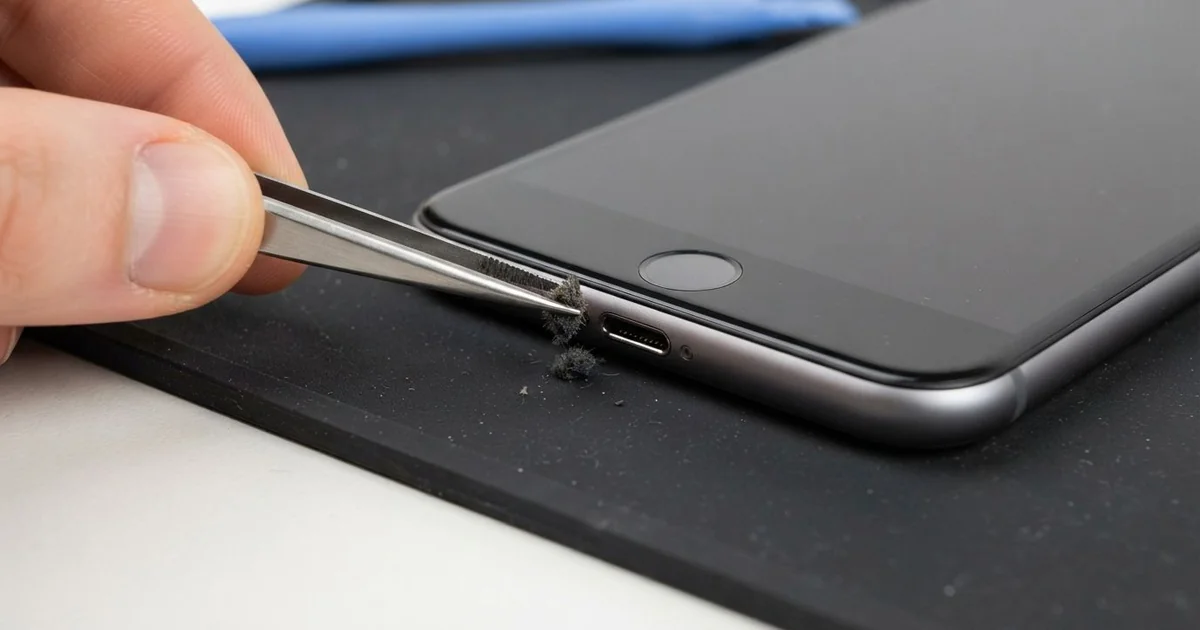
iPhone 5 Charging Port Repair in Al Khobar fixes a phone that charges loosely, slowly or not at all. We check the Lightning port free, then clean it or replace its cable. We test charging, the headphone socket and the bottom mic, and most jobs are done the same day.
An iPhone 5 not charging usually starts small. The cable needs a push, or it only works when the phone lies still. Later the charging sign flickers, and one day it stops showing at all.
When three or four new cables all fail the same way, the fault is in the phone. It's better not to wait, because a loose plug sparks on the pins and slowly burns them. The battery also runs flat again and again, and that wears it out early.
Not every fault needs a new part. Most ports are just packed with lint, sand or dust, and careful cleaning brings charging back. Bent, burnt or rusted pins are different.
The iPhone 5 charging port sits on one long cable with the headphone socket and bottom mic. When the pins are damaged, we replace that cable. It often fixes crackly headphones and muffled calls at the same time.
How Kabayan Center Repairs an iPhone 5 Charging Port
We fix these charging faults on this phone.
- A cable that wobbles, slips out or needs holding
- No charging at all, or charging that stops and starts
- Very slow charging with a good charger
- A message that the cable or accessory is not supported
- Crackly sound from the headphone socket
- Callers who say your voice is faint or muffled
These are the real steps of the iPhone 5 charging port repair:
- We look into the port under a magnifier lamp and test with our own cable.
- We tell you what it needs, and you decide before any work starts.
- We clean out lint and sand with plastic picks and a soft brush, never metal.
- If the pins are damaged, we lift the screen from the front and disconnect the battery.
- We take out the loudspeaker and peel the old port cable from the frame.
- We fit the new cable, then test charging, the headphone socket and the mic.
- We close the phone, refit the screws and let you try it yourself.
Have another phone with the same trouble? Our charging port repair service covers other models too. Many customers come to our King Fahd Road shop from Dammam and Dhahran.
Why an iPhone 5 Stops Charging: 3 Real Cases
Fine sand after a desert trip
One morning a phone came in after a weekend of camping in the desert. "It charged in the tent, and then it just stopped," the owner said. The owner works as a lab assistant and needs the phone for alarms.
They had searched for iPhone Charging Port Repair in Al Khobar on the drive back. Desert sand is very fine, and wind pushes it into every gap. Each time the cable goes in, it presses the sand deeper.
Under the lamp, we saw a pale layer packed hard at the back of the port. The cable could not reach the pins at all. We loosened the sand slowly with plastic picks and lifted it out with a soft brush.
Then we checked the pins closely. They were scratched but not bent or burnt, so no part was needed.
After the iPhone 5 charging port repair, the cable clicked in firmly. The phone charged at full speed. We tested the bottom mic too, since sand can reach it through the same holes.
The owner now keeps the phone in a zip bag on trips. A small dust plug in the port would also help on windy days.
Charging in a car mount on bumpy roads
A common case: a sales rep drove all day with the phone in a vent mount. The cable hung down and swung with every bump. Over many months, the swinging plug worked the port loose from inside.
"It charges only if I tape the cable," the rep told us, blaming the cables at first. The headphone socket had started to crackle as well.
We opened the phone and found the port cable worn near the plug. Two pins were bent a little to one side. Cleaning could not fix this, so we fitted a new port cable.
Charging was firm again, and the crackle in the headphones was gone too. Both sat on the same cable, so one part fixed both.
But our tester showed the battery was badly worn from constant short charges. The rep decided to wait on the battery for now. We noted it for a phone battery replacement on the next visit.
So the phone charges well, but it still drains early in the afternoon. The rep now uses a mount that holds the cable straight.
Sweet tea spilled on an office desk
This one starts with a cup of tea. A clerk knocked it over at work, and some of it ran into the bottom of the phone. The phone was wiped dry and plugged in to charge.
By the evening, it showed no charging at all, and the bottom of the phone felt warm. The clerk had looked up mobile repair in Al Khobar and brought it the next morning.
Sugar dries into a sticky film that holds water against the pins. When power runs through, the pins rust and burn quickly.
We found brown sticky marks in the port and green crust on two pins. Some of the tea had gone past the port, onto the board. So we did a water damage repair to clean the board first.
Then we did the iPhone 5 charging port repair, since the burnt pins could not be saved. The phone charged normally, and the mic worked in a test call. The headphone socket was clean and quiet too.
Never charge a phone after a spill, even if it looks dry. The clerk now keeps cups on the far side of the desk.
How to Keep Your iPhone 5 Charging Port Working
- Check the port with a torch every few weeks for lint or sand.
- Never clean it with a pin, a needle or a toothpick.
- Pull the cable out by the plug, never by the wire.
- Keep the cable straight in a car mount, so it doesn't swing.
- Switch the phone off after a spill, and don't charge it until it's checked.
- Get phone repair in Al Khobar as soon as the cable needs a special angle.
Related services
- Motherboard repair for a phone that still won't charge with a new port
- Phone screen replacement for a cracked or dark screen
Questions about this repair
Ask us anything else on WhatsApp
we answer during shop hours.