iPhone 5 Motherboard Repair in Al Khobar
iPhone 5 Motherboard Repair in Al Khobar for an old phone that stays black or loops on the logo. We check it free and explain the fault in plain words. You decide before any work starts, and we never delete your files without asking.
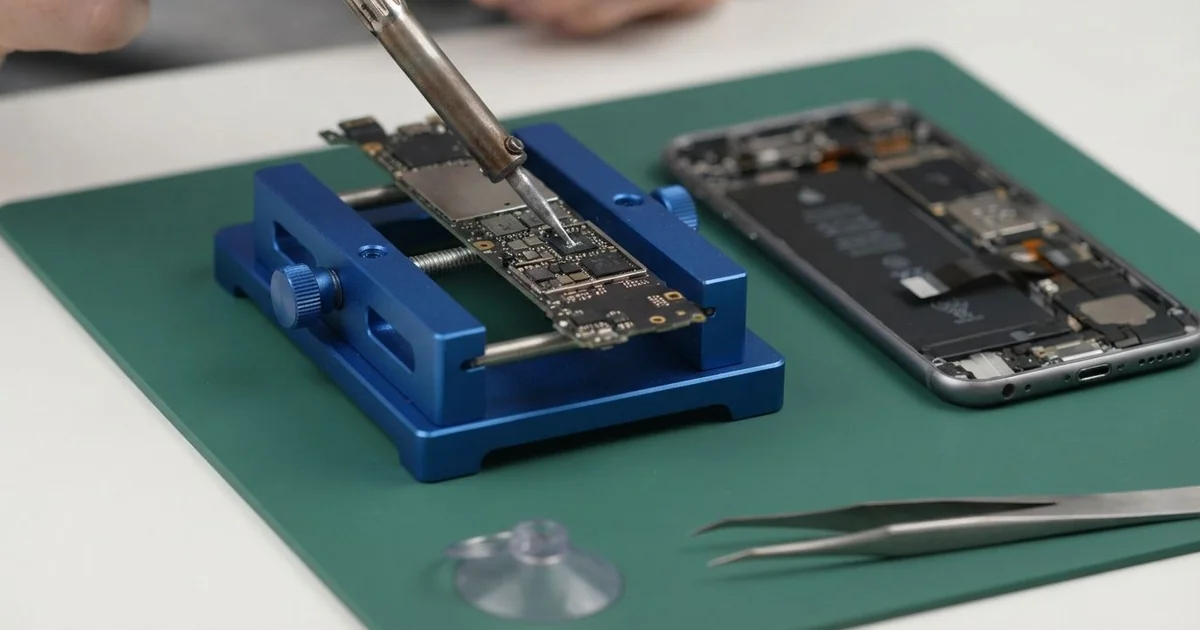
iPhone 5 Motherboard Repair in Al Khobar fixes a phone that won't power on, restarts or has no signal. We check the board free and find the faulty part under a microscope. Then we replace that small part, test the phone fully, and save your photos wherever we can.
An iPhone 5 not turning on is the most common reason people come in. The screen stays black, even after a night on the charger. Other phones freeze on the logo, restart by themselves or show no service.
It's better not to wait. Water left inside keeps eating the copper lines, so a small fault grows bigger every week. Many of these phones also hold years of photos that were never backed up.
Not every dead phone has a board fault. A fully flat battery, a dirty port or a loose screen cable can look the same. We test those first, so you never pay for board work you don't need.
When the fault is on the iPhone 5 motherboard, we look closer. Often only one tiny part has failed, and we replace just that. Parts for an older phone can be harder to find, and some take a day to arrive.
How Kabayan Center Repairs an iPhone 5 Motherboard
We fix these board faults on this phone.
- No power at all, even on a good charger
- Stuck on the logo, or restarting again and again
- No service, or a signal that comes and goes
- Wi-Fi that won't switch on
- A phone that gets warm while it's switched off
- Faults that start weeks after a spill or a damp room
Here is how an iPhone 5 motherboard repair works with us:
- We check the phone free and test the battery, port and screen to rule them out.
- We connect a power meter that shows how much power the board draws.
- We tell you what we found, and you decide before any work starts.
- We open the phone from the front, disconnect the battery and lift out the board.
- We find the faulty part under a microscope, using the meter and a little heat.
- We replace that part with a fine hot-air tool and a soldering tip.
- We rebuild the phone, test power, signal, Wi-Fi and cameras, then let you check it.
Need help with a newer phone or a laptop? Our motherboard repair service covers other devices too. Customers come to our King Fahd Road shop from Dammam and Dhahran as well.
Why an iPhone 5 Board Fails: 3 Real Cases
Found in a drawer, then charged with the wrong adapter
A customer came to us holding an old iPhone 5 and a frayed cable. The phone had sat flat in a drawer for years. It held photos from a family trip that were saved nowhere else.
"I tried every charger in the house," they said. One of them was a large tablet adapter with a damaged wire.
The customer had searched for iPhone Motherboard Repair in Al Khobar after nothing worked. A damaged cable can send a spike into the phone. A tiny part on the power line takes the hit first.
Our power meter showed a short as soon as we connected the board. Under the microscope, one small part near the charging line had a dark burn mark. We did the iPhone 5 motherboard repair by replacing it, and the short was gone.
The old battery was completely dead, so we fitted a temporary one to start the phone. Then we copied every photo through our data recovery service before anything else.
The phone turned on, and the family photos were safe on a new drive. The customer kept the old phone as a keepsake. We also showed them how to back up photos from it every few months.
Steam from the shower every morning
We often see this in phones used as a music player in the bathroom. A nurse played music on an old iPhone 5 during long hot showers. The phone sat on a shelf full of steam, day after day.
First the phone restarted now and then. Then it stopped turning on at all. The nurse had looked up mobile repair in Al Khobar, thinking the battery was dead.
This phone has no water seal, and steam settles inside as tiny drops. Over months, those drops leave minerals that turn into rust.
We opened it and found green crust near the Wi-Fi area and around the power parts. We did a water damage repair, cleaning the board in a special bath.
After cleaning, we replaced two eaten parts on the power line. The phone turned on, played music and made calls again.
But the Wi-Fi switch stayed grey, because rust had reached under the Wi-Fi chip. That damage was too deep to fully reverse.
The nurse chose to keep using it on mobile data. It now plays music from a shelf outside the bathroom.
Sat on in a back pocket every shift
This one starts in a taxi. A driver kept the phone in a back pocket and sat on it for hours each day. The thin metal body slowly bent a little, though it was hard to see at first.
"The signal keeps dropping in the middle of calls," the driver said. Then the phone began to restart while on the road.
Bending squeezes the board inside. Over time, it cracks the tiny solder balls under a chip. The chip then loses contact, and the signal or power cuts out.
We found the frame slightly curved and a weak joint under one chip near the signal parts. For the iPhone 5 motherboard repair, we lifted the chip, cleaned it, and fitted it back with fresh solder. The signal held steady through a long test, even with the phone pressed in our hands.
While testing, the battery drained too fast for a normal day. Our tester showed it was very worn. So we also did a phone battery replacement before closing the phone.
The driver left with steady calls and a phone that lasts the full shift. It now rides in a door pocket, not under the driver.
How to Keep Your iPhone 5 Board Safe
- Use a good charger and an undamaged cable, and throw away frayed ones.
- Keep the phone out of steamy bathrooms and away from spills.
- Don't sit on the phone, since bending stresses the board.
- Switch it off after a spill and bring it in before charging.
- Back up old photos from a spare phone, even if you rarely use it.
- Get phone repair in Al Khobar as soon as it restarts by itself or runs warm while off.
Related services
- Charging port repair for a cable that is loose or only charges at an angle
Questions about this repair
Ask us anything else on WhatsApp
we answer during shop hours.