iPhone 5S Motherboard Repair in Al Khobar
iPhone 5S Motherboard Repair in Al Khobar for a phone that is dead, restarting or showing no service. We check it free and explain the fault simply. You decide before any work starts, and we never delete your data without asking.
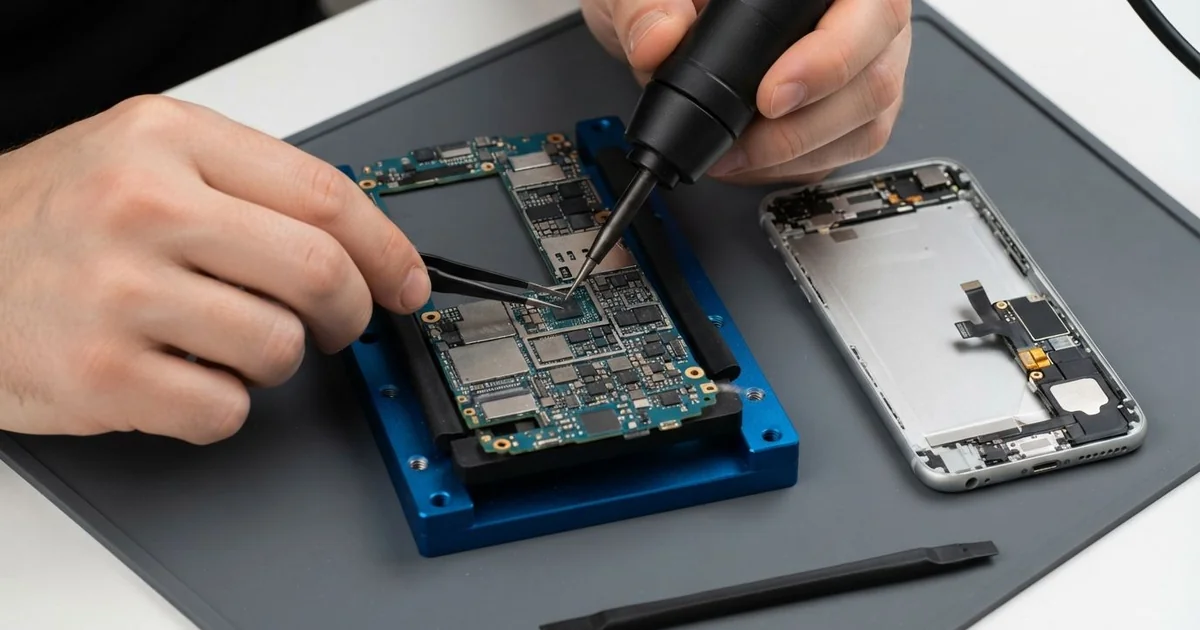
iPhone 5S Motherboard Repair in Al Khobar fixes a phone that is dead, restarting or without signal. We check the board free and find the failed part with a power meter and microscope. Then we replace that part and save your data wherever we can.
An iPhone 5S not turning on is the sign we see most. The screen stays black on the charger, and the buttons do nothing. Other phones restart every few minutes or show no service in places where others have signal.
Many owners keep these phones for work contacts or old family photos, so waiting is a risk. A short can heat the parts around it, and moisture inside keeps spreading rust. A board that could be fixed today may be too far gone later.
Not every dead phone has a board fault. A flat battery, a blocked port or a loose screen plug can look the same. We test those first, so you never pay for board work you don't need.
When the iPhone 5S motherboard is the problem, we find the exact part that failed. Often it is one tiny part, and we replace only that. Parts for an older phone can take time to find, and some take a day to arrive.
How Kabayan Center Repairs an iPhone 5S Motherboard
We fix these board faults on this phone.
- No power, even on a good charger
- Restarting by itself, or stuck on the logo
- No service, or searching for signal all the time
- No charging with a clean port and a good battery
- Heat from the phone while it's switched off
- Faults that start after moisture or a spill
Here is how an iPhone 5S motherboard repair works with us.
- We check the phone free and test the battery, port and screen to rule them out.
- We connect a power meter to see how much power the board draws.
- We tell you what we found, and you decide before any work starts.
- We lift the screen slowly, unplug the Touch ID cable and take out the board.
- We trace the fault under a microscope, using the meter and gentle heat.
- We replace the failed part with a hot-air tool and a fine soldering tip.
- We rebuild the phone, test power, signal, Touch ID and cameras, then let you check it.
Need board work on a laptop or another phone? Our motherboard repair service covers other devices too. Customers come to our King Fahd Road shop from Dammam and Dhahran as well.
Why an iPhone 5S Board Fails: 3 Real Cases
A faulty public charging locker
A customer came to us after charging at a public locker in a busy shopping area. The phone was warm when they took it out. By the evening, it would not turn on at all.
"It was fine an hour before," they said. The customer had searched for iPhone Motherboard Repair in Al Khobar that same night.
A faulty charging point can send uneven power into a phone. The small parts that control charging take the hit first.
Our power meter showed the board pulling too much power at once. Under the microscope, a tiny part on the charging line had a burn mark. We did the iPhone 5S motherboard repair, and the board drew power normally again.
The battery had also been damaged by the heat. It was slightly puffed and gave a low reading on our tester. So we did a phone battery replacement before closing the phone.
The phone turned on with all its photos and messages. The customer now carries a small power bank instead of using public lockers.
We also suggested a good cable of their own. A known cable and charger are always safer than an unknown socket.
Cold AC vent, then humid air every day
This one starts in a car with the AC on full. A real estate agent kept the phone on a vent mount, blowing cold air on it all day. Each time the agent stepped out, the cold phone met humid summer air.
That change makes droplets form inside the phone, like a cold glass on a hot day. It happened many times a day, for months, without anyone noticing.
First the phone lost signal now and then. Then it began to restart, and one morning it stayed dark. The agent had looked up mobile repair in Al Khobar, worried about losing client numbers.
We opened it and found light green rust along the board edge and near the signal parts. We did a water damage repair, cleaning the board in a special bath. Then we did the iPhone 5S motherboard repair, replacing two small rusted parts.
The phone turned on, held signal and kept every contact. We suggested angling the vent so it doesn't blow straight on the phone.
The agent now lets the phone warm up a little before getting out of the car. A short wait makes a big difference.
Dropped down a stairwell
We often see this in tall buildings with stone stairs. A maintenance worker dropped the phone over a railing, and it fell several floors. It hit the stairs hard, corner first, and bounced down a few more steps.
"It shows the logo, then goes black again and again," the worker said. The phone held all the contacts for work.
The frame was bent at one corner, and the board had a hairline crack near the main chip. Lines inside the board were broken where the crack ran. No solder or new part can join those again.
A cracked board can't be made reliable again. But the storage part was still answering on our bench. Through our data recovery service, we saved the contacts and photos.
The worker moved everything to a new phone the same day. So the old phone was lost, but the work contacts were safe.
We suggested a phone strap for work at height. A regular backup also means a fall costs only the phone, not the data.
The worker kept the old phone for its parts and as a reminder.
How to Keep Your iPhone 5S Board Safe
- Charge with your own good charger and cable, not unknown public points.
- Angle car vents away from the phone, so it doesn't get icy cold.
- Use a strap or a tight pocket when you work at height.
- Switch the phone off after a spill and bring it in before charging.
- Back up contacts and photos every month.
- Get phone repair in Al Khobar as soon as it restarts or loses signal often.
Related services
- Charging port repair for a cable that is loose or only charges at an angle
Questions about this repair
Ask us anything else on WhatsApp
we answer during shop hours.