iPhone 6 LCD Display Replacement in Al Khobar
iPhone 6 LCD Display Replacement in Al Khobar for cracked glass, a flickering picture or touch that fails. We check the phone free and explain what it needs. You decide before any work starts, and your photos stay where they are.
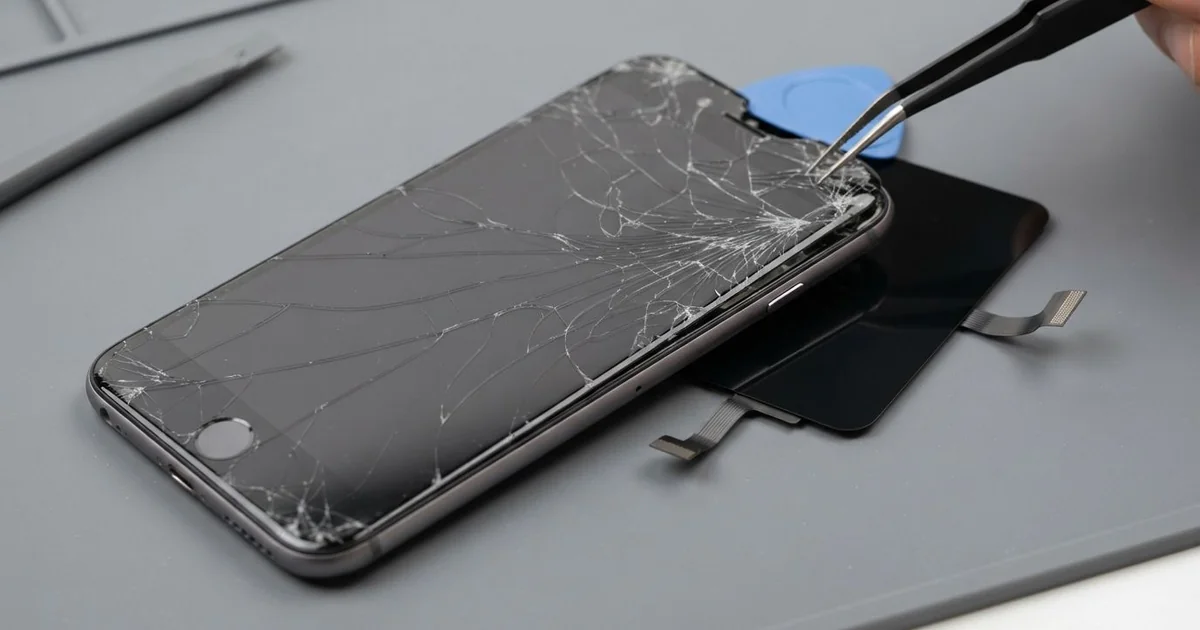
iPhone 6 LCD Display Replacement in Al Khobar fixes a cracked, flickering or unresponsive screen. We check it free and fit a complete new screen, moving your own Touch ID button and front camera across. Most jobs are done the same day.
An iPhone 6 broken screen can look very different from phone to phone. Some have a web of cracks from the curved edges, which take the hit in many falls. Others look whole, but show lines, a dark blot, or touch that jumps around the screen.
It's better not to wait. Glass splinters can cut fingers, and cracks let dust and water inside. This phone has no water seal, so a small splash can reach the display through a crack.
Not every fault needs a new part. After a drop, a screen plug can come loose inside, and refitting it brings the picture back. A badly fitted screen protector can also block touch at the edges.
Real cracks, lines and dark patches need an iPhone 6 screen replacement, since glass and display are one part. The Touch ID button is paired to this phone's own board. Only your own button keeps the fingerprint working, so we always move it across.
How Kabayan Center Replaces an iPhone 6 LCD Display
These are the screen faults we fix on the iPhone 6.
- Cracked or shattered front glass
- Lines, flicker or a dark blot on the picture
- A black screen while the phone still rings
- Touch that jumps, misses or presses by itself
- A screen that stays lit against your cheek in calls
- Glass lifting from the frame at one edge
This is how an iPhone 6 screen replacement goes with us.
- We check the phone free and test Touch ID, sound, cameras and charging.
- We tell you what it needs, and you decide before any work starts.
- We remove the two tiny screws beside the Lightning port and lift the screen with a suction cup.
- We remove the small metal cover over the plugs and disconnect the battery first.
- We move the Home button, front camera, earpiece and metal back plate to the new screen.
- We connect the new screen and test touch, brightness, Touch ID and the front camera.
- We close the phone, refit the screws and let you unlock it with your finger.
Own a different model? Our phone screen replacement service covers other phones too. Customers come to our shop on King Fahd Road from Dammam and Dhahran as well.
How an iPhone 6 Screen Breaks: 3 Real Cases
Thrown from a bicycle phone holder
This one starts on a cycling track. A dentist rode early in the morning with the phone in a handlebar holder. A bump knocked it loose, and it skidded across the path.
"The screen is in pieces, and the ringtone sounds broken too," the dentist said. They had searched for iPhone Screen Replacement in Al Khobar on the way home.
A skid on rough ground scrapes and cracks the glass at the edge. The shock also travels through the frame to the parts inside.
We found the glass shattered along one side and the display flickering. We did the iPhone 6 LCD display replacement and moved the Touch ID button and front camera across.
During testing, the ringtone buzzed and rattled. The loudspeaker at the bottom had shifted in the fall, and its mesh was full of grit. So we did a phone camera and speaker repair to clean and refit it.
The phone went home with a clear screen and clean sound. We suggested a holder with a locking clip for the bike.
The dentist also added a thin protector. A skid on the path now scratches the protector first, not the glass.
A toolbox slid onto it in a work van
A common case on busy work days: a phone left on a van seat under sliding tools. An electrician braked hard, and a heavy toolbox landed on the phone.
The glass had only a few cracks, but most of the display was dark. "I can hear calls, but I can't answer them," the electrician said.
Heavy pressure crushes the thin display layer behind the glass, even through a case. That's why the screen goes dark even when the cracks look small.
We did the iPhone 6 LCD display replacement and moved every small part across. Touch and colour worked well right away.
But the thin metal back had a deep dent near the camera. We don't reshape that frame, so the dent stayed. The phone works fully, but the back still shows the mark.
The electrician now puts the phone in the glove box before driving, away from the tools.
We also checked the camera lens near the dent. It was fine, and photos came out sharp.
The dent is easy to feel but does not affect the phone. A case now covers it.
Splashed through a crack at a washing area
We often see this with phones that carry a small crack for months. An accountant held the phone while washing hands and face at a busy washing area. Water splashed across the screen many times a day, and the phone was wiped on a sleeve each time.
Slowly, water crept in through the crack. The screen began to show a pale cloud, and touch failed near the top. The accountant had looked up mobile repair in Al Khobar when calls became hard to answer.
We opened it and found water marks under the display and a white crust on one plug. The water had reached the board. So we did a water damage repair to clean the board and plugs first.
After it dried fully, we did the iPhone 6 LCD display replacement. The cloud was gone, and touch worked across the whole screen.
A small crack is enough for water to get in. The accountant now keeps the phone in a pocket while washing.
A screen protector would also have sealed that crack early. It is a small step that protects the whole display.
How to Keep Your iPhone 6 Screen Safe
- Use a case with a raised lip around the curved glass.
- Use a bike holder with a locking clip.
- Keep the phone away from loose tools and heavy bags.
- Put the phone away before washing hands or face.
- Fix small cracks early, before water gets in.
- Take it for phone repair in Al Khobar at the first line or flicker.
Related services
- Phone battery replacement for a phone that drains fast or lifts its screen
- Charging port repair for a cable that is loose or only charges at an angle
Questions about this repair
Ask us anything else on WhatsApp
we answer during shop hours.