iPhone 6 Motherboard Repair in Al Khobar
iPhone 6 Motherboard Repair in Al Khobar for a phone that won't start or restarts by itself. We check it free and explain the fault. You decide before any work starts, and we never delete your data without asking.
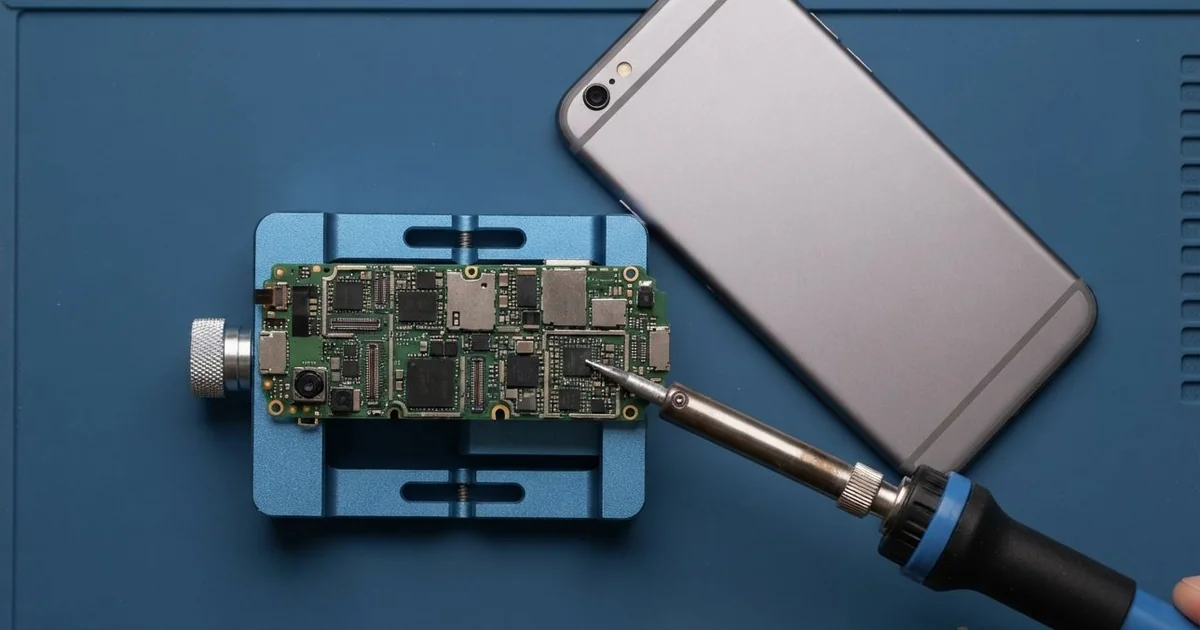
iPhone 6 Motherboard Repair in Al Khobar fixes a phone that won't power on, restarts or won't charge. We check the board free and find the failed chip under a microscope. Then we replace that chip, test the whole phone, and save your photos wherever we can.
An iPhone 6 not turning on is the most common sign of a board fault. The screen stays black, even after new cables, a reset or hours on the charger. Other phones restart by themselves, or show the charging sign but never fill up.
It's better not to wait. A short can heat the parts around it, and moisture inside keeps spreading rust. The longer a fault sits, the harder it gets to fix.
Not every dead phone has a board fault. A worn battery, a dirty port or a loose screen plug can look exactly the same. We test those first, so you never pay for board work you don't need.
When the iPhone 6 motherboard is at fault, we track down the exact chip under the microscope. Often one small chip has failed, and we replace just that. This model's thin body can also bend, and bending cracks the tiny joints under chips.
How Kabayan Center Repairs an iPhone 6 Motherboard
We fix these board faults on this phone.
- No power, even on a good charger
- A charging sign that shows, but the battery never fills
- Restarting by itself, or stuck on the logo
- No service, or a signal that comes and goes
- A phone that gets warm while switched off
- Faults after a spill or a bend in a pocket
Here is how an iPhone 6 motherboard repair works with us.
- We check the phone free and test the battery, port and screen first.
- We connect a power meter that shows how the board draws power.
- We tell you what we found, and you decide before any work starts.
- We open the phone from the front, disconnect the battery and lift out the board.
- We find the faulty chip under a microscope, using the meter and gentle heat.
- We replace the chip with a hot-air tool and a fine soldering tip.
- We rebuild the phone, test power, charging, signal and Touch ID, then let you check it.
Need board work on another device? Our motherboard repair service covers other phones and laptops too. Customers come to our King Fahd Road shop from Dammam and Dhahran.
Why an iPhone 6 Board Fails: 3 Real Cases
It showed charging but never filled up
A customer came to us with a phone that seemed to charge all night. "It says charging, but by morning it's still nearly empty," they said. The customer, a security supervisor, had tried three chargers.
The supervisor had searched for iPhone Motherboard Repair in Al Khobar after the phone died on a night shift. One of the chargers was an unbranded fast charger from a roadside stall.
A poor charger can send rough power into the phone. On this model, a small chip that manages charging often takes the damage.
Our power meter showed the phone taking almost no current. Under the microscope, the charging chip looked fine but tested faulty. We did the iPhone 6 motherboard repair with a fine hot-air tool.
After that, the phone charged at normal speed. But months of near-empty running had worn the battery badly. So we also did a phone battery replacement.
Now the phone fills up in a normal time and lasts the shift. The supervisor threw away the roadside charger the same day.
We suggested one good charger at home and one in the car. That avoids buying a poor one in a hurry.
Laban spilled at the breakfast table
This one starts with breakfast. A glass of laban tipped over and ran under the phone on the table. It was wiped and seemed fine for a day.
The next evening, it went black and would not start. A teacher, the owner, had looked up mobile repair in Al Khobar that night.
Milk drinks are thick and sticky. They hold moisture against the board and start rust faster than water.
We found a dried white film around the power parts, with green rust starting under it. We did a water damage repair, cleaning the board in a special bath.
Then we did the iPhone 6 motherboard repair, replacing one small rusted power part. The phone turned on with every photo and lesson file in place.
Calls, charging, cameras and Touch ID all passed our tests. The teacher was relieved, since the class notes lived only on the phone.
Switch a phone off after any spill, even a small one. The teacher now keeps the phone on a shelf at breakfast.
A spill caught early is much easier to fix. A day's wait gave the rust its start.
A bent phone that kept restarting
We often see this with phones carried in tight back pockets. A delivery driver sat on the phone for long hours behind the wheel. Slowly, the thin body took a gentle curve that was hard to see from the front.
"It restarts every few minutes, and now it won't stay on," the driver said. The phone held photos of the family that were saved nowhere else.
A bend squeezes the board inside, a little more each day. Over time, it cracks the tiny solder joints under a chip. When the joints break, the phone loses power or restarts.
We found the frame bent and cracked joints under a large chip near the storage.
We repaired some of them, but the board itself had cracked lines inside. It could not run reliably again. No repair can join lines inside a cracked board.
Through our data recovery service, we saved the family photos and contacts. The driver moved them to a new phone.
So the old phone was lost, but the photos were not. The driver now carries the new phone in a front pocket. Backups now run every week, so the photos are always safe.
How to Keep Your iPhone 6 Board Safe
- Use a good charger, and avoid unbranded fast chargers.
- Don't keep the phone in a back pocket, since bending cracks the board.
- Switch the phone off after any spill and bring it in quickly.
- Keep the phone out of hot cars and direct sun.
- Back up your photos every month.
- Get phone repair in Al Khobar as soon as it restarts or charges strangely.
Related services
- Charging port repair for a cable that is loose or only charges at an angle
Questions about this repair
Ask us anything else on WhatsApp
we answer during shop hours.