iPhone 6 Plus Charging Port Repair in Al Khobar
iPhone 6 Plus Charging Port Repair in Al Khobar for a loose plug or a phone that won't charge. We check the port free and show you what we find. You decide before any work starts, and nothing is wiped.
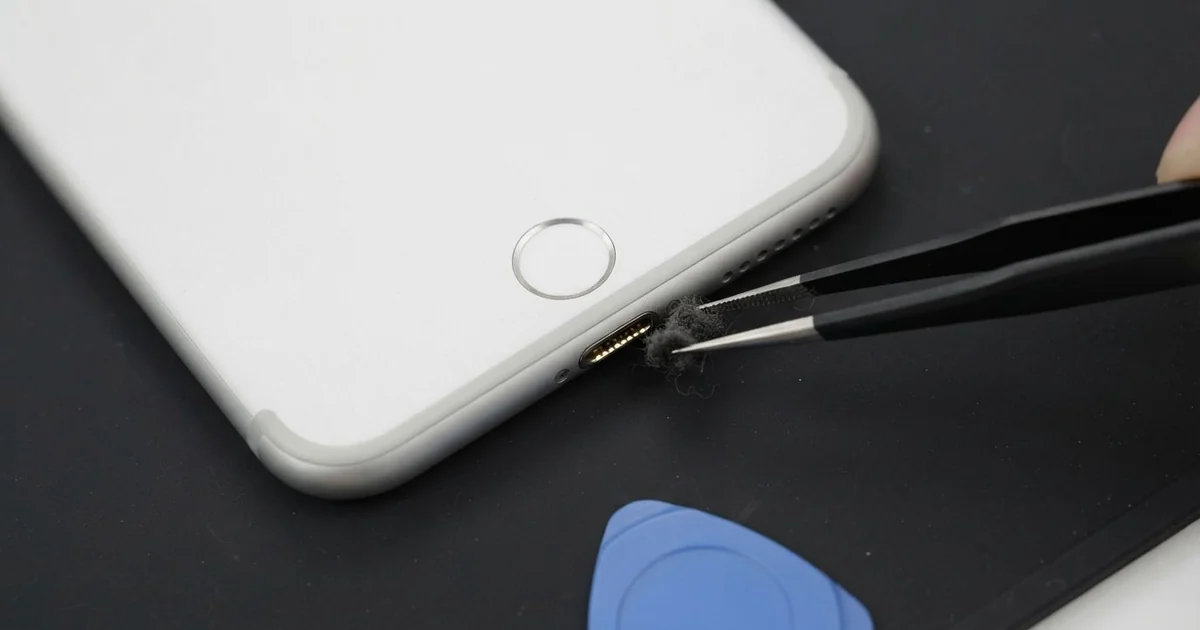
iPhone 6 Plus Charging Port Repair in Al Khobar fixes a phone that charges loosely, slowly or not at all. We check the Lightning port free, then clean it or replace the port cable. We test charging, headphones and the mic, and most jobs are done the same day.
An iPhone 6 Plus not charging often begins with a plug that feels loose. The phone charges only when it lies flat, or the charging sign flickers when you move it. In the end, it may not charge at all.
This large, heavy phone pulls on the plug when used while charging, bending the port each time. It's better not to wait, because a loose plug heats the pins and slowly burns them. A battery that keeps running flat also wears out sooner.
Not every fault needs a new part. Many ports are just blocked with lint, dust or grit. We clean them carefully with plastic tools, and the plug clicks in firmly again.
Bent, burnt or rusted pins need a new part. The iPhone 6 Plus charging port sits on one cable with the headphone socket and the bottom mic. We replace that cable, and all three work properly again.
How Kabayan Center Repairs an iPhone 6 Plus Charging Port
We fix these charging faults on this phone.
- A plug that is loose or slips out
- Charging only when the phone lies flat
- No charging, or charging that stops and starts
- Slow charging with a good charger
- A burnt smell or dark marks in the port
- Crackly headphones or a faint voice on calls
These are the real steps of the iPhone 6 Plus charging port repair.
- We look into the port under a magnifier and test with our own cable.
- We tell you what it needs, and you decide before any work starts.
- We clean out lint and grit with plastic picks and a soft brush.
- If the pins are damaged, we lift the screen from the front and disconnect the battery.
- We remove the loudspeaker and free the old port cable from the frame.
- We fit the new cable, then test charging, headphones and the mic.
- We close the phone and let you plug it in yourself.
Have a different phone with the same trouble? Our charging port repair service covers other models too. Customers come to our King Fahd Road shop from Dammam and Dhahran.
Why an iPhone 6 Plus Stops Charging: 3 Real Cases
Cement dust set hard in the port
One morning a site foreman brought in a phone that had stopped charging overnight. "There's something hard in there, and I can't get it out," the foreman said.
The foreman had searched for iPhone Charging Port Repair in Al Khobar from the site. Cement dust is fine and dry at first. But with sweat or humid air, it sets like a thin layer of stone.
Under the magnifier, the bottom of the port had a grey, hard crust. The plug stopped halfway and never reached the pins. We softened the crust and chipped it away slowly with plastic picks.
It took patience, but the pins under it were straight and clean. One had a light scratch, but it still made good contact.
The iPhone 6 Plus charging port repair worked. The plug clicked in firmly, and the phone charged at full speed. No new part was needed.
We suggested a dust plug for the port and a closed pocket on site. A quick look with a torch at the end of each day also helps.
The foreman bought a dust plug before leaving. It takes seconds to fit and keeps the port clear.
Watching videos in bed while charging
This one starts at bedtime. A student watched long videos lying down, with the big phone held up and the cable plugged in. The heavy phone pulled on the plug at an angle every night.
"It only charges if I prop it on a pillow," the student said. The plug wobbled even with a brand new cable from a good shop.
We found the port cable cracked near the plug and two pins bent. Cleaning could not fix this, so we did the iPhone 6 Plus charging port repair. The plug went in straight and firm again, with a clear click.
But the battery health in Settings was low. Months of charging and draining in short bursts had worn it out. The cells could no longer hold a full charge.
The student chose to wait on a phone battery replacement for now. So the phone charges well, but it still drains by evening.
We suggested charging first and watching videos after, with the cable out. A phone stand in bed also takes the weight off the plug.
We noted the battery on the job card for the student's next visit.
A poor cable that burnt a pin
We often see this after a cable from a market stall. A pharmacist noticed a burnt smell while the phone was charging. After that, it would not charge at all, with any cable or charger.
The pharmacist had looked up mobile repair in Al Khobar that evening. The cable's tip had a black mark, and so did one pin in the port. The plastic around it had melted slightly.
A poor cable can short two pins together. The heat burns the pin and sends a spike into the phone. The damage can go further than the port.
We fitted a new port cable first, but the phone still would not charge. Our power meter showed a fault further in. A small charging part on the board had also failed.
So we did a motherboard repair to replace that part under the microscope. After that, the phone charged normally and kept all its data.
Stop charging at once if you smell burning. The pharmacist threw the cable away and now uses a good one. The burnt port cable went in the bin too.
How to Keep Your iPhone 6 Plus Charging Port Working
- Charge first, then use the phone with the cable out.
- Use a stand, so the heavy phone doesn't hang from the plug.
- Keep a dust plug in the port on dusty sites.
- Throw away any cable with a dark or bent tip.
- Unplug at once if you smell burning or the plug gets hot.
- Get phone repair in Al Khobar as soon as the plug feels loose.
Related services
- Water damage repair for a phone that got wet, even if it still charges
- Phone screen replacement for a cracked or dark screen
Questions about this repair
Ask us anything else on WhatsApp
we answer during shop hours.