iPhone 6S LCD Display Replacement in Al Khobar
iPhone 6S LCD Display Replacement in Al Khobar for a cracked, black or flickering screen, or dead touch. We check your phone free and tell you what it needs. You decide first, and we keep your own Home button so Touch ID still works.
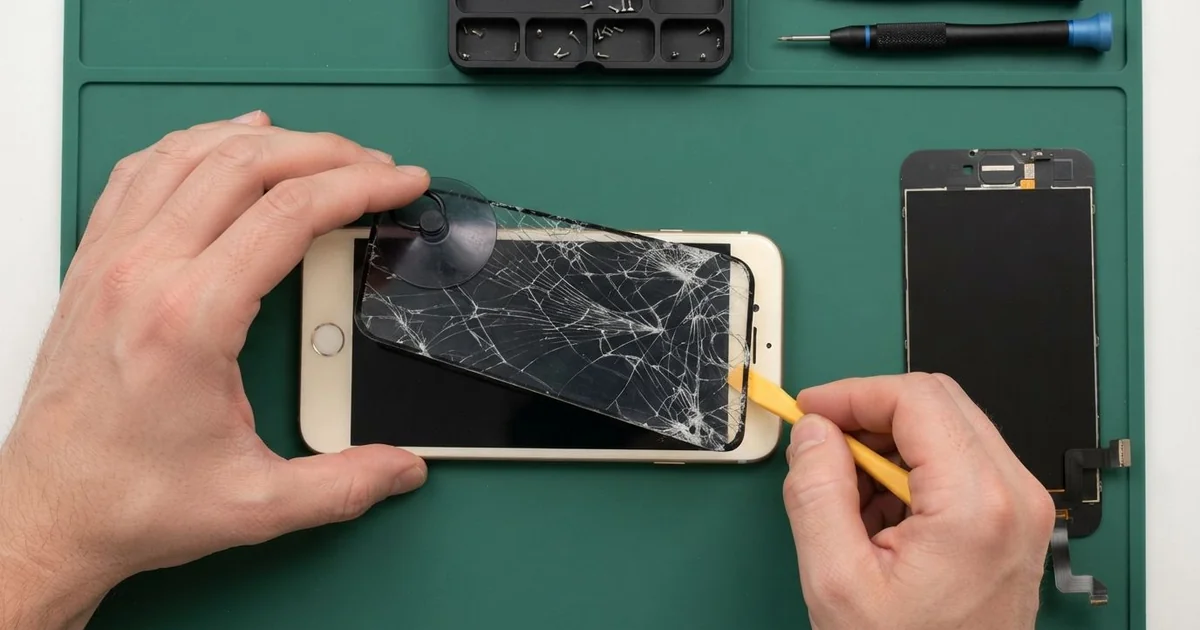
iPhone 6S LCD Display Replacement in Al Khobar fixes a cracked or dark screen, or touch that has stopped working. We check it free, then fit a complete new screen with the glass and display as one part. We move your own Home button across, test Touch ID and finish most jobs the same day.
An iPhone 6S broken screen rarely looks the same twice. Some crack out from one corner, while others stay whole but show a black ink blot. On some phones the picture is fine, yet part of the screen ignores your finger.
It's better not to wait. Loose glass cuts fingers, and this model has no water rating, so cracks let sweat and moisture straight in. A dark screen also makes a backup much harder later.
Not every fault needs a new part. After a drop, the screen cables at the top can work loose, and refitting them brings the picture back. A thick screen protector can also block touch along the edges.
Cracked glass, lines and ink blots are different. The glass and the LCD are one part, so an iPhone 6S screen replacement fits the whole new screen. Your Home button moves to it, because only the original one works with Touch ID.
How Kabayan Center Replaces an iPhone 6S LCD Display
We fix these screen faults on this phone.
- Cracked or shattered front glass
- A black ink blot that spreads from one spot
- Lines, a flickering picture or a very dim screen
- Touch that is dead in one area, or taps that land in the wrong place
- A black screen while calls and sound still work
- A screen lifting from the frame after a drop or a swollen battery
This is how we do the iPhone 6S LCD display replacement, step by step:
- We check the phone free and test what still works: sound, cameras, charging and Touch ID.
- We tell you what it needs, and you decide before any work starts.
- We take out the two tiny screws beside the charging port and lift the bottom edge with a suction cup.
- We open the screen like a lid, because its cables sit at the top, and unplug the battery first.
- We move the Home button, the earpiece and the front camera to the new screen.
- We connect the new screen and test touch, 3D Touch, brightness and Touch ID before closing.
- We press the screen evenly into the frame and let you check the phone yourself.
Using a different phone? Our phone screen replacement service covers other models too. Customers reach our shop on King Fahd Road from Dammam and Dhahran as well.
How an iPhone 6S Screen Gets Broken: 3 Real Cases
Slipped from a shirt pocket at a petrol station
One evening a phone came in wrapped in a tissue. It had slipped from a shirt pocket when the owner bent down at a petrol station. "I can see the picture, but nothing happens when I touch it," they said.
The owner had searched for iPhone Screen Replacement in Al Khobar before even paying for the fuel. A drop from a shirt pocket lands the phone flat on hard concrete. The glass takes the hit, and the touch layer behind it breaks too.
We opened it and found a web of cracks across the bottom half. The cables at the top were fine, so the screen itself had failed. We fitted a new one and moved the Home button across with care.
During the test call, the sound was muffled and scratchy. The earpiece grille was packed with dust from months in that pocket. So we cleaned the grille and tested the earpiece as part of a phone camera and speaker repair.
The phone went home with a clear screen and clear calls. We suggested a case with a raised edge, so the next fall lands on rubber, not glass.
Sat on in a back pocket during long shifts
We often see this with drivers. A taxi driver kept the phone in a back pocket for whole shifts behind the wheel. One day a dark blot appeared in the middle of the screen.
"It looks like ink spilled inside," the driver told us. Sitting on a phone bends it a little every time. The LCD under the glass can crack inside, even when the top glass looks perfect.
The driver had looked up mobile repair in Al Khobar between rides. We opened the phone and found a pressure crack inside the display layer. The glass on top had no mark at all.
We fitted a new screen and moved the Home button, earpiece and front camera across. Touch ID and 3D Touch both worked on the first test.
While testing, the battery health showed very low. The phone also switched off when we used the camera with the flash. The driver chose a phone battery replacement in the same visit.
Now the phone rides in a holder on the AC vent, never in a back pocket. The new screen has stayed clear since the iPhone 6S LCD display replacement.
Dropped into a bucket while washing the car
This one starts with a car wash at home. The phone fell from a shirt pocket into a bucket of soapy water. It was out in seconds, but green lines crossed the screen by evening.
The owner had dried it with a hair dryer and left it on charge overnight. Both are common, and both make things worse. The iPhone 6S has no water rating, so water reaches the inside quickly.
We opened it and found soapy marks under the display and white crust near the Home button cable. The water had gone past the screen. So we did a water damage repair on the board before any new part went in.
Then we did the iPhone 6S LCD display replacement, and the lines were gone. The Home button clicked again, but Touch ID did not come back. The water had damaged the button's own sensor.
Only the phone's original Home button can read fingerprints on this model. So the owner now unlocks with a passcode, and everything else works normally.
We also explained that a wet phone should go nowhere near a charger. A quick check right away gives the board its best chance.
How to Keep Your iPhone 6S Screen Safe
- Use a case with a raised edge, so the glass never meets the floor first.
- Keep the phone out of back pockets, where sitting on it can crack the LCD inside.
- Fit a thin glass protector, and change it as soon as it cracks.
- Keep it away from water and sweat, since this model has no water rating.
- Back up your photos while the screen still works.
- Get phone repair in Al Khobar at the first line or blot, before it spreads.
Related services
- Charging port repair for a cable that wobbles or only charges at one angle
Questions about this repair
Ask us anything else on WhatsApp
we answer during shop hours.