iPhone 6S Motherboard Repair in Al Khobar
iPhone 6S Motherboard Repair in Al Khobar for a phone that won't start, sticks on the logo or lost Wi-Fi. We check the board free and explain what we find. You decide before any work starts, and we never delete your data without asking.
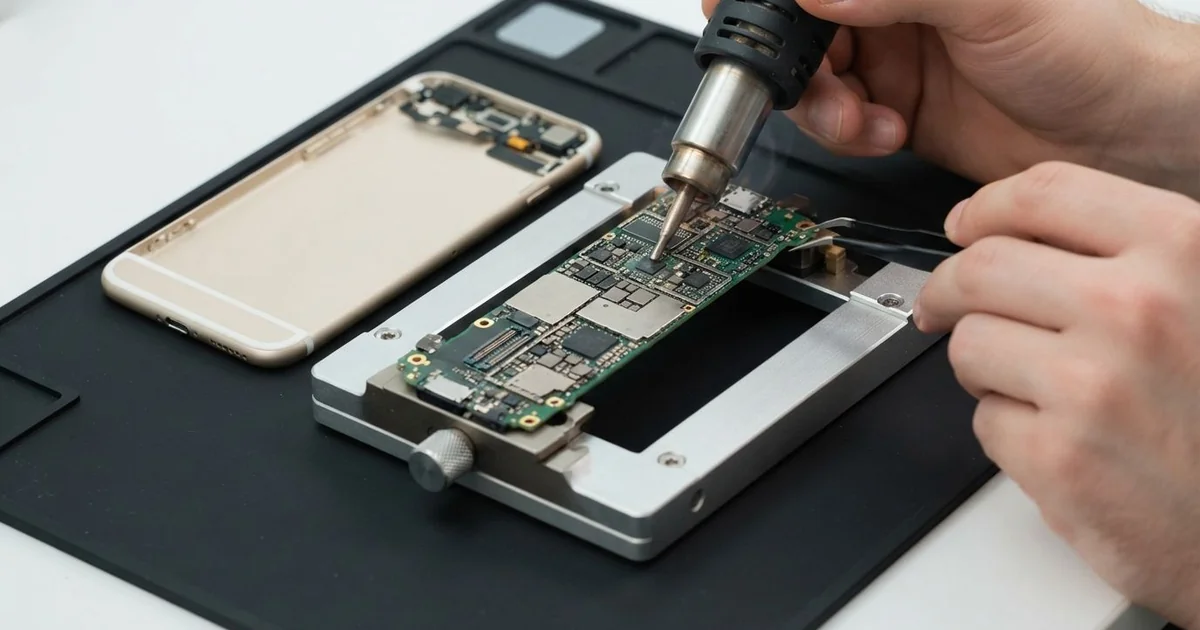
iPhone 6S Motherboard Repair in Al Khobar fixes a phone that has no power, no signal or no Wi-Fi. We check the board free and find the faulty part under a microscope. We replace that small part, not the whole board, and save your data wherever we can.
An iPhone 6S not turning on is the sign we see most. The screen stays black, even after hours on the charger. Other phones show the logo again and again, or the Wi-Fi switch turns grey and won't move.
Owners often try a reset, a new cable or a whole night on the charger first. When none of that helps, the fault is usually on the board. That's when most of these phones reach us.
It's better not to wait. A short on the board slowly heats the parts around it. Moisture left inside keeps eating the copper, so a small fault grows bigger every day it waits.
Not every dead phone has a board fault. A flat battery or a loose screen cable can look the same, so we test those first, free. When the iPhone 6S motherboard is the cause, it's often one tiny failed part, and we replace just that.
How Kabayan Center Repairs an iPhone 6S Motherboard
These are the board faults we repair on this phone.
- No power at all, even on the charger
- Stuck on the logo, or restarting in a loop
- A grey Wi-Fi switch that won't turn on
- No signal, or "No Service" in a good area
- A phone that gets hot while it's switched off
- Faults that start after water, sweat or damp air
Here is how the iPhone 6S motherboard repair works, step by step:
- We check the phone free and test the battery, screen and port to rule them out.
- We connect a power meter that shows how much power the board pulls.
- We tell you what we found, and you decide before any work starts.
- We open the screen, unplug the battery and lift the board out of the frame.
- We find the faulty part under a microscope, using the meter and a cold spray that shows hot spots.
- We replace that part with a fine hot-air tool and a soldering tip.
- We rebuild the phone, test power, Wi-Fi, signal and charging, then let you check it.
Have a different phone or a laptop? Our motherboard repair service covers other devices too. Customers come to our shop on King Fahd Road from Dammam and Dhahran as well.
Why an iPhone 6S Board Fails: 3 Real Cases
Damp, salty air at a fish market
A common case near the coast: a phone that never fell in water, but still has water damage. A fish market worker kept the phone in a shirt pocket all day. The air there is wet, salty and warm.
"It just died while I was on a call," the worker said. They had searched for iPhone Motherboard Repair in Al Khobar that same evening. Damp salt air slowly settles on the board and turns into rust.
We opened it and found green crust around the power parts. We did a water damage repair, cleaning the board in a special bath and drying it fully. Then we replaced one small power part that the rust had eaten.
After the iPhone 6S motherboard repair, the phone turned on again with all its photos and chats. But the Wi-Fi switch stayed grey. The rust had also reached under the Wi-Fi chip, and that area could not be saved.
The worker chose to keep the phone and use mobile data only. Salt air works slowly, so a phone in a damp place needs a check before it dies.
A sealed pouch at work would have kept most of that air away. The worker uses one now.
A long screw in the wrong hole
We often see this after a screen change at home. Someone had fitted a new screen from an online kit. The phone worked for a day, then went dark.
The owner had looked up mobile repair in Al Khobar to ask what went wrong. "The screen is new, so why is it dead?" they asked. The answer was one screw.
The screen cables sit under a small metal plate held by screws of different lengths. A long screw in a short hole goes straight into the board. It cuts tiny lines buried inside.
Under the microscope, we found a small hole in the board beside the screen connector. Two thin lines inside were broken. We cleaned the spot and bridged the lines with very fine wire.
The iPhone 6S motherboard repair worked, and the new screen lit up. We put every screw back in its right hole and ran a long test. It stayed stable the whole time.
For any repair at home, keep each screw on a paper map as it comes out. It sounds small, but it saves a board.
An old phone from a drawer, full of family photos
This one starts in a drawer. A parent found an old iPhone 6S that had been put away long ago. It held early photos of the children, and it would not turn on.
A phone left flat for a long time drains its battery below a safe level. On top of that, a small power part had failed with age. The phone showed nothing at all on the charger.
We tested the battery first, and it was too far gone to wake. So we did a phone battery replacement to give the board steady power. Then we replaced the failed power part under the microscope.
The phone started slowly and showed the logo. We copied the photos off first, before trying anything else. Our data recovery steps saved every file to a memory stick.
The phone itself ran, but slowly. We advised against using it every day, since its age shows in other parts too. A newer phone would serve the family better.
The family now keeps the photos on a computer, with a second copy. The old phone sits back in the drawer, charged this time.
How to Keep Your iPhone 6S Board Safe
- Keep the phone in a sealed pouch in damp, salty or sweaty places.
- Use a good charger and cable, and avoid unbranded ones.
- Never charge a phone that got wet. Bring it in first.
- Keep every screw in its own place if you open the phone yourself.
- Charge an old spare phone now and then, so its battery never drains flat.
- Back up your photos often, and get phone repair in Al Khobar as soon as it restarts or runs hot.
Related services
- Charging port repair for a cable that is loose or only charges at an angle
Questions about this repair
Ask us anything else on WhatsApp
we answer during shop hours.