iPhone 7 Battery Replacement in Al Khobar
iPhone 7 Battery Replacement in Al Khobar for a phone that drains fast, shuts down early or feels slow. We check the battery health free and explain what we find. You decide before any work starts, and your photos and chats stay on the phone.
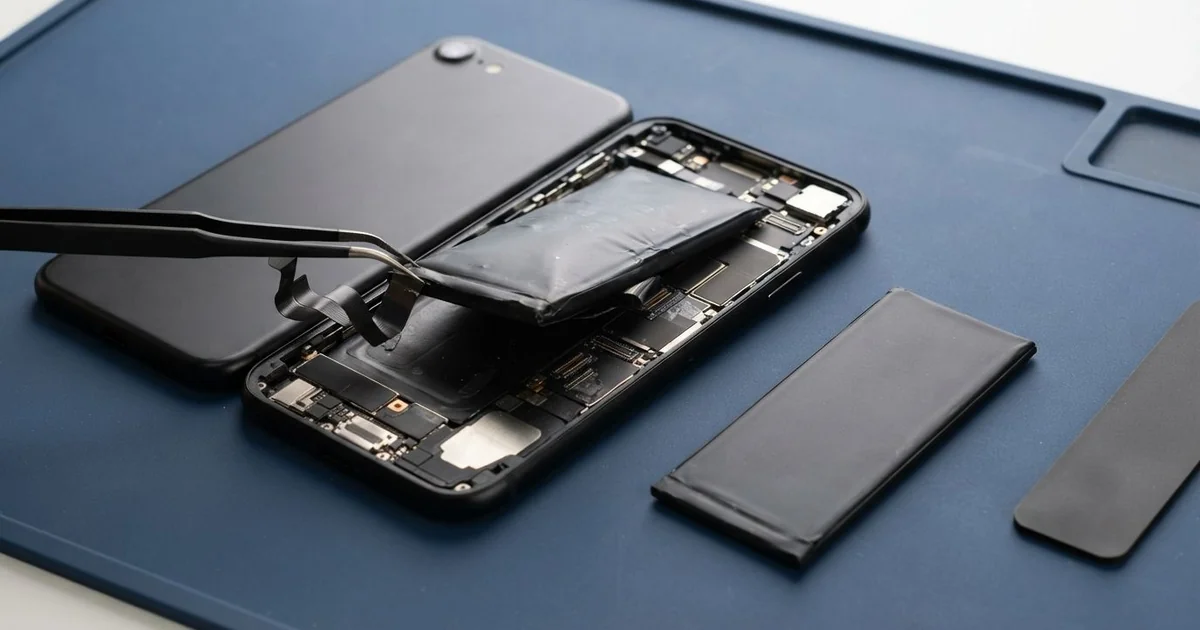
iPhone 7 Battery Replacement in Al Khobar brings back a phone that lasts the day. We check the battery health free, then fit a new battery under the screen. We fit a fresh seal, test charging and power, and most jobs are done the same day.
An iPhone 7 battery draining fast is the sign most owners notice first. Full in the morning, it's nearly empty by the afternoon. Other phones switch off with charge showing, or feel slow when the camera opens.
It's better not to wait. A worn battery can't give power quickly, so the phone slows itself down to stay on. An old battery can also swell, and that lifts the screen and breaks the water seal.
Not every drain needs a new part. Bright screens, weak signal and apps running in the background can empty a healthy battery. We check those first, and we tell you honestly if a setting is the cause.
When the battery is worn, an iPhone 7 battery replacement is the real fix. The battery sits under the screen, held by stretch strips, and the screen opens like a book. We fit a fresh seal when we close it, though an older phone should still stay away from water.
How Kabayan Center Replaces an iPhone 7 Battery
These are the battery faults we fix on this phone.
- Fast drain, even on a quiet day
- Shutdowns while the screen still shows charge
- A slow phone, or apps that keep reloading
- A swollen battery lifting the screen at one side
- A phone that gets hot when charging
- A low battery health reading in Settings
Here is how the job goes, step by step:
- We read the battery health free and test charging with our own cable.
- We tell you what it needs, and you decide before any work starts.
- We take out the two tiny screws by the port and warm the edges to soften the seal.
- We open the screen like a book from the left side and unplug the battery first.
- We pull the stretch strips out slowly, so the old battery comes free without bending.
- We fit the new battery and test charging and power under load.
- We fit a fresh seal, close the phone and let you check it yourself.
Using a different phone? Our phone battery replacement service covers other models too. Customers come to our shop on King Fahd Road from Dammam and Dhahran as well.
Why an iPhone 7 Battery Wears Out: 3 Real Cases
Shutting down during photos at a family wedding
A customer came to us after missing the best photos at a family wedding. The phone switched off each time the camera flash fired. "It showed plenty of charge, and then it was gone," they told us.
They had searched for iPhone Battery Replacement in Al Khobar the morning after. The flash and the camera pull a burst of power all at once. A worn battery can't deliver that burst, so the phone shuts down.
Our test showed the battery health well below normal. Under a heavy load, its power level dropped sharply, just like at the wedding.
We did the iPhone 7 battery replacement and ran the same test with the flash firing repeatedly. The phone stayed on every time. Its power level held steady, even with the screen at full brightness.
The camera also opened faster, and videos no longer stopped halfway. The customer took a test photo right there at the counter.
We fitted a fresh seal and pressed the screen evenly into place. The phone looked and felt the same, just stronger.
The next family event went much better, with the phone lasting until the very end.
Music by the pool, every weekend
This one starts beside a compound pool. The phone played music from a sunbed every weekend, out in the full sun. Over the summer, the screen began to rise along one side.
"The screen opens like a door now," the owner said. They had looked up mobile repair in Al Khobar when the gap grew wider. Heat is the worst thing for a battery, and direct sun is worse still.
We opened it and found the battery puffed up under the screen. A swollen battery is not safe to keep using, even when it still works. We took it out at once and did the iPhone 7 battery replacement.
While testing, charging came and went. The port held damp grit from the pool deck, and two pins had dulled. So we did a charging port repair and cleaned it out fully.
The screen itself had no crack, so it went back in place with a fresh seal. It sat flat in the frame again.
The owner now plays music from a small speaker in the shade. The phone stays in a bag, out of the sun.
A battery fitted at home pinched the screen cable
We often see this after a home repair. The owner had bought a battery online and fitted it at home with a kit. It worked, but the screen began to flicker soon after.
"Sometimes touch works, sometimes it doesn't," the owner said. On this model, the screen cables fold around the edge when the screen closes. If one gets pinched or creased, the picture and touch both suffer.
We opened it and found a crease in the screen cable, right where it bends. The battery from the kit also sat loose, with no strips to hold it.
We did the iPhone 7 battery replacement properly, with new stretch strips. Then we tested the screen, but the creased cable still flickered now and then.
A creased cable is part of the screen, so the real fix is a new screen. We explained a phone screen replacement, and the owner chose to wait for now.
So the battery is right, but the screen still flickers at times. We noted it on the job card.
Opening this phone takes heat, patience and the right order of steps. A small slip at home can turn one repair into two.
How to Keep Your iPhone 7 Battery Healthy
- Keep the phone out of direct sun, at the pool, the beach or in the car.
- Charge between 20% and 80% when you can.
- Let a hot phone cool before you plug it in.
- Use a good cable and charger.
- Check the battery health in Settings every few months.
- Stop using the phone if the screen lifts, and get phone repair in Al Khobar.
Related services
- Water damage repair for a phone that got wet, even if it still turns on
- Motherboard repair for a phone that won't power on, even with a new battery
Questions about this repair
Ask us anything else on WhatsApp
we answer during shop hours.