iPhone 7 LCD Display Replacement in Al Khobar
iPhone 7 LCD Display Replacement in Al Khobar for a cracked, dark or unresponsive screen. We check your phone free and tell you what it needs. You decide before any work starts, and we move your own Home button so Touch ID keeps working.
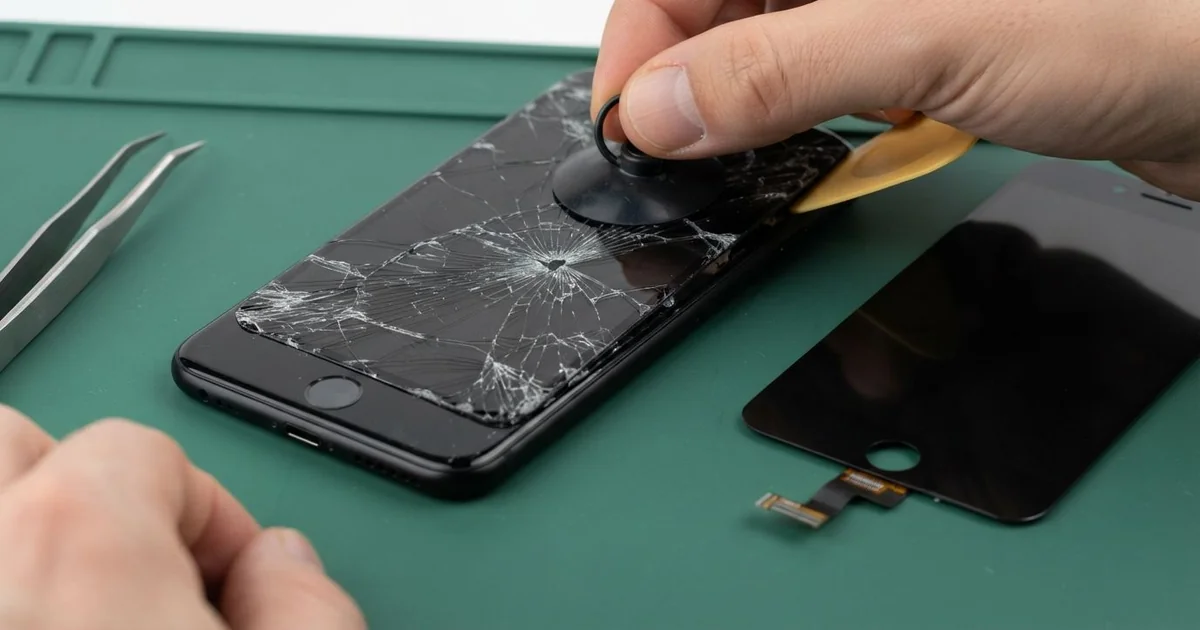
iPhone 7 LCD Display Replacement in Al Khobar fixes a screen that is cracked, black or ignoring your touch. We check it free, then fit a complete new screen with the glass and LCD as one part. We move your own Home button across, fit a fresh seal, and most jobs are done the same day.
An iPhone 7 broken screen can look many ways. The glass cracks into a web, a black blot spreads from one spot, or lines cross the picture. Sometimes the picture is perfect, but the bottom of the screen ignores your taps.
It's better not to wait. The iPhone 7 left the factory with a water seal, but a cracked screen breaks it. Sweat, steam and spilled drinks can then reach the board.
Not every fault needs a new part. After a drop, a screen cable can work loose, and refitting it brings the picture back. A cracked glass protector can also look like a broken screen when the screen underneath is fine.
When the screen itself is broken, an iPhone 7 screen replacement fits the whole new part, glass and LCD together. The Home button here doesn't really move when you press it. Only the original one fully works with this phone, so we always move it across.
How Kabayan Center Replaces an iPhone 7 LCD Display
We fix these screen faults on this phone.
- Cracked or shattered front glass
- A black blot or dark patch that keeps spreading
- Lines, flicker or a pale, washed-out picture
- Touch that is dead in one area, or taps that land in the wrong place
- A black screen while calls and sound still work
- A screen that sits up from the frame after a drop
This is how the job works, step by step:
- We check the phone free and test sound, cameras, charging and Touch ID.
- We tell you what it needs, and you decide before any work starts.
- We take out the two tiny screws by the port and warm the edges to soften the seal.
- We lift the screen and open it like a book from the left side, since its cables sit on the right.
- We unplug the battery first, then move the Home button, earpiece and front camera to the new screen.
- We finish the iPhone 7 LCD display replacement and test touch, 3D Touch, brightness and Touch ID.
- We fit a fresh seal, press the screen evenly and let you check the phone yourself.
Using a different phone? Our phone screen replacement service covers other models with much the same steps. Customers come to our shop on King Fahd Road from Dammam and Dhahran too.
How an iPhone 7 Screen Breaks: 3 Real Cases
A knee landed on it during a football game
One afternoon a phone came in with a crack shaped like a star. A hotel worker had played football with friends at a park after a shift. The phone was in a shorts pocket, and a knee landed right on it in a tackle.
"I felt it crunch," the player told us. They had searched for iPhone Screen Replacement in Al Khobar before even leaving the park. A sharp hit in one spot cracks both the glass and the LCD behind it.
We opened the phone and found a black blot spreading from the centre of the star. The screen cables on the right side were fine. The screen itself had broken.
We did the iPhone 7 LCD display replacement and moved the Home button across with great care. On this model, a torn Home button cable means losing Touch ID for good. Everything tested well, and the fingerprint worked on the first try.
We also checked the frame for bends, since a knee is a heavy hit. It was straight, so the new screen sat flat and even.
The player now leaves the phone in a bag at the side of the pitch. A phone in a pocket during a game takes every fall with you.
Football is still on, but the phone sits it out now.
Clamped to a delivery bike in the sun
This one starts on a delivery motorbike. A rider kept the phone clamped to the handlebars for maps, all day in the sun. Strong shaking and heat worked on it for months.
The rider had looked up mobile repair in Al Khobar when a dark patch appeared at the top. "It gets bigger every hot day," the rider said. Heat damages the layers inside an LCD, and shaking loosens everything.
We opened it and found the LCD stained by heat. One arm of the clamp had also pressed a crack into the glass edge. The iPhone 7 LCD display replacement was next, and we moved the Home button across.
While testing, the rear camera would not focus. It buzzed and shook when we opened the camera app. Shaking from the motorbike had damaged the tiny parts that move the camera lens.
We explained that a phone camera repair would fix the focus. The rider chose to wait, since maps and calls mattered most.
So the screen is clear again, but photos still come out blurry. We noted the camera on the job card for the next visit.
A mount with a rubber damper takes most of that shaking away. The rider plans to fit one soon.
Dropped in the sink after an old screen change
A common surprise: "But this phone is water resistant!" A cook dropped the phone into a sink full of dishwater. It was out within seconds, yet lines crossed the screen by night.
The iPhone 7 left the factory with a water seal under the screen. But this phone had an earlier screen change, with no new seal fitted. Water went straight past the edge of the screen.
We opened it and found soapy marks on the screen cable and white crust near the battery connector. So we did a water damage repair, cleaning the board in a special bath. Only then did a new part go in.
We did the iPhone 7 LCD display replacement with a fresh seal. The lines were gone, and the board tested clean. Touch ID, sound and charging all worked on the first test.
A fresh seal helps, but a repaired phone should never be trusted under water. Old seals also weaken with age, drops and heat.
The cook now keeps the phone on a shelf, well away from the sink. It works well again, and it's still the cook's favourite size of phone. Soap and water had sat inside for hours, so the quick visit mattered.
How to Keep Your iPhone 7 Screen Safe
- Use a case with a raised edge, so the glass doesn't hit the floor first.
- Take the phone out of your pocket before sports.
- Use a bike mount with a rubber damper, and keep the phone out of strong sun.
- Don't trust the water rating on an older or repaired phone.
- Fit a thin glass protector, and change it once it cracks.
- Get phone repair in Al Khobar at the first blot or line, since both spread.
Related services
- Phone battery replacement for a phone that drains fast or shuts down early
- Charging port repair for a cable that wobbles or only charges at one angle
Questions about this repair
Ask us anything else on WhatsApp
we answer during shop hours.