iPhone 7 Motherboard Repair in Al Khobar
iPhone 7 Motherboard Repair in Al Khobar for a dead phone, a frozen logo or silent calls. We check the board free and explain what we find. You decide before any work starts, and we never delete your data without asking.
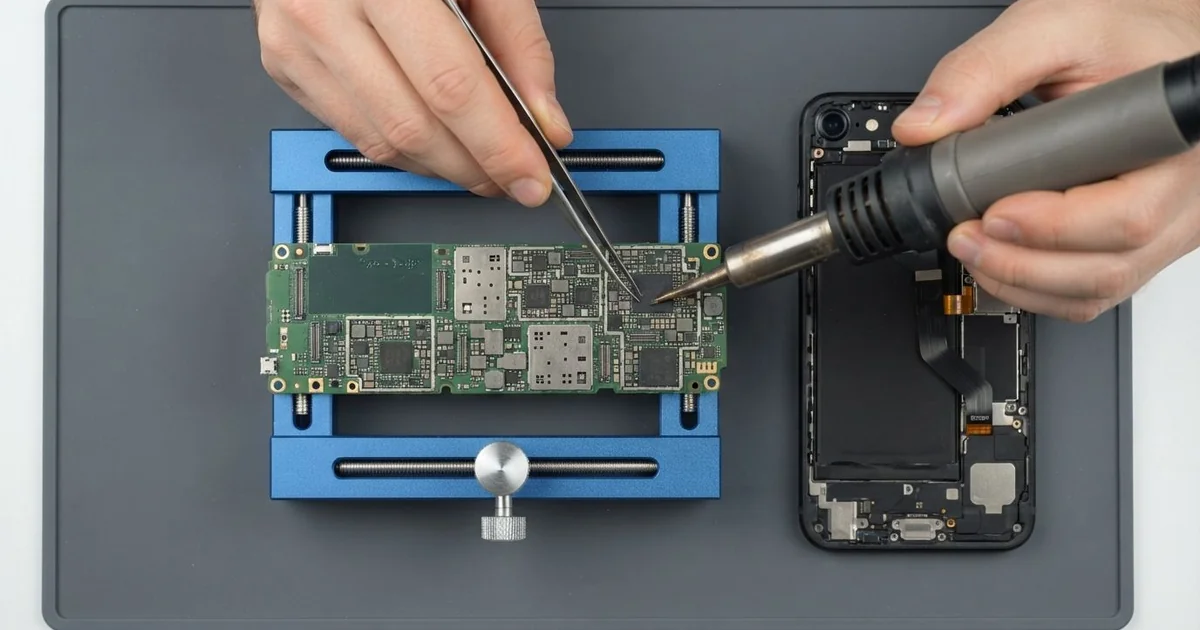
iPhone 7 Motherboard Repair in Al Khobar fixes board faults that a new battery or screen can't. We check it free and find the failed part under a microscope. We replace that part instead of the whole board, and we save your data wherever we can.
An iPhone 7 not turning on is one common sign. Others are just as typical for this model. The speaker button turns grey during calls, the mic stops working, or the phone takes ages to start.
Owners often try a reset or a new charger first. Some even restore the whole system, which can wipe photos without fixing anything. When the fault stays, it usually sits on the board, in one small chip or part.
It's better not to wait. A weak joint under a chip gets worse with every bend and every hot day. A short can also heat the healthy parts around it, and that makes the repair much bigger.
Not every fault is on the board. A worn battery, a loose cable or a dirty port can look the same, so we test those first. When the iPhone 7 motherboard is the cause, we replace just the failed part, not the whole board.
How Kabayan Center Repairs an iPhone 7 Motherboard
These are the board faults we fix on this phone.
- No power, even on the charger
- Stuck on the logo, or a very slow start
- A grey speaker button and silent calls
- No signal, or a network search that never ends
- A phone that heats up while switched off
- Faults that start after a drop, a bend or water
Here is how the board repair works, step by step:
- We check the phone free and test the battery, screen and port to rule them out.
- We connect a power meter that shows how much power the board pulls.
- We tell you what we found, and you decide before any work starts.
- We open the screen like a book, unplug the battery and take the board out.
- We find the failed part under a microscope, using the meter and a cold spray.
- We do the iPhone 7 motherboard repair, or rebuild a broken joint, with a hot-air tool and a fine tip.
- We rebuild the phone, fit a fresh seal and test power, calls, signal and charging.
Have a different phone or a laptop? Our motherboard repair service covers other devices too. Customers come to our shop on King Fahd Road from Dammam and Dhahran as well.
Why an iPhone 7 Board Fails: 3 Real Cases
A grey speaker button from a back pocket
We see this fault on this model more than any other. A showroom salesperson kept the phone in a back pocket and sat at a desk all day. Slowly, calls started to go wrong.
"The speaker button is grey, and nobody can hear me," the salesperson said. They had searched for iPhone Motherboard Repair in Al Khobar after a reset didn't help. The phone also took a very long time to start.
Bending the phone again and again cracks the tiny joints under the sound chip. Once they crack, the chip loses contact with the board. Calls, the mic and the speaker button all stop working.
For the iPhone 7 motherboard repair, we found the sound chip lifting at one corner under the microscope. We took it off, cleaned the pads and fitted it back. A thin wire now strengthens the weakest line.
Calls worked again, the speaker button came back, and the phone started quickly. During the test, the battery health was low too. The salesperson chose a phone battery replacement in the same visit.
We suggested carrying the phone in a jacket or a bag, not a back pocket. This fault can return if the bending goes on.
The salesperson now keeps the phone on the desk while working.
Dropped on tiles and stuck on the logo
This one starts on a kitchen floor. A teacher dropped the phone on hard tiles while cooking. After that, it showed the logo, went dark, and showed the logo again.
"It never gets past the logo," the teacher said. They had looked up mobile repair in Al Khobar, worried about years of school photos. A hard drop can crack the joints under the storage chip.
The phone then can't read its own system, so it keeps restarting. We tried a gentle repair of those joints under the microscope first. The phone started once, but it was not stable.
The storage chip itself had been damaged in the fall. So we saved the photos first, while the phone would still start.
Through our data recovery service, we copied the photos and contacts to a memory stick. Every school photo came across safely.
The phone itself could not be made reliable again. The teacher moved everything to a new phone the next day.
So the phone was lost, but the photos were safe. A weekly backup would have made that day much calmer.
A frayed cable and a phone that ran hot while off
A customer came to us with a phone that felt warm in the pocket, even switched off. It had stopped charging after weeks on a frayed cable. Bare copper showed through near the plug.
"I thought it was fine as long as it charged," they told us. Many people keep using a cable like that for months.
A damaged cable can send uneven power into the phone. It burnt two pins in the port first, and then the damage reached the board.
We found the port pins dark and scorched. So we did a charging port repair first, fitting a new port part.
The phone still ran warm. Our cold spray showed a hot spot on a tiny part near the charging chip. It had shorted and was heating the whole board.
The iPhone 7 motherboard repair replaced that part, and the board cooled down at once. Charging worked normally, and the phone kept all its data. It stayed cool through a full night of testing.
"It's just a cable," the customer said when we showed it. But a frayed cable can damage parts that are much harder to fix.
The customer now replaces a cable at the first sign of wear.
How to Keep Your iPhone 7 Board Safe
- Keep the phone out of back pockets, so it doesn't bend every time you sit.
- Use a case with thick corners for hard floors.
- Throw away frayed cables at once.
- Back up your photos and chats every week.
- Never charge a phone that got wet.
- Get phone repair in Al Khobar as soon as the speaker button turns grey or the phone runs hot.
Related services
- Water damage repair for a phone that got wet, even if it still turns on
Questions about this repair
Ask us anything else on WhatsApp
we answer during shop hours.