iPhone 7 Plus LCD Display Replacement in Al Khobar
iPhone 7 Plus LCD Display Replacement in Al Khobar for a cracked, dark or flickering big screen. We check your phone free and tell you what it needs. You decide before any work starts, and we move your own Home button so Touch ID keeps working.
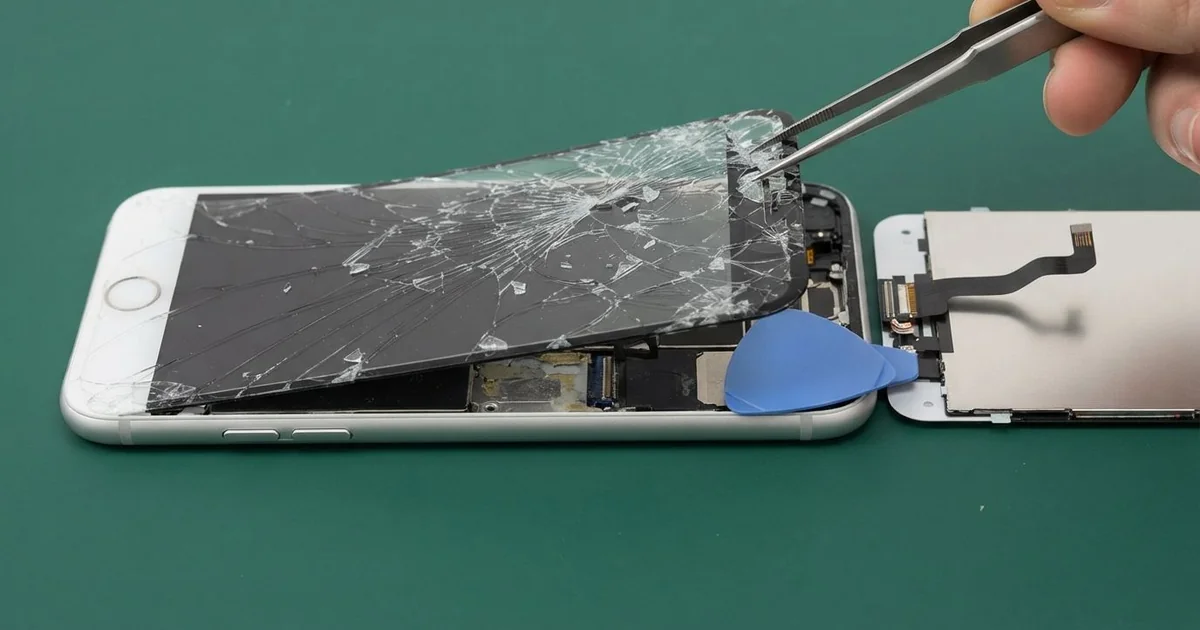
iPhone 7 Plus LCD Display Replacement in Al Khobar fixes a big screen that is cracked, dark or ignoring touch. We check it free, then fit a complete new screen with the glass and LCD as one part. We move your own Home button across, fit a fresh seal, and most jobs are done the same day.
An iPhone 7 Plus broken screen shows up in many ways. The glass cracks from a corner, a black blot spreads, or coloured lines run down the picture. Sometimes the picture is fine, but touch stops working along one edge.
It's better not to wait. A cracked screen breaks the water seal, so sweat and spills can reach the board. Small glass chips can also cut a finger or scratch the camera lens beside them.
Not every fault needs a new part. After a knock, a screen cable can work loose, and refitting it brings the picture back. A cracked glass protector can also look like real damage when the screen beneath is fine.
When the screen itself is broken, an iPhone 7 Plus screen replacement fits the whole new part. The big glass bends more in a pocket and catches more falls. Only the original Home button fully works with this phone, so we always move it across with care.
How Kabayan Center Replaces an iPhone 7 Plus LCD Display
We fix these screen faults on this phone.
- Cracked or shattered front glass
- A black blot or dark patch that keeps growing
- Coloured lines, flicker or white spots on the picture
- Touch that is dead along one edge, or taps that land in the wrong place
- A black screen while calls and sound still work
- A screen that lifts from the frame after a drop
This is how the job works, step by step:
- We check the phone free and test sound, both rear cameras, charging and Touch ID.
- We tell you what it needs, and you decide before any work starts.
- We take out the two tiny screws by the port and warm the edges to soften the seal.
- We lift the screen and open it like a book from the left, since its cables sit on the right.
- We unplug the battery first, then move the Home button, earpiece and front camera to the new screen.
- We connect the new screen and test touch, 3D Touch, brightness and Touch ID.
- We fit a fresh seal, press the screen evenly and let you check the phone yourself.
Using a different phone? Our phone screen replacement service covers other models with much the same steps. Customers come to our shop on King Fahd Road from Dammam and Dhahran too.
How an iPhone 7 Plus Screen Breaks: 3 Real Cases
Slid off a café table onto stone
One evening a phone came in with a crack running from the top corner. Its owner had left it on the edge of a café table while chatting with friends. A sleeve caught it, and it slid off onto a stone floor.
"It landed right on the corner," the owner told us. They had searched for iPhone Screen Replacement in Al Khobar from a friend's phone that same night. A corner hit sends the whole shock into one small spot of glass.
We opened the phone and found the LCD cracked under the glass too. A dark patch was creeping out from the corner. The cables on the right side were fine, and the board looked clean.
We did the iPhone 7 Plus LCD display replacement and moved the Home button across slowly. Its cable is thin and short on this model. A tear means losing Touch ID for good, so we never rush that step.
We also checked the frame corner, since metal can bend in a fall like that. It had a small dent, which we eased back so the new screen sat flat.
Everything tested well, including both rear cameras and portrait mode. The fingerprint worked on the first try.
The owner now puts the phone in a bag at the café. A big phone on a table edge is always one sleeve away from a fall.
Oud oil leaked inside a handbag
This one starts with a gift. A small bottle of oud oil was in a handbag next to the phone. The cap worked loose on the drive home, and oil soaked the phone.
The owner had looked up mobile repair in Al Khobar when a cloudy stain spread across the screen. "It smells lovely, but I can't read anything," the owner said. Oil creeps along the edge and under the glass slowly.
We opened it and found oil inside the screen layers and around the bottom of the phone. Oil holds dust and can cause corrosion over time. So we did a water damage repair, cleaning the board in a special bath.
Then we did the iPhone 7 Plus LCD display replacement with a fresh seal. The picture was clear again, and touch worked on every edge.
While testing, the loudspeaker sounded muffled. Oil had soaked into its fine mesh and dried there. A phone speaker repair would bring the sound back.
The owner chose to leave the speaker for now, since calls through the earpiece were fine. So music still sounds a little flat, and we noted it on the job card.
Bottles of oil or perfume now travel in a separate zipped pouch.
Lines from a back pocket, a little at a time
A common fault on this big model: lines with no crack at all. A driver kept the phone in a back pocket all day and sat on it for hours. Slowly, thin coloured lines began to appear on one side.
"There's no crack, so how can it be broken?" the driver asked. A large phone bends slightly each time you sit down. That bending works on the screen layers and the cables behind them.
We opened it and found the LCD itself damaged, with a pressure mark behind the glass. The screen cables were fine. So the lines came from the screen, not the board.
We did the iPhone 7 Plus LCD display replacement and moved the Home button across. The lines were gone, and the picture looked bright and even again.
We also checked the frame for a bend. It was very slightly curved, which we noted for the driver. A curved frame can press on a new screen too.
We suggested a front shirt pocket or a car holder instead. The driver now keeps the phone in a holder on the dashboard vent.
The new screen has stayed clear since then.
How to Keep Your iPhone 7 Plus Screen Safe
- Use a case with raised edges and thick corners for this big phone.
- Keep the phone out of back pockets, so it doesn't bend when you sit.
- Place it in the middle of a table, never on the edge.
- Carry oils and perfumes in a separate zipped pouch.
- Fit a thin glass protector, and change it once it cracks.
- Get phone repair in Al Khobar at the first line or blot, since both spread.
Related services
- Phone battery replacement for a phone that drains fast or shuts down early
- Charging port repair for a cable that wobbles or only charges at one angle
Questions about this repair
Ask us anything else on WhatsApp
we answer during shop hours.