iPhone 8 Battery Replacement in Al Khobar
iPhone 8 Battery Replacement in Al Khobar for a phone that needs two charges a day or runs warm. We check your battery free and tell you what it needs. You decide before any work starts, and your photos and chats stay on the phone.
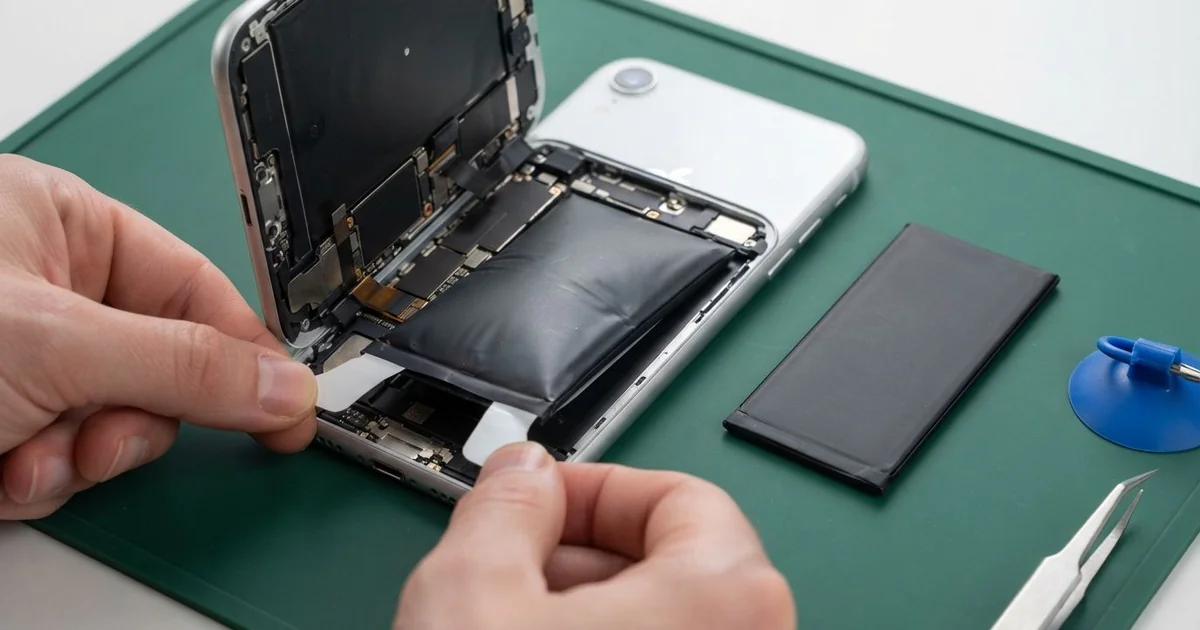
iPhone 8 Battery Replacement in Al Khobar fixes a phone that drains fast, switches off early or feels slow. We check the battery health free, then fit a new battery under the screen. We test wired and wireless charging, seal the screen again, and most jobs are done the same day.
An iPhone 8 battery draining fast is easy to spot. You charge it fully before work, and it asks for the charger again by the afternoon. Some phones drop from a healthy number to zero in minutes, or switch off when the camera opens.
It's better not to wait. A worn battery can't give the power the phone needs, so the phone slows itself down to stay on. An old battery can also swell over time, and on this model it pushes the screen up from inside.
Not every fast drain needs a new part. A phone stuck searching for signal, or an app running all day, can look like a weak battery. We check those first and tell you if a simple setting is the real cause.
When the battery itself is worn, an iPhone 8 battery replacement is the fix. The battery sits under the screen, held down by thin stretch tabs. So the phone opens from the front, and the glass back stays untouched.
How Kabayan Center Replaces an iPhone 8 Battery
We fix these battery faults on the iPhone 8.
- Fast drain, even on a quiet day with few apps
- Sudden shutdowns with charge still showing
- A slow phone, or a camera that freezes before the photo
- A swollen battery lifting the screen at one side
- A phone that gets hot on the charger or the wireless pad
- A battery health reading that asks for service
This is how the iPhone 8 battery replacement goes on our bench.
- We check the battery health free and test charging with our own cable and pad.
- We tell you what it needs, and you decide before any work starts.
- We remove the two tiny screws by the Lightning port and warm the screen edges.
- We open the screen like a book and disconnect the battery before anything else.
- We pull the stretch tabs slowly to free the old battery, without prying near it.
- We fit the new battery with fresh tabs, connect it and test wired and wireless charging.
- We fit a new seal, press the screen flat and let you check the phone yourself.
Have a different phone? Our phone battery replacement service covers most other models too. Our shop is on King Fahd Road, and many customers come from Dammam and Dhahran.
Why an iPhone 8 Battery Wears Out: 3 Real Cases
Used as a hotspot all day in a site cabin
One morning a phone came in from a site engineer who worked out of a small cabin. The cabin had weak internet, so the phone ran as a hotspot for a laptop all day. "It's hot in my hand and dead by two o'clock," the engineer said.
A hotspot keeps the phone's radio working at full power for hours. Add a cabin that warms up by noon, and the battery cooks slowly. Heat and heavy load together wear a battery out far faster than normal use.
The engineer had searched for iPhone Battery Replacement in Al Khobar during a lunch break. Our test showed the battery health well below normal.
It also dropped sharply when we ran the camera and the hotspot together. That explained the afternoon shutdowns the engineer kept seeing.
We did the iPhone 8 battery replacement and ran the same hotspot test on the bench. The phone stayed cool and held its charge for a full working day. It no longer felt hot in the hand, even with the laptop connected.
We also suggested a small internet router for the cabin. That way the phone can rest on a shelf instead of doing the router's job.
A wireless pad, a thick case and a lifted screen
We often see this with phones charged on a pad every night. A customer kept the phone in a thick leather case and set it on a wireless pad by the bed.
Over time the screen began to rise along the right side. "It feels soft when I press the middle," the customer told us.
Wireless charging makes more heat than a cable, and a thick case traps it. Night after night, that warmth made the old battery swell.
On this phone the swelling pushes up, against the back of the screen. A soft feel in the middle of the glass is a classic warning sign.
A swollen battery is not safe to use, even when it still works. We removed it at once and did the iPhone 8 battery replacement.
But the pressure had also cracked a cable at the bottom of the display. Part of the touch had stopped working.
The customer chose a phone screen replacement in the same visit. The phone now closes flat and every tap lands where it should.
Now the case comes off at night, or the phone charges on a cable instead. The pad stays, but only for short top-ups during the day.
Sea spray on a fishing trip by the Corniche
This case starts with a night of fishing on the rocks along the Corniche. The phone sat in a shirt pocket, and waves sprayed it again and again.
A few days later, the battery began to drain while the phone lay untouched on a table. By the morning it was flat every time.
The owner had looked up mobile repair in Al Khobar, sure the battery was simply old. Salt water had crept in past the worn seal. It left white crust on the battery connector, and that crust was leaking power away.
We cleaned the connector and fitted a new battery, but the salt had gone further. So we did a water damage repair, cleaning the board around the bottom speaker.
The drain stopped and the phone held its charge again. Still, the bottom speaker stayed a little quiet, because salt had eaten part of it.
The owner decided to live with that for now, since calls on the earpiece were clear. We noted the speaker on the job card in case the owner changes their mind.
On the next trip, the phone went into a sealed pouch in the bag.
How to Keep Your iPhone 8 Battery Healthy
- Take a thick case off before you charge on a wireless pad.
- Keep the phone out of hot cars, cabins and direct sun.
- Charge between 20% and 80% when you can, and avoid running it to zero.
- Check the battery health in Settings every few months.
- Use a separate router for long hotspot use instead of the phone.
- Stop using the phone if the screen starts to lift, and bring it for phone repair in Al Khobar.
Related services
- Charging port repair for a cable that wobbles or charges only at one angle
- Motherboard repair for a phone that still won't power on with a new battery
Questions about this repair
Ask us anything else on WhatsApp
we answer during shop hours.