iPhone 8 LCD Display Replacement in Al Khobar
iPhone 8 LCD Display Replacement in Al Khobar for cracked glass, black spots, lines or touch that skips letters. We check your phone free and tell you what it needs. You decide before any work starts, and your own Home button stays with your phone.
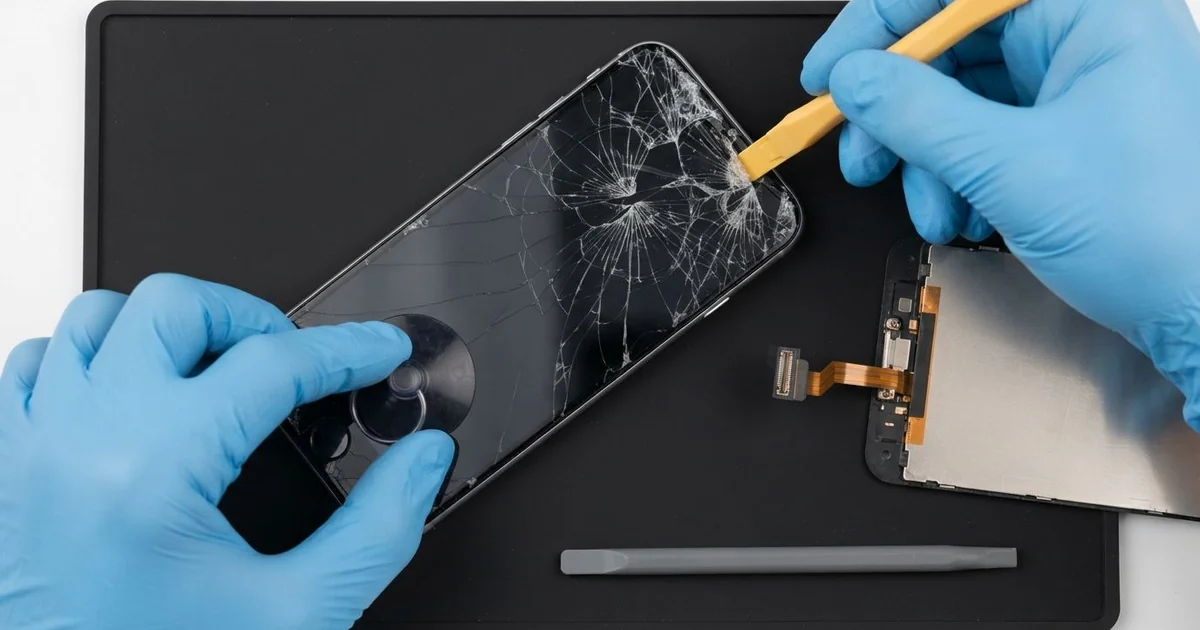
iPhone 8 LCD Display Replacement in Al Khobar fixes a cracked, dark or unresponsive screen on this Touch ID phone. We check it free, then fit a complete new screen with the glass and display joined as one part. We move your own Home button across, so Touch ID keeps working, and most jobs are done the same day.
An iPhone 8 broken screen shows up in different ways. Some phones have a web of cracks from one corner, and some show black spots that look like spilled ink. Others look fine, but the touch skips letters while you type.
It's better not to wait. The iPhone 8 has glass on the back too, so one bad fall can leave both sides weak. Cracks also let in sweat and dust, and they slowly push the water seal apart.
Some faults need no new part. A poor glass protector with a bubble can block touch along the edge. A screen cable shaken loose in a fall just needs refitting, and we check both before we suggest anything.
Cracks, lines and black spots need an iPhone 8 screen replacement. On this model the glass and the display are one part, so we change them together. The Home button is the one piece we never swap, because it is matched to your phone's board.
How Kabayan Center Replaces an iPhone 8 LCD Display
We fix these screen faults on the iPhone 8.
- Cracked front glass, from a hairline to a full web
- Black ink spots or a purple patch that grows each day
- Lines, flicker, or a dark screen while the phone still rings
- Touch that misses letters or works only in some areas
- A screen lifting at the bottom edge after a fall
- A loose or badly fitted screen from an earlier repair
These are the real steps we follow on this phone.
- We check the phone free and test Touch ID, sound, cameras and charging first.
- We tell you what it needs, and you decide before any work starts.
- We remove the two tiny screws beside the Lightning port and gently warm the edges.
- We lift the screen from the bottom, open it like a book and disconnect the battery.
- We move your own Home button to the new screen, with the earpiece and front camera.
- We connect the new screen and test touch, brightness, Touch ID and the front camera.
- We fit a fresh seal, press the screen flat and let you check the phone yourself.
Need a screen for another model? Our phone screen replacement service covers most phones with the same care. Our shop is on King Fahd Road, and customers drive in from Dammam and Dhahran too.
How an iPhone 8 Screen Gets Broken: 3 Real Cases
Slipped from a bunk bed ladder onto tiles
A customer came to us after climbing down a bunk bed in a shared flat. The phone slid out of a shirt pocket and hit the tiles face first. "The screen went black, but I can still hear my messages," they said.
They had searched for iPhone Screen Replacement in Al Khobar on a friend's phone that same night. A face-first fall on tiles sends the whole shock into the glass. The display layer behind it often breaks as well.
We opened it and found the display cracked under a wide black patch. The screen cable was still firmly in place. We did the iPhone 8 LCD display replacement and moved the Home button, so Touch ID worked at once.
Then we turned the phone over for the final test. The glass back had a long crack running past the camera. A cracked back cuts fingers and lets dust reach the lens, so we also did an iPhone back glass replacement.
Both sides came back smooth and whole. We suggested a case with a raised edge, and a small shelf by the bed instead of a shirt pocket.
A rushed earlier repair tore the Home button cable
We often see this with phones fixed in a hurry somewhere else. A delivery rider brought in a phone with a low-grade screen fitted months before. Now the touch lagged, and the Home button did nothing at all.
The rider had looked up mobile repair in Al Khobar, hoping for a quick and simple swap. When a screen is changed in a rush, the thin Home button cable tears easily. On this phone, that button holds Touch ID, and it is matched to the board.
Inside, we found the cable torn and stuck down with tape. The iPhone 8 LCD display replacement used a good new screen, and the touch was smooth again.
A torn Touch ID cable can't be mended, and a new button won't read fingerprints on this phone. So Touch ID could not come back. We turned on the on-screen home button in Settings instead.
The phone works well again, but unlocking now takes a passcode. The rider said it was still far better than a lagging screen. We advised choosing a shop that moves the original button with care next time.
Sand in a back pocket after a beach day
This one starts at Half Moon Bay on a windy afternoon. A teacher slipped the phone into a back pocket, still dusty with sand, then sat down in the car. "I heard a little crunch," the teacher told us.
Sand grains act like tiny stones under pressure. Sitting on the phone pressed them hard into the glass. The screen cracked in a curve, and a thin line ran down the display.
We did the iPhone 8 LCD display replacement and cleaned sand out of the speaker holes before closing. During the charging test, the cable only held at one angle. Sand had packed the bottom of the Lightning port, so we did a charging port repair as well.
The iPhone 8 broken screen was gone, and the cable clicked in firmly again. The teacher was glad both faults were sorted in one visit. The speaker sounded clearer too, once the sand was out of its holes.
Now the phone goes into a zip bag at the beach. In the car, it rides in a front pocket or on the seat, never under the teacher.
How to Keep Your iPhone 8 Screen Safe
- Use a case with a raised edge, so the glass doesn't land first.
- Fit a thin glass protector and change it as soon as it cracks.
- Keep the phone out of back pockets, especially after the beach.
- Ask any repair shop to move your own Home button, so Touch ID keeps working.
- Fix small cracks early, before sweat and dust get inside.
- Back up your photos while the screen still works.
- Bring it in for phone repair in Al Khobar at the first black spot, since these spots spread.
Related services
- Phone battery replacement for a phone that drains fast or lifts its screen
- Water damage repair for a phone that got wet through a crack
Questions about this repair
Ask us anything else on WhatsApp
we answer during shop hours.