iPhone 8 Plus Battery Replacement in Al Khobar
iPhone 8 Plus Battery Replacement in Al Khobar for a phone that won't last the day. We check your battery free and tell you what it needs. You decide before any work starts, and your photos, chats and settings stay just as they are.
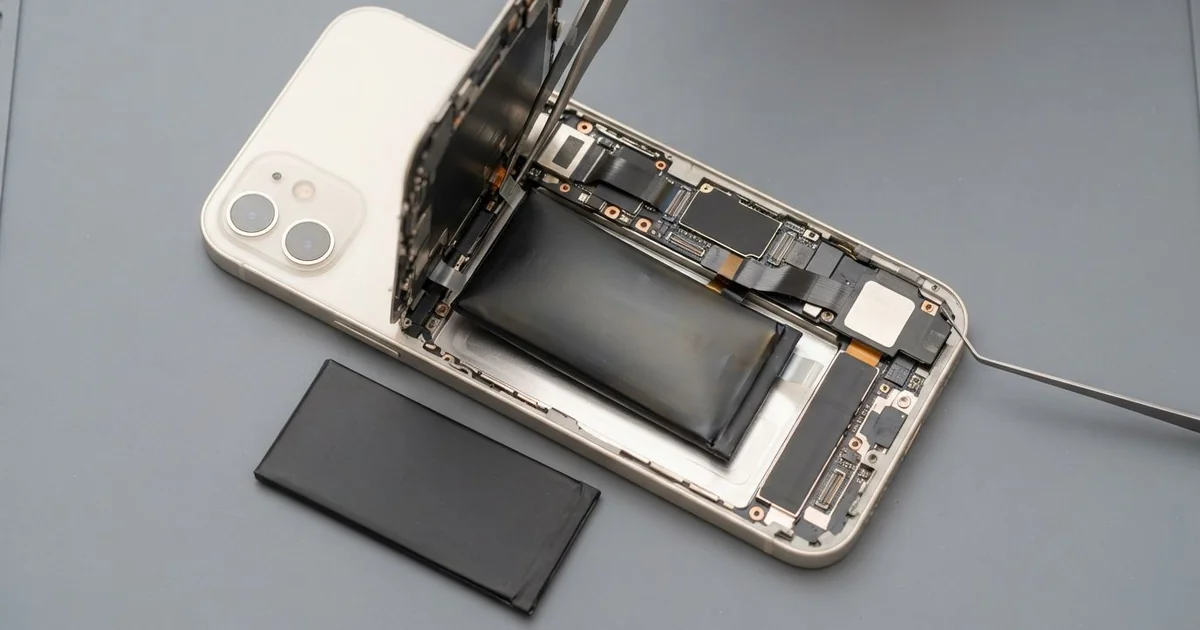
iPhone 8 Plus Battery Replacement in Al Khobar fixes a phone that drains fast, shuts down early or feels slow. We check the battery health free, then fit a new battery under the screen. We test charging on a cable and a pad, and most jobs are done the same day.
An iPhone 8 Plus battery draining fast is the most common sign. The bigger screen uses more power, so a tired battery shows it quickly. Many owners notice the phone dying in the afternoon, or switching off in a cold room.
It's better not to wait. A worn battery can't keep up, so the phone slows itself down to avoid shutting off. Left long enough, an old battery can swell and push the screen out of its frame.
Not every drain needs a new part. Screen brightness on full, a weak signal or one hungry app can empty a good battery. We check those first, and we tell you if a setting is the real cause.
When the battery is worn, an iPhone 8 Plus battery replacement brings back a full day. The battery sits under the screen, held by stretch tabs. We open the phone from the front, so the glass back is never touched.
How Kabayan Center Replaces an iPhone 8 Plus Battery
We fix these battery faults on the iPhone 8 Plus.
- Fast drain, even on light use
- Shutting off in cold AC or when the camera opens
- A slow phone, or apps that take ages to open
- A screen lifting at the edge from a swollen battery
- Heat on the charger, the pad or during navigation
- A low battery health reading in Settings
On this phone, a new battery goes in like this.
- We check the battery health free and test charging with our own cable.
- We tell you what it needs, and you decide before any work starts.
- We remove the two tiny screws at the bottom edge and warm the screen seal.
- We swing the screen open from the bottom and disconnect the battery first.
- We pull the stretch tabs gently to lift the old battery out without bending it.
- We fit the new battery, connect it and test charging and power.
- We fit a new seal, press the screen flat and let you check the phone yourself.
Got another model? Our phone battery replacement service covers other phones as well. Our shop is on King Fahd Road, and people come from Dammam and Dhahran too.
Why an iPhone 8 Plus Battery Wears Out: 3 Real Cases
Navigation all day behind a hot windscreen
A ride-hailing driver came to us with a phone that couldn't finish a shift. It sat in a mount on the windscreen, with maps open and the brightness on full. "I charge it in the car, and it still runs out," the driver said.
The sun through the windscreen heats the phone from the front. Maps, data and a bright screen heat it from the inside. A battery that runs hot for hours every day wears out far sooner.
The driver had searched for iPhone Battery Replacement in Al Khobar between rides. Our test showed the battery health very low. We did the iPhone 8 Plus battery replacement and ran a long navigation test.
During the test, the car cable kept slipping out of the port. Dust from the car vents had packed in tight. So we did a charging port repair, cleaning the port and checking the pins.
The phone now lasts a full shift and charges firmly in the car again. We suggested moving the mount to an AC vent, out of the direct sun.
The driver also turned on auto-brightness. That alone saves a good share of power on long days.
A handed-down phone that switched off in class
Here is a common case. A parent passed an old phone down to a student when buying a new one. In a cold lecture hall, the phone kept switching off with charge still showing.
The student had looked up mobile repair in Al Khobar, thinking the phone was simply too old. A worn battery struggles most in the cold. When the phone asks for a burst of power, the battery's voltage drops and the phone shuts down.
We checked the battery health and found it well below normal. The phone had been on its first battery for years. The screen, board and port all tested fine.
We did the iPhone 8 Plus battery replacement and ran a cold test with the AC near it. It stayed on, even with the camera and video running. The student was surprised that one part made the old phone feel quick again.
We showed the student the battery health page in Settings. Now it's easy to see when the next change is due.
The phone now lasts the whole day of lectures, with charge to spare for the bus home.
Steam from a hot shower every morning
We often see this with phones that play music in the bathroom. A customer kept the phone on the sink during long hot showers every day. Over time, the iPhone 8 Plus battery draining fast became a battery that drained even when switched off.
The steam had found its way past the old screen seal. Warm, wet air settles inside the phone as tiny drops. It left a light green crust on the battery connector.
"But it never touched water," the customer told us. Steam is water too, just in a form that slips in quietly.
That crust let power leak away all night. We cleaned the connector and did the iPhone 8 Plus battery replacement. Then we did a water damage repair to clean the board around it.
The drain stopped, and the phone held its charge again. But the rust had also reached the flash next to the rear cameras. It no longer lights up, and the customer chose to live without it for now.
We fitted a fresh screen seal before closing. The phone now plays music from the bedroom, away from the steam.
How to Keep Your iPhone 8 Plus Battery Healthy
- Mount the phone on an AC vent, not behind a sunny windscreen.
- Turn on auto-brightness, since the large screen uses a lot of power.
- Keep the phone out of steamy bathrooms and hot cars.
- Charge between 20% and 80% when you can, and avoid running it to zero.
- Check the battery health in Settings every few months.
- Stop using the phone if the screen starts to lift, and bring it for phone repair in Al Khobar.
Related services
- Phone screen replacement for a cracked screen or one damaged by a swollen battery
- Motherboard repair for a phone that won't start even with a new battery
Questions about this repair
Ask us anything else on WhatsApp
we answer during shop hours.