iPhone 8 Plus Charging Port Repair in Al Khobar
iPhone 8 Plus Charging Port Repair in Al Khobar for a plug that won't stay in. We check the port free and tell you what it needs. You decide before any work starts, and we never wipe or reset your phone to fix a port.
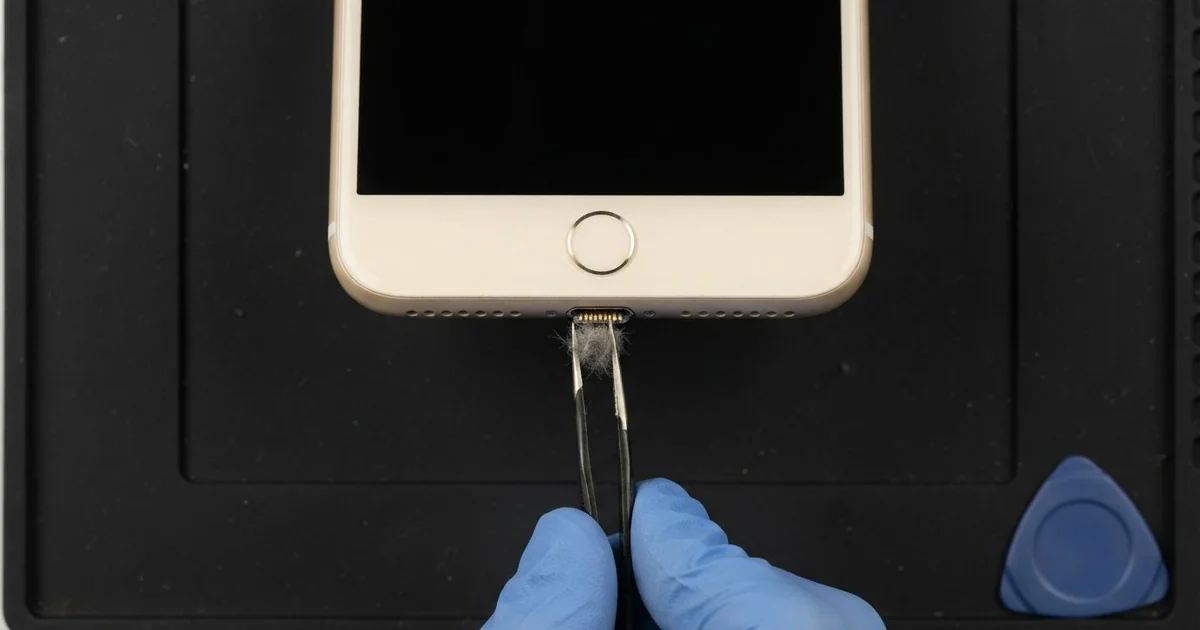
iPhone 8 Plus Charging Port Repair in Al Khobar fixes a phone that charges loosely, slowly or not at all. We check the Lightning port free, then clean it or replace the port cable. We test charging, the plug fit and the bottom mics, and most jobs are done the same day.
An iPhone 8 Plus not charging usually starts small. The plug feels loose, then it only works at one angle. In the end, the charging sign stops showing at all, whatever cable you try.
It's better not to wait. A plug that wobbles makes tiny sparks that slowly burn the pins. A phone that keeps running flat also wears out its battery faster.
This phone can also charge on a wireless pad, so try one if you have it. If the pad works and the cable doesn't, the battery is fine and the port is the problem. Buying a new cable rarely helps, because the fault sits inside the phone.
Most port faults don't need a new part. The bottom fills with lint and dust, and we clean it out with fine plastic tools. Bent, cracked or rusted pins are different, so we replace the iPhone 8 Plus charging port cable.
How Kabayan Center Repairs an iPhone 8 Plus Charging Port
We fix these charging faults on the iPhone 8 Plus.
- A loose plug, or charging only at one angle
- No cable charging, while the wireless pad still works
- Very slow charging with a good charger
- A warning that the accessory is not supported
- Muffled calls, since the bottom mics sit on the port cable
- Sticky, green or white build-up inside the port
The repair goes step by step like this.
- We check the port under a lamp and test it with our own cable and pad.
- We tell you what it needs, and you decide before any work starts.
- We clean out dust and lint with fine plastic tools, never metal.
- If the port is damaged, we open the screen from the front and disconnect the battery.
- We take out the loudspeaker and the vibration motor to reach the port cable.
- We fit the new port cable and test charging, the plug fit and both mics.
- We close the phone with a fresh seal and let you check it yourself.
Have another phone with a loose plug? Our charging port repair service covers other models too. Our shop is on King Fahd Road, and customers come from Dammam and Dhahran as well.
Why an iPhone 8 Plus Stops Charging: 3 Real Cases
Tile grout dust set hard in the port
A tile fitter came to us with a plug that would only go in halfway. The phone lived in a work trouser pocket all day on building sites. "I think the port is broken inside," the fitter said.
Grout and cement dust are much finer than normal lint. In humid coastal air, the dust takes in moisture and sets almost like stone. Each time the plug goes in, it presses that layer harder.
The fitter had searched for iPhone Charging Port Repair in Al Khobar, sure a new part was needed. Under our lamp, the port was lined with a grey crust. The pins under it looked clean and straight.
We softened the crust and picked it out slowly with plastic tools. It came out in small flakes, almost like plaster. After that, the plug clicked in with a firm, clean sound.
The iPhone 8 Plus charging port repair needed no new part at all. The phone charged at full speed, and both mics worked well in a test call.
We suggested a phone case with a port cover for work days. A quick look with a torch each week will now catch any new build-up early.
Dropped while still plugged in
One evening a phone came in with the plug bent and the screen cracked. A student had dozed off with the phone charging on the bed. It slid off the edge, and the plug took the full weight of the fall.
When a phone lands on its plug, the plug acts like a crowbar. It can crack the port and tear it from its cable inside. Here, the plug was bent, and the port had shifted sideways.
We opened the phone and found the port cable cracked near the pins. We did the iPhone 8 Plus charging port repair and tested it with several plugs. The fit was firm again, and charging was steady.
The same fall had also cracked the glass across one corner. The touch still worked, but splinters were lifting. So we did a phone screen replacement in the same visit.
The phone went home charging well and with clear glass. The student now uses a longer cable and a bedside shelf.
A phone that charges on a shelf can't fall far, and the plug never takes the weight. It's a small habit that saves a repair.
Sweet juice spilled into the bottom edge
We often see this in homes with small children. A juice box tipped over on a table, right next to a charging phone. The owner wiped the outside, and the phone kept charging as if nothing had happened.
A few days later, it was the iPhone 8 Plus not charging at all. The owner had looked up mobile repair in Al Khobar, thinking the cable was faulty. In fact, sugar had dried into a sticky layer inside the port.
Sugar holds water, and it lets power creep between the pins. We found the pins dark and pitted, with a sticky ring around them. So we did a water damage repair, cleaning the board near the port.
Then the iPhone 8 Plus charging port repair used a new port cable, and charging came back. But the juice had also seeped into the bottom speaker. It still plays, with a light crackle on loud music.
The owner chose to keep the speaker for now, since calls still sound clear. We noted it on the job card in case they change their mind.
The phone now charges on a high shelf, away from drinks and small hands.
How to Keep Your iPhone 8 Plus Charging Port Working
- Look into the port with a torch every week if you work around dust.
- Use a case with a port cover on building sites.
- Never clean the port with a metal pin, a needle or a toothpick.
- Charge on a shelf or table, not on the edge of a bed.
- Keep drinks away from a phone that is charging.
- Unplug and get it checked if anything spills near the port.
- Book phone repair in Al Khobar as soon as the plug feels loose.
Related services
- Phone battery replacement for a phone that drains fast after months of running flat
- Motherboard repair for a phone that still won't charge with a new port
Questions about this repair
Ask us anything else on WhatsApp
we answer during shop hours.