iPhone 8 Plus LCD Display Replacement in Al Khobar
iPhone 8 Plus LCD Display Replacement in Al Khobar for cracked glass, spreading ink or dead touch. We check your phone free and tell you what it needs. You decide before any work starts, and your original Home button goes back on your phone.
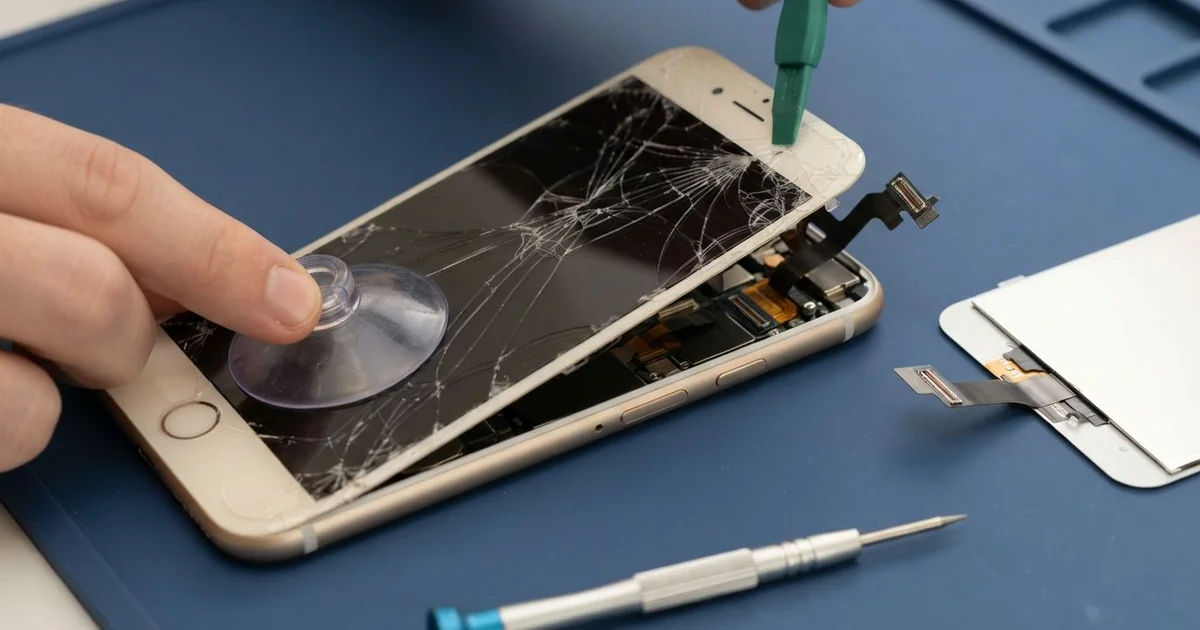
iPhone 8 Plus LCD Display Replacement in Al Khobar fixes a cracked, dark or unresponsive screen on this big phone. We check it free, then fit a complete new screen with the glass and display as one part. We move your own Home button across so Touch ID still works, and most jobs are done the same day.
An iPhone 8 Plus broken screen can look a few different ways. A big phone often lands on a corner, and the crack spreads out from there. Others show a black blot that spreads like ink, or touch that dies in a strip.
It's better not to wait. A wide, cracked screen sheds tiny glass splinters that catch your thumb. The cracks also let sweat and dust reach the display, and the black blot keeps growing.
Some screen faults need no new part. A thick protector that has lifted at one edge can stop touch there. A screen cable knocked loose in a fall only needs to be refitted, and we check that first.
Real cracks, lines and blots need an iPhone 8 Plus screen replacement. The glass and display are joined on this model, so they are changed together. Your Home button stays your own, because Touch ID is matched to the phone's board.
How Kabayan Center Replaces an iPhone 8 Plus LCD Display
We fix these screen faults on the iPhone 8 Plus.
- Cracked glass, often starting from a corner
- A black blot or a purple patch that grows
- Lines across the display, or a screen that flickers
- A strip of the screen that ignores your finger
- Ghost taps that open apps on their own
- A screen that sits proud of the frame after a fall
On this phone, the repair follows these steps.
- We check the phone free and test Touch ID, both rear cameras, sound and charging.
- We tell you what it needs, and you decide before any work starts.
- We take out the two tiny screws next to the Lightning port and warm the edges.
- We lift the screen from the bottom, swing it open and disconnect the battery first.
- We move your Home button, the earpiece and the front camera to the new screen.
- We connect the new screen and test touch, colour, brightness and Touch ID.
- We fit a fresh seal, press the screen down evenly and let you check it yourself.
Using another model? Our phone screen replacement service covers most other phones too. You'll find us on King Fahd Road, and customers come in from Dammam and Dhahran too.
How an iPhone 8 Plus Screen Breaks: 3 Real Cases
A tripod blown over by the Corniche wind
This one starts on the Corniche on a breezy evening. A photographer set the phone on a small tripod to film the sunset over the water. A gust tipped it over, and it landed corner first on the stone walkway.
"There's a black spot, and it's getting bigger," the photographer told us the next day. They had searched for iPhone Screen Replacement in Al Khobar that same night.
A corner hit sends all the force into one small point. The glass cracks there, and the display under it starts to leak. That leak is the black blot, and it spreads as the phone warms up.
We did the iPhone 8 Plus LCD display replacement and moved the Home button across. Touch ID read the fingerprint on the first try.
Then we checked the back. The glass beside the dual camera had cracked in the same fall. Loose glass there can scratch the lenses, so we did an iPhone back glass replacement as well.
Both sides came back clear and smooth. Now the tripod gets a small sandbag on its legs on windy days. The photographer also clips the phone in more firmly before filming.
Pressed under a sofa cushion
A customer came to us after a family evening at home. The phone had slipped under a sofa cushion, and someone sat down hard on it. "It doesn't look that bad, but the touch is crazy," the customer said.
Weight on a large phone bends the glass in the middle. The display can crack inside even when the top glass shows only a small line. Here, a lot of the screen had stopped responding.
The customer had looked up mobile repair in Al Khobar, half expecting to need a new phone.
We opened the phone and found a crack across the display layer. The iPhone 8 Plus LCD display replacement was done, and every tap landed in the right place again.
But we noticed something else while the phone was open. The battery had started to swell and was pressing up on the screen. That had made the screen weaker before the cushion did the rest.
A swollen battery is not safe to use, even when it still works. So we also did a phone battery replacement before sealing the phone.
The new screen now sits flat, with nothing pushing on it from below. The customer now keeps the phone on a side table in the evening.
A splash at the kitchen sink
We often see this with phones that already have a small crack. A cook kept a phone propped by the kitchen sink to follow recipes. A splash from the tap went straight into a crack near the top.
Within an hour, the iPhone 8 Plus broken screen began typing on its own. The cook switched it off and dried it with a towel, which was the right move.
Water had seeped past the crack and under the display. We found water marks there and a white crust near the screen cable. So we did a water damage repair on the board before the iPhone 8 Plus LCD display replacement.
Touch came back clean, with no more ghost typing. But the water had also reached the front camera. It now gives selfies a soft haze that cleaning could not remove.
The cook chose to keep that camera for now, since video calls still worked. We noted it on the job card in case they want it changed later.
Now the phone rests on a stand away from the sink. A small crack gets fixed early, before water finds it.
How to Keep Your iPhone 8 Plus Screen Safe
- Use a case with raised corners, since a big phone often lands on one.
- Change a lifted or cracked screen protector right away.
- Keep the phone off sofas and beds, where people sit down on it.
- Fix small cracks early, before water or sweat gets inside.
- Steady a tripod on windy days, or hold the phone yourself.
- Ask for your own Home button to be moved across, so Touch ID keeps working.
- Bring it for phone repair in Al Khobar when a black blot first appears.
Related services
- Charging port repair for a phone that charges loosely or not at all
Questions about this repair
Ask us anything else on WhatsApp
we answer during shop hours.