iPhone SE (1st generation) Charging Port Repair in Al Khobar
iPhone SE (1st generation) Charging Port Repair in Al Khobar for a cable that wobbles or won't charge. We check the port free and tell you what it needs. You decide before any work starts, and nothing on the phone is deleted.
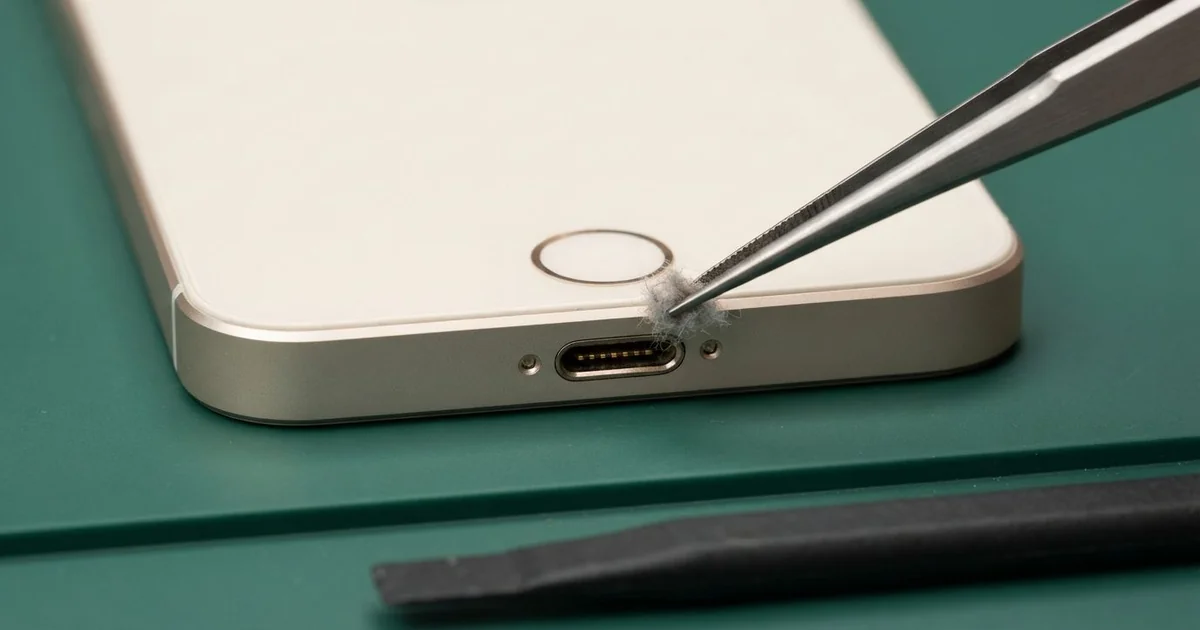
iPhone SE (1st generation) Charging Port Repair in Al Khobar gets your small phone charging firmly again. We check the Lightning port free, then clean it or fit a new port part. That part also holds the headphone jack and mic, and most jobs are done the same day.
An iPhone SE 2016 not charging usually gives warnings first. The cable needs a wiggle, the charging sign flickers, or the phone charges only at night when it lies still. Then one day it stops charging completely.
Many owners blame the cable and buy a new one straight away. When that doesn't help, the fault is inside the phone, in the port or the part around it. Not every fault there needs a new part, though.
It's better not to wait. A loose plug sparks a little, heats the pins and slowly burns them. A battery that keeps running flat also wears out early, and that's a second repair.
Most ports just hold lint, dust or sand, and careful cleaning fixes them. When the pins are damaged, we replace the iPhone SE 2016 charging port part. Parts for this older model can be harder to find, so some take a day to arrive.
How Kabayan Center Repairs an iPhone SE (1st generation) Charging Port
We fix these charging faults on this phone.
- A loose cable, or charging at one angle only
- Charging that stops and starts
- No charging at all
- Slow charging with a good charger
- Crackling or no sound from wired earphones
- Callers who say you sound far away
Here is how the repair goes, step by step:
- We look into the port under a magnifier and test it with our own cable.
- We tell you what it needs, and you decide before any work starts.
- We clean out dirt with plastic tools and a soft brush.
- If the pins are damaged, we lift the screen a little and unplug the Home button cable first.
- We unplug the battery and take out the loudspeaker to reach the port part.
- We fit the new port part and test charging, the headphone jack and the mic.
- We close the phone and let you check it yourself.
Using a different phone? Our charging port repair service covers other models too. Customers come to our shop on King Fahd Road from Dammam and Dhahran as well.
Why an iPhone SE (1st generation) Stops Charging: 3 Real Cases
A short cable stretched tight in the car
A customer came to us with a port that felt ready to fall out. The phone sat in a car holder high on the windscreen. The cable was too short, so it pulled tight on every bump.
"It charges on the straight road, then stops at every turn," the customer said. They had searched for iPhone Charging Port Repair in Al Khobar after a long drive with a dead phone. Steady pulling on a plug slowly bends the part behind it.
We opened it and found the port part bent and cracked near its joint. Cleaning could never fix that. The iPhone SE (1st generation) charging port repair used a new part, and the cable clicked in firmly.
During the test, the battery health showed low too. All that stop-start charging had worn it down. The customer chose a phone battery replacement in the same visit.
With both parts new, the phone charged steadily and lasted the whole drive. We suggested a longer cable with a little slack, or a holder lower down.
The phone now charges through every turn, and the maps stay on screen.
Salt spray on a fishing trip
This one starts on a boat. A weekend angler took the phone out on a fishing trip off the coast. Salt spray soaked the shirt pocket for hours.
A few days later, the phone stopped charging. "I can see green stuff in the hole," the angler said. Salt water leaves crystals that pull in moisture and rust the pins.
The angler had looked up mobile repair in Al Khobar and came in the same day. We opened it and found green crust on the port and white salt on the board nearby. So we did a water damage repair to clean the board first.
Then the iPhone SE (1st generation) charging port repair used a new part, and charging came back. The headphone jack and mic tested fine on the new part.
The loudspeaker beside the port was another matter. Salt had dulled it, and music sounded quieter than before. The angler chose to leave it for now, since calls through the earpiece were clear.
So charging is fixed, but the speaker is still a little quiet. A sealed pouch is now part of the fishing kit.
Earphones that crackled, then a port that died
We often see two faults that turn out to be one. A student used wired earphones every day for lectures and music. First the left side crackled, then the phone stopped charging.
"I thought the earphones broke, so I bought new ones," the student said. The new pair crackled too. So the problem had to be inside the phone.
On this phone, the headphone jack, the charging port and the bottom mic sit on one shared part. A hard pull on the earphone cable can crack it inside. The student often pulled the earphones out by the wire.
We opened the phone and found a crack in the shared part, right between the jack and the port. We did the iPhone SE (1st generation) charging port repair, and both the jack and charging came back.
Music played clearly in both ears, and the cable clicked in firmly. A test call showed the mic was clear too. Nothing else needed changing.
We showed the student how to pull out a plug by its head, not its wire. One new part fixed three problems at once. It was a quick, simple fix in the end.
How to Keep Your iPhone SE (1st generation) Charging Port Working
- Look into the port with a torch now and then.
- Never clean it with a needle, pin or toothpick.
- Pull cables and earphones out by the plug, never by the wire.
- Use a cable long enough to hang loose in the car.
- Keep the phone in a sealed pouch on boats and at the beach.
- Get phone repair in Al Khobar as soon as charging needs a special angle.
Related services
- Motherboard repair for a phone that still won't charge with a new port
- Phone screen replacement for a cracked or dark screen
Questions about this repair
Ask us anything else on WhatsApp
we answer during shop hours.