iPhone SE (1st generation) LCD Display Replacement in Al Khobar
iPhone SE (1st generation) LCD Display Replacement in Al Khobar for a cracked or dark small screen. We check your phone free and tell you what it needs. You decide before any work starts, and we keep your own Home button for Touch ID.
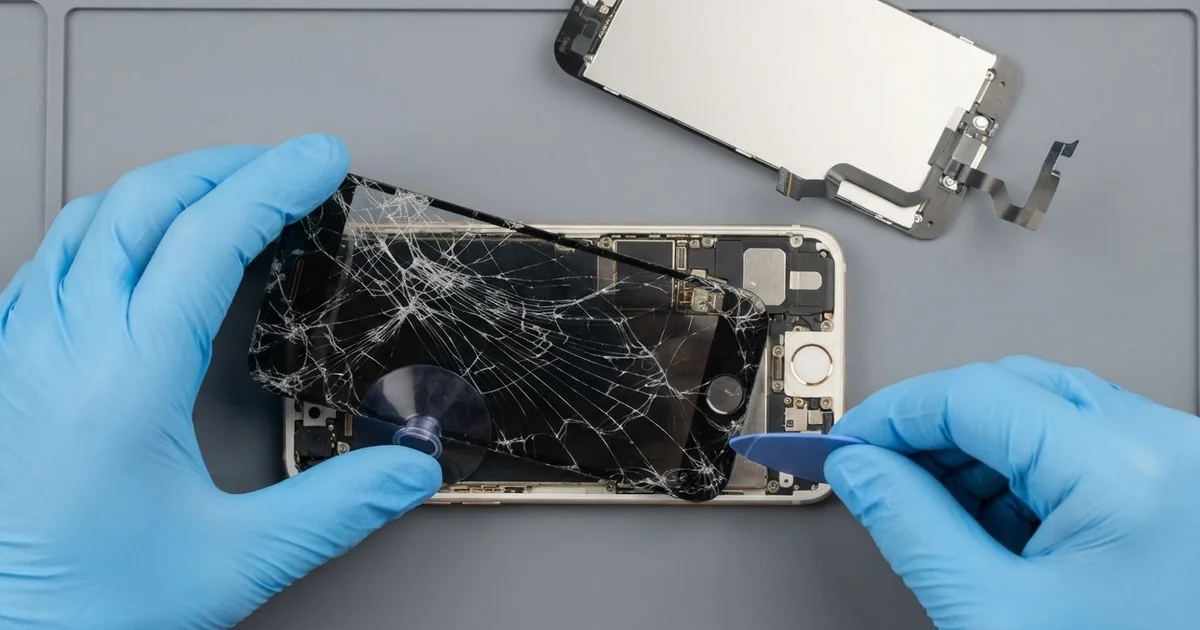
iPhone SE (1st generation) LCD Display Replacement in Al Khobar keeps your small phone going. We check it free, then fit a complete new screen with the glass and LCD as one part. We move your own Home button across and test Touch ID, and most jobs are done the same day.
Many people keep this phone because it fits so well in one hand. So an iPhone SE 2016 broken screen hurts more than most. The glass cracks from a corner, lines run down the picture, or touch stops working in one strip.
It's better not to wait. Small glass chips cut fingers, and this model has no water rating to stop sweat getting in. A dark screen also makes saving your photos much harder.
Not every fault needs a new part. After a knock, a screen cable can come loose, and refitting it brings the picture back. A cracked glass protector can also fool you, while the screen under it is perfectly fine.
When the screen is truly broken, an iPhone SE 2016 screen replacement fits the whole new part. This is an older model, so screens are harder to find than for newer phones. Some parts take a day to arrive, and we tell you before you decide.
How Kabayan Center Replaces an iPhone SE (1st generation) LCD Display
We fix these screen faults on this small phone.
- Cracked or shattered glass
- Lines, flicker or a dark patch on the picture
- A black screen while the phone still rings
- Touch that is dead in one area, or taps that land in the wrong place
- A screen that came loose from the frame after a drop
- A Home button that stopped clicking after a fall
Here is how we do it, step by step:
- We check the phone free and test sound, cameras, charging and Touch ID.
- We tell you what it needs, and you decide before any work starts.
- We take out the two tiny screws beside the charging port and lift the screen with a suction cup.
- We open it only a little at first, because a thin cable joins the Home button to the board.
- We unplug that cable and the battery, then open the screen fully.
- We move the Home button, earpiece and front camera to the new screen.
- We test touch, brightness and Touch ID, then close the phone and let you check it.
Using a different phone? Our phone screen replacement service covers other models too. Customers come to our shop on King Fahd Road from Dammam and Dhahran as well.
How an iPhone SE (1st generation) Screen Breaks: 3 Real Cases
Thrown from a bike mount on the Corniche path
One morning a phone came in with a cracked screen and sand in every gap. A cyclist had it on a handlebar mount for a ride along the Corniche. The clip let go on a bump, and the phone hit the path.
"It flew off and slid along the ground," the cyclist said. They had searched for iPhone Screen Replacement in Al Khobar on the way home. The screen had a web of cracks, and one corner had dug into the path.
We checked our stock first, since parts for this model are harder to find. The screen was in, so the iPhone SE (1st generation) LCD display replacement was done the same day. We moved the Home button across, and Touch ID worked at once.
While testing, music from the loudspeaker sounded rattly and thin. Sand had packed into the grille along the bottom edge. So we cleaned it out and tested the speaker as part of a phone camera and speaker repair.
The phone went back with a clear screen and full sound. We suggested a mount with a locking clip, and a case with a lip around the screen.
The cyclist now checks the clip before every ride. A few seconds of checking saves a long wait for parts.
Opened at home with a kitchen knife
We often see this with older phones. Someone at home tried to fix a cracked screen with an online kit and a kitchen knife. They pulled the screen up from the bottom, all the way open.
On this model, a thin cable joins the Home button to the board near the bottom. Opening the screen too far tears that cable. "Now the button does nothing," the owner told us.
The owner had looked up mobile repair in Al Khobar after the kit went wrong. We opened it carefully and found the Home button cable torn in half. The new screen from the kit was also cracked at one edge.
The iPhone SE (1st generation) LCD display replacement gave a good new screen, and the picture was clear again. But the torn cable belongs to the fingerprint sensor itself. Only the phone's original Home button can read fingerprints on this model.
So Touch ID could not come back. We fitted a working button so the phone could be used again. The owner now unlocks it with a passcode.
The screen is perfect, but the fingerprint is gone for good. Opening this phone needs a slow, small lift at first, and the right tools.
Fog behind the glass after the office AC
This one starts with cold office air. An office clerk kept the phone on a desk right under an AC vent all day. Then it went straight into a hot car each evening.
Cold glass meeting hot, damp air fogs over, like a pair of glasses. It happens inside the phone too, since this model has no water seal. Over time, a cloudy stain grew in one corner of the screen.
"It looks like a fingerprint inside the glass," the clerk said. We opened it and found tiny water marks under the display and white spots near the screen cable. The moisture had reached the board as well.
So we did a water damage repair first, cleaning and drying the board fully. Then we did the iPhone SE (1st generation) LCD display replacement, and the stain was gone.
The phone worked normally again, with clear colours from edge to edge. We told the clerk the stain itself was not the main worry. The moisture on the board was.
The clerk now keeps the phone in a drawer, away from the vent. In the car, it warms up slowly in a bag instead of in the sun.
How to Keep Your iPhone SE (1st generation) Screen Safe
- Use a case with a lip that rises above the glass.
- Check the clip on any bike or car mount before you set off.
- Keep the phone away from AC vents, then out of sudden heat.
- Never open the screen at home with a knife or a metal tool.
- Back up your photos while the screen still works.
- Get phone repair in Al Khobar at the first crack, since parts for this model can take time to arrive.
Related services
- Phone battery replacement for a phone that drains fast or shuts down early
- Charging port repair for a cable that wobbles or only charges at one angle
Questions about this repair
Ask us anything else on WhatsApp
we answer during shop hours.