iPhone SE (2nd generation) Battery Replacement in Al Khobar
iPhone SE (2nd generation) Battery Replacement in Al Khobar for a phone that dies too soon. We test the battery free and tell you what we find. You decide before any work starts, and nothing on the phone is wiped.
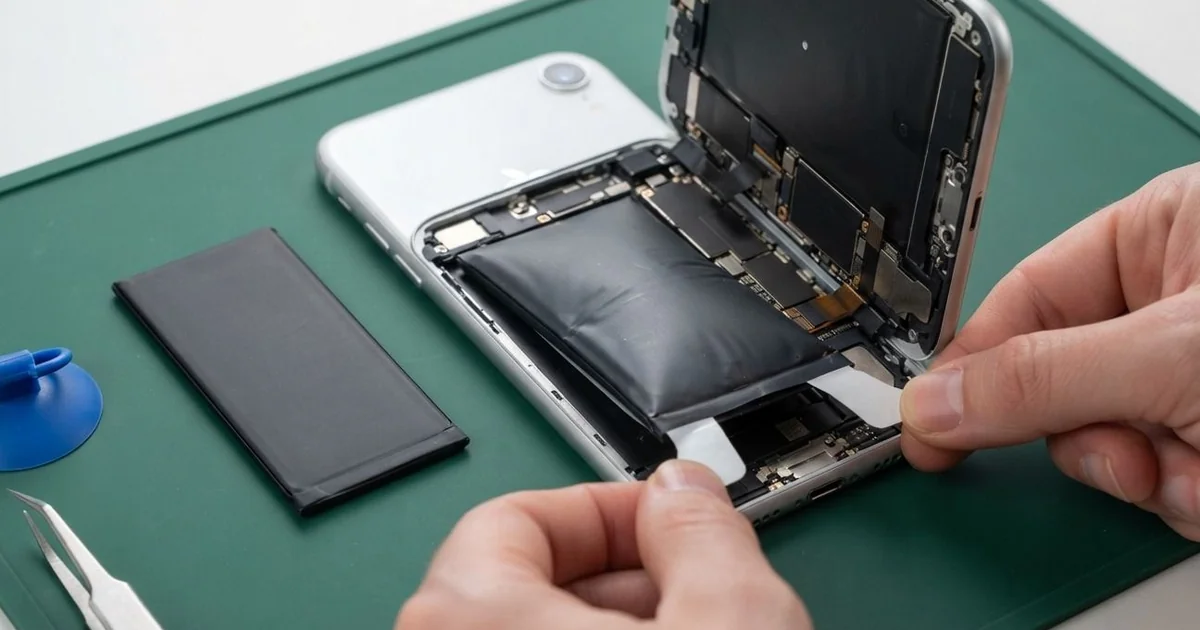
iPhone SE (2nd generation) Battery Replacement in Al Khobar fixes a phone that drains fast or shuts down early. We run a free health test, then fit a new battery behind the screen. We reseal the screen and test charging and Touch ID, and most jobs are done the same day.
This phone is also called the iPhone SE 2020. It is small, so its battery is small too, and it shows wear sooner than a bigger phone. An iPhone SE 2020 battery draining fast is the most common thing owners tell us.
The signs are easy to spot. The phone needs charging twice a day, switches off at a fair charge, or slows down when the camera opens. Some owners also see a battery message in Settings, asking for service.
It's better not to wait. A worn battery makes the phone slow itself down to avoid shutting off. Old batteries can also swell and push the screen away from the frame, which can crack it.
Not every drain is the battery's fault. Bright screens, busy apps and weak signal all use more power, so we check those first. When the battery itself is worn, an iPhone SE 2020 battery replacement is the fix.
How Kabayan Center Replaces an iPhone SE (2nd generation) Battery
These are the battery faults we fix on this phone.
- Fast drain, even with light use
- Shutting down with charge still showing
- A slow phone, or a camera that lags
- A swollen battery lifting the screen
- Heat while charging, on a cable or a wireless pad
- A low health reading or a service message in Settings
Here is how an iPhone SE 2020 battery replacement works, step by step.
- We read the battery health and test charging with our own cable, free.
- We explain what we found, and you decide before any work starts.
- We remove the two screws beside the charging port and warm the screen edges.
- We open the screen from the bottom and disconnect the battery first, keeping the Home button cable safe.
- We pull the stretch tabs slowly to free the old battery, with no prying near it.
- We fit the new battery and test charging, power and heat.
- We reseal the screen, then test Touch ID and let you check the phone.
Bringing another phone along? Our phone battery replacement service covers other models with the same care. Customers visit our shop on King Fahd Road from Dammam and Dhahran too.
What Wears Out an iPhone SE (2nd generation) Battery: 3 Real Cases
A hand-me-down phone for a teenager
A parent came to us with an older phone passed down to a teenager. "It's dead before school is even over," the parent said. The phone had already served the parent for years of daily use.
The parent had searched for iPhone Battery Replacement in Al Khobar instead of buying a new phone. Every battery loses strength with each charge. After that much use, it simply can't hold a full school day.
We tested it, and the battery health was very low. The phone was also slowing itself down, which is why games felt choppy.
We did the iPhone SE (2nd generation) battery replacement and ran a long test with video and games. It stayed smooth and cool, and the charge dropped slowly and evenly.
While testing, the cable kept slipping out of the port. A school bag had packed it with lint and pencil dust. So we did a charging port repair, cleaning it out until the plug clicked in firmly.
The teenager now gets through the whole school day with charge to spare. We showed them where to check the battery health in Settings.
Charged beside a hot kitchen stove
This one starts in a small restaurant kitchen. A cook charged the phone on a shelf right beside the stove during long shifts. The heat there never really stopped.
"The screen is coming away from the side," the cook said, pressing it with a thumb. A thin gap had opened along one edge. It had been like that for a few days.
Heat makes a battery age and swell much faster. On this phone, the battery sits right behind the screen. As it swells, it pushes the screen up and out.
A swollen battery is not safe to use, even when it still works. We took it out at once and did the iPhone SE (2nd generation) battery replacement. The screen had also cracked at one corner where the cook kept pressing it down.
So we did a phone screen replacement as well, moving the original Home button across. Touch ID worked straight away on the new screen.
The phone now charges in the staff room, away from the heat. It sits flat and lasts the whole shift again. We also suggested a longer cable to a socket outside the kitchen.
Shutting down in a cold server room
We often see this with people who work in very cold rooms. An IT technician noticed the phone switching off each time they entered the server room. Outside, it seemed almost normal.
The technician had looked up mobile repair in Al Khobar after losing an important call. Cold makes a worn battery even weaker for a while. When it can't give enough power, the phone shuts down to protect itself.
The battery health was low, so we did the iPhone SE (2nd generation) battery replacement. The cold shutdowns stopped during our test in a chilled room. Even with the AC at its coldest, the phone stayed on.
But during the bench test, the phone stayed warm even when idle. Our power meter showed a small leak on the board, from a part starting to fail. We explained a motherboard repair would fix it.
The technician chose to wait for now, since the phone works. So the battery is new and the shutdowns are gone, but the phone still runs a little warm.
We noted the board fault on the job card for the next visit. The warmth is mild for now, but it may grow.
How to Keep Your iPhone SE (2nd generation) Battery Healthy
- Charge the phone away from stoves, heaters and direct sun.
- Keep it in an inside pocket in very cold rooms.
- Charge between 20% and 80% when you can.
- Lower the screen brightness, since this small battery feels it fast.
- Use a good cable and charger, and replace frayed ones.
- Check Battery Health in Settings every few months.
- Stop using a phone with a lifting screen, and get phone repair in Al Khobar.
Related services
- Water damage repair for a phone that got wet, even if it still turns on
Questions about this repair
Ask us anything else on WhatsApp
we answer during shop hours.