iPhone SE (3rd generation) Charging Port Repair in Al Khobar
iPhone SE (3rd generation) Charging Port Repair in Al Khobar for a cable that won't hold. It also fixes slow charging and a phone that won't charge at all. We check the port free, and you decide before any work starts.
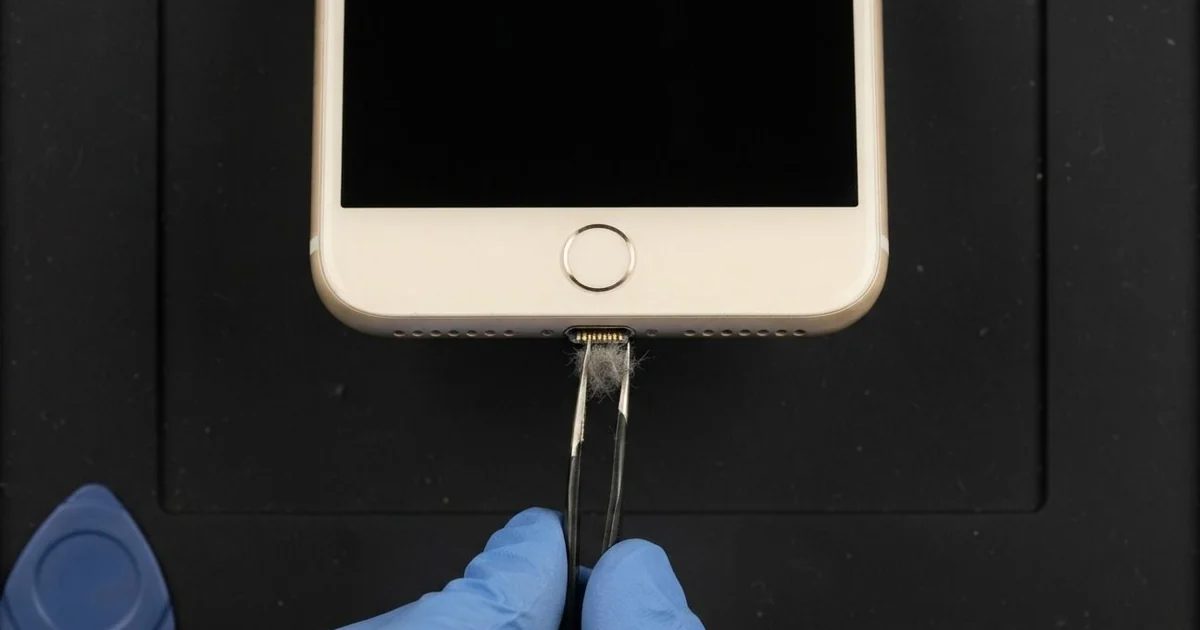
iPhone SE (3rd generation) Charging Port Repair in Al Khobar fixes loose, slow or failed charging. We check the Lightning port free, then clean it or fit a new port part. We test charging, the cable fit and the bottom microphone, and most jobs are done the same day.
Many people call this model the iPhone SE 2022. An iPhone SE 2022 not charging often begins with a cable that needs holding at an angle. If a wireless pad still charges it but the cable doesn't, the port is the likely problem.
It's better not to wait. A loose plug heats and burns the pins a little more each day, even when you barely notice it. The battery also keeps running flat, which wears it out much faster over time.
Many port faults need only a careful clean, because lint, dust and powder pack into the bottom. We lift it out with plastic tools while you wait, and often that is all the port needs.
Bent, burnt or rusted pins are different. The iPhone SE 2022 charging port sits on a thin cable with the bottom microphone. So we replace that whole part, and both charging and clear calls come back.
How Kabayan Center Repairs an iPhone SE (3rd generation) Charging Port
These are the charging faults we fix on this model.
- A cable that wobbles or falls out
- Charging only at one angle, or not at all
- Wireless charging that works while the cable doesn't
- Very slow charging with a good charger
- A message that the accessory is not supported
- A quiet or muffled voice on calls, from the shared microphone
Here is how an iPhone SE (3rd generation) charging port repair works with us, step by step.
- We look into the port under a magnifier and test it with our own cable.
- We tell you what it needs, and you decide before any work starts.
- We clean out lint, dust and powder with plastic tools, never metal.
- If the pins are damaged, we open the screen from the front, keeping the Home button cable safe.
- We disconnect the battery and lift out the parts that sit over the port cable.
- We fit the new port part and test charging, the cable fit and the microphone.
- We reseal the screen and let you test charging and the Home button yourself.
Have a different phone? Our charging port repair service covers other models with similar steps. Customers come to our shop on King Fahd Road from Dammam and Dhahran too.
Why an iPhone SE (3rd generation) Stops Charging: 3 Real Cases
Face powder and hair in a handbag
A customer came to us from a beauty salon nearby. The phone lived in a handbag all day, next to a powder case and a brush. "It charges for a second, then stops," the stylist said.
They had searched for iPhone Charging Port Repair in Al Khobar between appointments. Fine powder and loose hair get into a port easily. Each time the cable goes in, they press down into a hard layer.
Under the magnifier, the port was lined with pale powder and tangled hair at the bottom. The cable could only reach part of the way. We worked it out slowly with plastic tools, a little at a time.
Once it was clean, the cable clicked in firmly. The phone charged at full speed, and the pins looked bright and straight. That iPhone SE (3rd generation) charging port repair needed no new part.
We suggested keeping the phone in its own bag pocket, away from makeup. A quick look with a torch every few weeks catches the build-up early.
The stylist was relieved it was only a cleaning. It took a short time while they waited at the counter.
Salty air at a seaside flat
This one starts on a balcony facing the sea. A remote worker charged the phone every day at a desk by the open balcony door. The sea air there is damp and full of salt, especially on humid summer nights.
Over many months, the salt settled in the port and turned the pins green. "I clean the cable, but it still won't charge," the worker said.
We found green rust on several pins and a little more at the edge of the port cable. Cleaning could not save pins that badly eaten. So we did the iPhone SE (3rd generation) charging port repair, and charging came back strong.
But the rust had also crept near the battery connector, and the battery tested weak. A phone battery replacement would fix the short battery life.
The worker chose to wait on the battery for now. So charging works well, but the phone still runs down by evening. We cleaned the battery connector and noted it on the job card.
The desk has since moved further inside, away from the sea breeze. The phone now charges in a dry room with the door closed.
A SIM pin pushed into the port
We often see this in homes with curious children. A small child found the SIM tool and pushed it into the charging port. A parent noticed when the phone stopped charging that evening.
There was also a faint burnt smell near the bottom of the phone.
The parent had looked up mobile repair in Al Khobar, worried the phone was broken for good. A metal pin in the port can bend the contacts and touch two of them at once. That makes a short circuit the moment a cable goes in.
Under the magnifier, two pins were bent and one had a small burn mark. We did the iPhone SE (3rd generation) charging port repair, but the phone still didn't charge. The power meter showed the board taking no charge at all.
The short had also burnt a tiny protection part on the board. So we did a motherboard repair, replacing that part under the microscope.
After that, the phone charged normally and kept all its photos. The SIM tool now lives in a drawer, out of small hands. Never put anything metal into a charging port.
How to Keep Your iPhone SE (3rd generation) Charging Port Working
- Keep the phone in its own bag pocket, away from makeup and crumbs.
- Look into the port with a torch every few weeks.
- Never put a pin, needle or SIM tool into the port.
- Charge away from open windows and doors by the sea.
- Pull the cable out by the plug, never by the wire.
- Use a good cable that clicks in firmly.
- Get phone repair in Al Khobar as soon as charging needs a special angle.
Related services
- Water damage repair for a phone that got wet, even if it still charges
- Phone screen replacement for a cracked or dark screen
Questions about this repair
Ask us anything else on WhatsApp
we answer during shop hours.