iPhone SE (3rd generation) LCD Display Replacement in Al Khobar
iPhone SE (3rd generation) LCD Display Replacement in Al Khobar for cracked glass or a dark screen. It also fixes spots, lines and touch that stops working. We check it free, and you decide before any work starts.
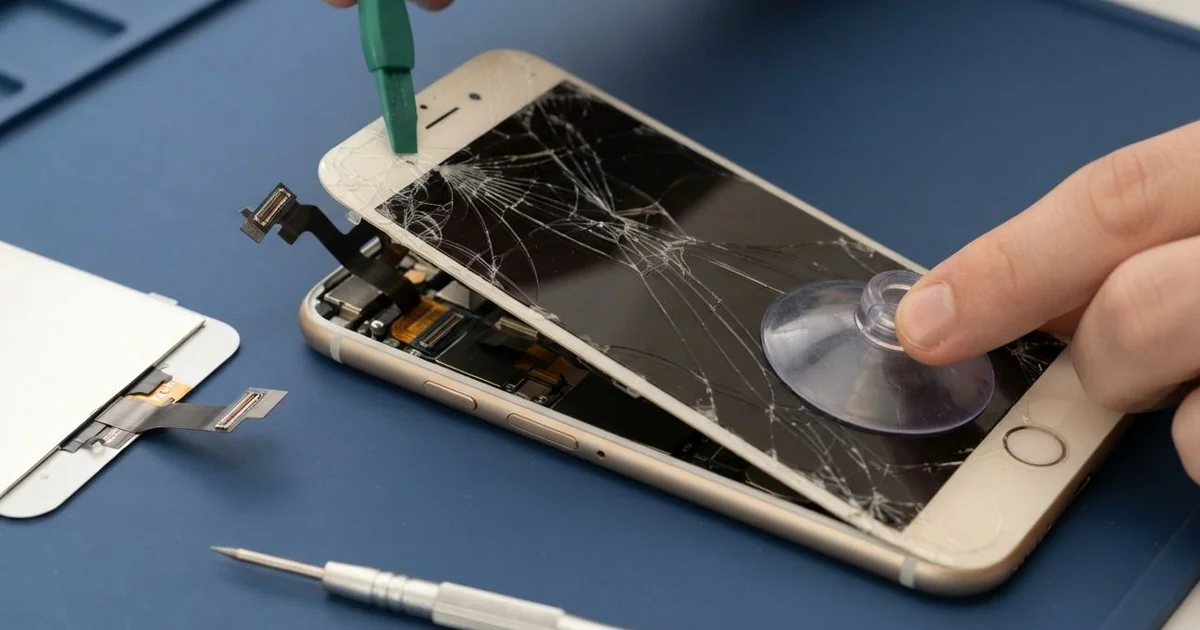
iPhone SE (3rd generation) LCD Display Replacement in Al Khobar fixes cracks, spots and dead touch. We check the phone free and fit a new screen, with the glass and display as one part. We move your own Home button across, test Touch ID and touch, and most jobs are done the same day.
Many people call this model the iPhone SE 2022. An iPhone SE 2022 broken screen usually cracks from a corner after a drop. Other times the glass is fine, but black or white spots spread, or part of the screen ignores your finger.
It's better not to wait. A crack lets dust, sweat and steam reach the display. Glass splinters can also cut your thumb near the Home button.
Some faults don't need a new screen. A loose screen cable after a knock can be refitted, and a thick protector can block touch at the edges. We check those first and tell you what we find.
Cracked glass and damaged displays need a new screen, with the glass and display as one part. An iPhone SE 2022 screen replacement fits that part, and we move your earpiece, front camera and Home button across. Only your phone's own Home button works for Touch ID, so we handle it with extra care.
How Kabayan Center Replaces an iPhone SE (3rd generation) LCD Display
These are the screen faults we fix on this model.
- Cracked or shattered front glass
- Black, white or rainbow spots on the display
- Lines, flicker or a yellow patch
- Touch that misses taps in one area
- A black screen while the phone still rings
- A screen lifting from the frame after a knock
Here is how an iPhone SE (3rd generation) LCD display replacement works with us, step by step.
- We check the phone free and test the Home button, Touch ID, cameras and sound.
- We tell you what it needs, and you decide before any work starts.
- We take out the two small screws at the bottom and warm the screen edges.
- We lift the screen with a suction cup, then disconnect the battery and the screen.
- We move the earpiece, front camera and Home button to the new screen.
- We test touch, brightness, the Home button and Touch ID before sealing.
- We fit a fresh seal, press the screen evenly and let you check the phone.
Have a different phone? Our phone screen replacement covers other models with the same care. Customers come to our shop on King Fahd Road from Dammam and Dhahran too.
How an iPhone SE (3rd generation) Screen Breaks: 3 Real Cases
Fell out of a shirt pocket
A customer came to us after bending down to tie a shoe at a bus stop. The small phone slid out of a shirt pocket and landed on the kerb. "It fits the pocket so well, I never thought it would fall," they said.
They had searched for iPhone Screen Replacement in Al Khobar while waiting for the bus. The glass had cracked from the top corner, and a black spot was spreading by the earpiece.
We did the iPhone SE (3rd generation) LCD display replacement and moved the earpiece, camera and Home button. Touch ID read the thumb on the first try. The black spot was gone, and the colours looked even again.
Then we checked the back. The glass back had cracked too, with a sharp edge near the camera. So we also did an iPhone back glass replacement, because broken back glass cuts fingers and lets dust in.
The phone went home looking new from both sides. We suggested a thin case with a raised edge.
A shirt pocket with a button also keeps the phone in place when you bend. Small phones slip out of open pockets more often than people think.
Crushed in a tool bag
We often see this with phones that ride in work bags. A maintenance technician kept the phone in a tool bag, next to a heavy spanner. One day the spanner shifted on a bumpy road and pressed hard on the screen.
"Half the screen is black, and the button doesn't work," the technician told us. The display had cracked under the glass, with black ink spreading from the middle.
The technician had looked up mobile repair in Al Khobar during a lunch break. We did the iPhone SE (3rd generation) LCD display replacement, and the picture and touch were clear again.
But the pressure had also torn the thin cable on the Home button. Touch ID only works with the phone's own button, so a new one can't read fingerprints.
We fitted a working replacement button so Home presses still work. Touch ID stays off, so the technician now unlocks with a passcode instead. It's not the full fix, but the phone is usable every day.
The phone now rides in its own padded pocket, away from tools. Keep heavy tools and keys away from your screen.
A cracked screen and shower steam
This one starts in a small bathroom. A student played music on the phone every morning in the shower. The screen had a small crack in one corner from an earlier drop.
Steam is just warm water in the air. It went in through the crack and settled under the display. After some weeks, a white haze spread across the screen, and touch started to jump.
"It looks foggy, like a window in winter," the student said. Wiping the glass did nothing, because the fog was inside.
We opened the phone and found water marks under the display and light rust near the screen connector. The moisture had reached the board too. So we did a water damage repair first, cleaning and drying the board.
After that, we did the iPhone SE (3rd generation) LCD display replacement and moved the Home button across. Touch ID, touch and the speakers all tested well. The haze was gone, and the screen looked sharp again.
The student now leaves the phone outside the bathroom and plays music from a small speaker. A crack in the glass also gets fixed early now, before steam can get in.
How to Keep Your iPhone SE (3rd generation) Screen Safe
- Use a case with a raised edge, so the glass doesn't hit the ground first.
- Keep the phone in a buttoned pocket or a bag, not an open shirt pocket.
- Keep tools, keys and coins away from the screen.
- Leave the phone outside the bathroom, away from steam.
- Fix small cracks early, before steam or sweat get in.
- Look after your Home button, since only that one works for Touch ID.
- Get phone repair in Al Khobar at the first black spot, because spots spread.
Related services
- Phone battery replacement for a phone that drains fast or swells
- Charging port repair for a phone that charges loosely or not at all
Questions about this repair
Ask us anything else on WhatsApp
we answer during shop hours.