iPhone SE (3rd generation) Motherboard Repair in Al Khobar
iPhone SE (3rd generation) Motherboard Repair in Al Khobar for a phone that won't power on. It also covers restarts, a frozen logo and lost signal. We check the board free, and you decide before any work starts.
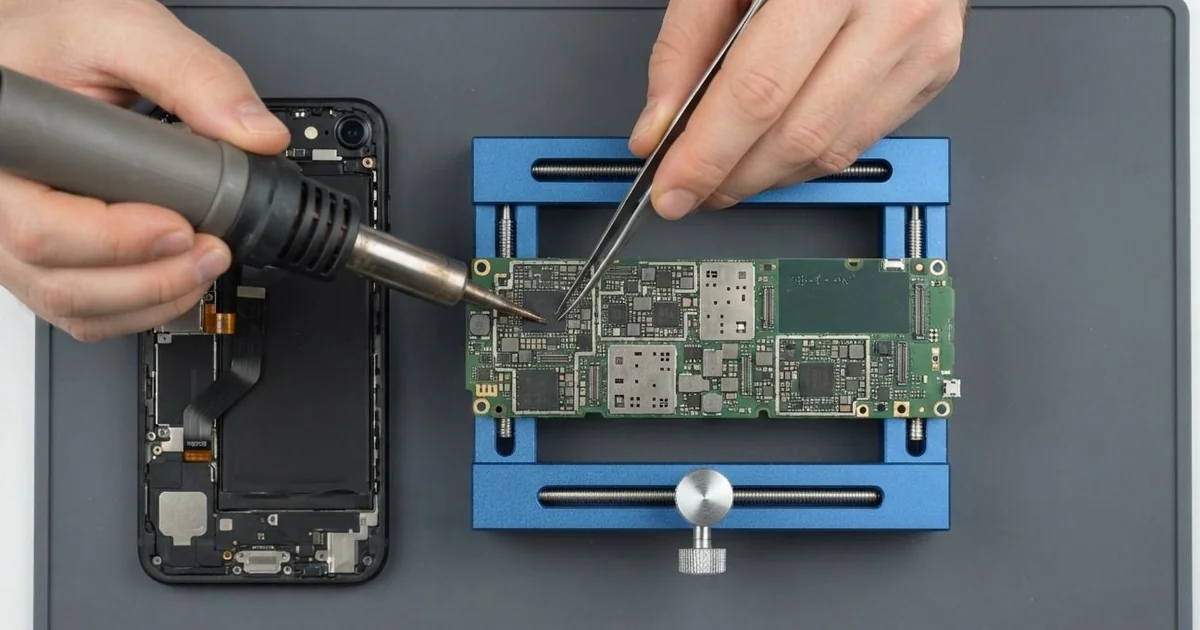
iPhone SE (3rd generation) Motherboard Repair in Al Khobar fixes no power, restarts and lost signal. We check the board free and find the failed part under a microscope. Then we replace that small part, not the whole board, and we keep your data whenever we can.
Many people call this phone the iPhone SE 2022. An iPhone SE 2022 not turning on stays dark, even on the charger, with a dead Home button. Other phones freeze on the logo, restart when you open the camera, or show no signal at all.
It's better not to wait. A short on the board makes heat, and that heat harms the healthy parts around it. Liquid or rust left inside keeps eating the board, so a small fault today grows bigger every day.
Not every dead phone has a board fault. A flat battery, a loose screen cable or a dirty port can look exactly the same. So we always test those first.
The iPhone SE 2022 motherboard is small and packed tight with tiny parts. Often only one of those parts has failed, and we replace just that one. The rest of the board, with all its healthy parts, is left exactly as it is.
How Kabayan Center Repairs an iPhone SE (3rd generation) Motherboard
These are the board faults we fix on this model.
- No power, no Home button response and no charging sign
- A logo that freezes, or a phone that restarts again and again
- No signal, or a SIM that is never found
- No charging, even with a good port and battery
- A phone that warms up while switched off
- Faults that start days after a spill
Here is how an iPhone SE (3rd generation) motherboard repair works with us, step by step.
- We check the phone free and test the battery, screen and port to rule them out.
- We connect a power meter that shows how the board takes power.
- We tell you what we found, and you decide before any work starts.
- We open the phone from the front, keeping the Home button cable safe, and take out the board.
- We find the failed part under a microscope, using the meter and gentle heat.
- We replace that part, or rejoin a cracked joint, with fine soldering tools.
- We rebuild the phone and test power, charging, signal, Touch ID and cameras with you.
Have a different phone or a laptop? Our motherboard repair service covers other devices too. Customers come to our shop on King Fahd Road from Dammam and Dhahran as well.
Why an iPhone SE (3rd generation) Board Fails: 3 Real Cases
Coffee spilled across an office desk
A customer came to us after a busy morning at work. An accountant knocked over a full cup of coffee, and the phone was lying right in the puddle. It was wiped dry and kept working, so the accountant forgot about it.
A few days later, the phone began restarting every time the camera opened. Then it stopped turning on at all. "It was fine for days, so why now?" the accountant asked.
The accountant had searched for iPhone Motherboard Repair in Al Khobar that evening. Coffee is sweet and sticky. It creeps in through the speaker holes and the port, then slowly eats the board.
We opened the phone and found brown marks and fresh rust near the power parts. We did a water damage repair, cleaning the board in a special bath. Then we did the iPhone SE (3rd generation) motherboard repair and replaced one burnt power part.
The phone turned on again and stayed on through a long test. All the work files and photos were still there.
We explained that a wiped phone can still be wet inside. A quick check after a spill is much easier than a board repair later.
A fall down the stairs
This one starts on a concrete staircase in a car park. A nurse dropped the phone at the top, and it bounced all the way down. "It showed the logo once, and that was it," the nurse said.
The nurse had looked up mobile repair in Al Khobar, mostly worried about family photos. A hard fall can crack joints under the main chips. The phone then can't finish starting up.
Under the microscope, we found cracked joints under a large chip and a small chip broken off nearby. We rejoined what we could and replaced the broken part. The phone started, but only for short periods before freezing.
Each time, it ran for a little while and then went dark again.
That was enough time to save the files. We saved the photos and contacts first, before any other work. We used our data recovery service and moved everything to a new phone.
The board was too badly cracked for the iPhone SE (3rd generation) motherboard repair to last. So the phone could not be saved, but the family photos were. The nurse now backs up the phone every week and uses a case with thick corners.
Bent in a tight pocket on long drives
We often see this with drivers who keep the phone in a front trouser pocket. A sales driver sat for long hours with the phone pressed against the leg. Over time, the thin frame bent very slightly.
Nobody noticed, because the screen and back looked perfect.
The phone started restarting whenever it was squeezed or pressed in the middle. "If I hold it tight, it reboots," the driver told us.
Bending flexes the board inside, again and again. In the end, a joint under one of the power chips cracked. Pressing the phone opened and closed that crack.
Under the microscope, we lifted the chip, cleaned the pads and fitted it again with fresh solder. The iPhone SE (3rd generation) motherboard repair worked, and the phone ran a long test without one restart. The slight bend in the frame stayed, so a firm case now stops it getting worse.
During testing, the battery health was very low and the battery was a little puffy. With the driver's go-ahead, we did a phone battery replacement too.
The phone now rides in a door holder, not a pocket. Nothing presses on it during long drives, and the frame has stayed straight.
How to Keep Your iPhone SE (3rd generation) Board Safe
- Bring the phone in after any spill, even if it seems fine.
- Never charge a phone that got wet, and don't trust rice to dry it.
- Use a case with thick corners for hard falls.
- Keep the phone out of tight front pockets on long drives.
- Use a good charger and cable, and avoid unbranded fast chargers.
- Back up your photos every week, so a board fault never costs you your files.
- Get phone repair in Al Khobar as soon as the phone restarts by itself.
Related services
- Charging port repair for a cable that is loose or only charges at an angle
Questions about this repair
Ask us anything else on WhatsApp
we answer during shop hours.