iPhone XR LCD Display Replacement in Al Khobar
iPhone XR LCD Display Replacement in Al Khobar for cracked glass, a black display or dead touch. The check is free, and we tell you what the phone needs. Nothing starts until you say yes, and your photos stay on the phone.
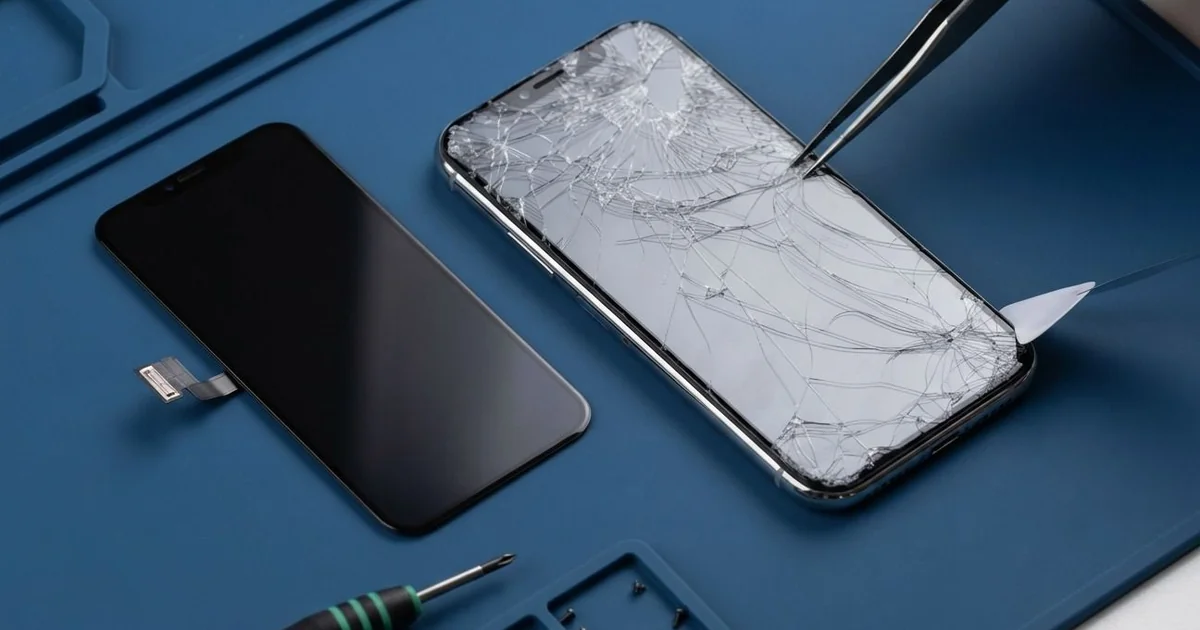
iPhone XR LCD Display Replacement in Al Khobar fixes a screen that is cracked, lined or dead to touch. After a free check, we fit a complete new screen, with the glass and display in one part. We move the earpiece and sensor strip, test Face ID and touch, and most jobs are done the same day.
An iPhone XR broken screen rarely looks the same twice. Some phones get a web of cracks from one corner. Others look whole but show green lines, a black patch or no picture at all.
Waiting tends to make it worse. Loose glass chips cut thumbs and catch on pockets. A cracked screen also stops sealing the phone well, so sweat, dust and water find a way in.
Some faults don't need a new screen at all. A display cable can work loose after a drop and leave the screen black, and we simply refit it. A thick glass protector can also block touch at the edges, so we test without it first.
Cracked glass, lines and dead patches need the new part. The XR uses an LCD screen with the glass bonded on top, so the glass can't be changed alone. An iPhone XR screen replacement swaps the whole front screen and fixes all of these together.
How Kabayan Center Replaces an iPhone XR LCD Display
These are the screen faults we fix on the XR.
- Cracked or shattered front glass
- Green or white lines, or a flickering picture
- A black screen while the phone still rings
- Dead touch in one area, or ghost taps that open apps
- A screen lifting away from the frame at one edge
- Patchy, uneven light after heat or a hard knock
This is how an iPhone XR LCD display replacement goes on our bench:
- We check the phone free and test sound, cameras, charging and Face ID first.
- We explain what it needs, and you decide before any work starts.
- We remove the two small screws at the bottom edge and warm the screen to soften the seal.
- We lift the screen from the bottom, open it to the side like a book and disconnect the battery.
- We move the earpiece and the sensor strip at the top to the new screen, so Face ID and calls keep working.
- We connect the new screen and test touch, colour, brightness and the front camera.
- We fit a new seal, press the screen down evenly and hand the phone to you to check.
Own a different model? Our phone screen replacement service covers it with much the same care. Customers drive to our shop on King Fahd Road from Dammam and Dhahran as well.
How an iPhone XR Screen Gets Damaged: 3 Real Cases
Knocked off a kitchen counter onto tiles
One evening a cook brought in a phone that had slid off a wet counter. It hit the kitchen tiles corner first. "The top half works, the bottom half doesn't," the cook said.
The cook had searched for iPhone Screen Replacement in Al Khobar on a second phone that night. Corner drops on tiles are hard on this model. The force runs through the glass and into the display layer behind it.
We tested touch with a simple drawing app. Nothing responded below a line near the keyboard area. The display cable was seated well, so the screen itself had failed.
We did the iPhone XR LCD display replacement and moved the earpiece and sensor strip across. Then we turned the phone over for the final check.
The glass back had cracked in the same fall, with a sharp split beside the camera. So we also did an iPhone back glass replacement, since loose glass there cuts hands and lets dust in.
Both sides went home smooth and whole. The cook now keeps the phone on a shelf above the counter while working.
A low-cost screen from an earlier repair
This case began with a repair done somewhere else. A taxi driver had a low-cost screen fitted after an earlier crack. Within weeks, the colours looked washed out and touch began to lag.
"It feels like typing through a glove," the driver told us. The driver had looked up mobile repair in Al Khobar between fares, hoping for a quick fix.
When we opened the phone, the screen was a thin copy with a weak touch layer. Worse, the sensor strip at the top had been torn during that earlier job. That strip helps run Face ID, and a torn one usually can't be brought back.
We did the iPhone XR LCD display replacement, and touch and colour were right again at once. Face ID stayed off, because the torn strip could not be saved.
The driver now unlocks the phone with a passcode. We explained this before starting, so there were no surprises at the counter.
It's a good reason to ask any shop how they handle the top sensor strip. On this model, that small part matters as much as the screen.
Left on the dashboard at midday
Summer brings this case to us often. A sales rep left the phone on the dashboard during a long lunch meeting. Back in the car, the screen showed a dark, cloudy patch in the middle.
An LCD screen doesn't like strong heat. Inside a parked car, the dashboard gets far hotter than the air outside. That heat can damage the light layers behind the glass and leave a lasting stain.
The rep hoped the patch would fade once the phone cooled down. Restarting it made no difference. It was still there days later, so the phone came to us.
When we opened it, the battery had also puffed up slightly from the same heat. A swollen battery is not safe to keep using. We did the iPhone XR LCD display replacement and also did a phone battery replacement in the same visit.
The picture came back clear and even, and the screen now sits flat in the frame. The rep keeps the phone in a vent mount now, right in the cool air from the AC. We also suggested a sunshade for the windscreen on long stops.
How to Keep Your iPhone XR Screen Safe
- Use a case with a raised lip, so the glass never meets the floor first.
- Pick a thin, well-fitted screen protector, so touch still works near the edges.
- Keep the phone off the dashboard and out of direct sun in the car.
- Fix small cracks early, before sweat and dust get inside.
- Ask how the top sensor strip is handled before any screen repair, to protect Face ID.
- Back up your photos while the screen still works.
- Get phone repair in Al Khobar at the first dark patch or line, as both tend to spread.
Related services
- Water damage repair for a phone that got wet through a cracked screen
- Charging port repair for a cable that is loose or charges only at an angle
Questions about this repair
Ask us anything else on WhatsApp
we answer during shop hours.