iPhone XR Motherboard Repair in Al Khobar
iPhone XR Motherboard Repair in Al Khobar for a phone that won't start, keeps restarting or has no signal. The board check is free. You decide before any work starts, and we never wipe your data without asking.
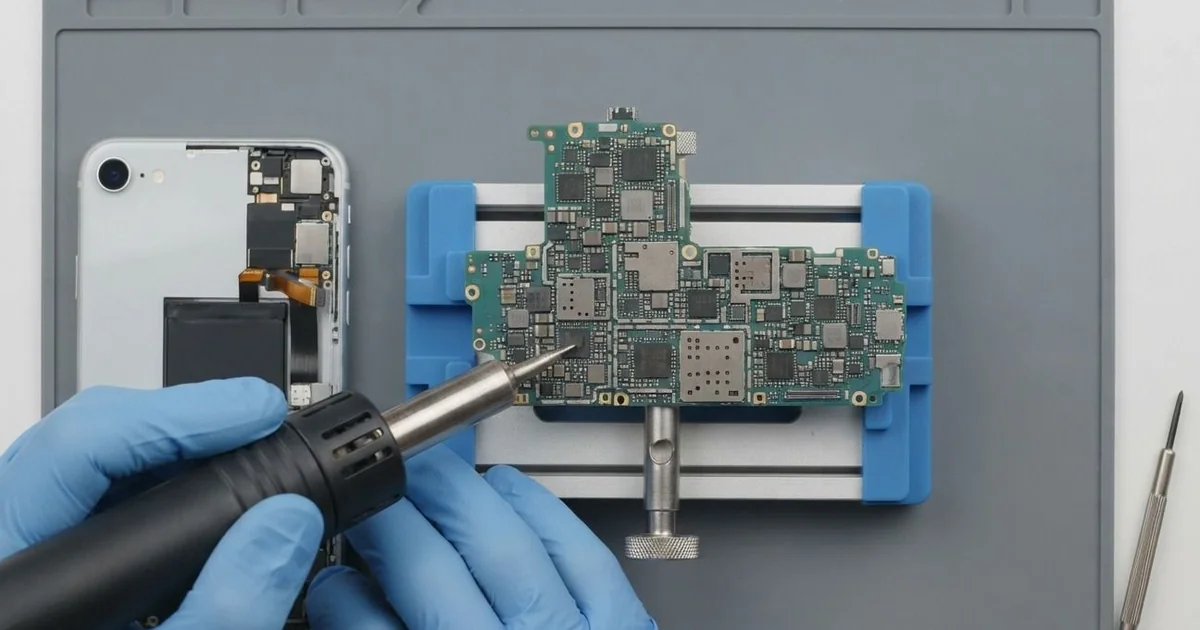
iPhone XR Motherboard Repair in Al Khobar fixes a phone that is dead, stuck on the logo or without signal. We test the board free and trace the fault under a microscope. Then we replace the small failed part, not the whole board, and save your data wherever we can.
An iPhone XR not turning on is the sign we see most. The screen stays black on the charger, with no logo and no buzz. Other phones loop on the logo, run hot while switched off or show No Service all day.
It's better not to wait. A short on the board can heat the parts around it, and water left inside keeps eating away. A small fault today can grow into one that can't be fixed.
Not every dead phone has a board fault. A flat battery, a loose screen cable or a bad port can look exactly the same. We test those first, so you never pay for board work you don't need.
When it is the board, we look closer. The iPhone XR motherboard is two thin boards stacked and joined together, packed with tiny parts. Often one small chip or part has failed, and we replace only that.
How Kabayan Center Repairs an iPhone XR Motherboard
These are the board faults we fix on the XR.
- No power, no logo and no buzz
- Restarting on the logo again and again
- No Service, or a signal that drops after a fall
- Wi-Fi or Bluetooth that won't switch on
- No charging, even with a good port and battery
- Heat from the phone while it's switched off
Here is how an iPhone XR motherboard repair works, step by step.
- We check the phone free and rule out the battery, screen and port with known good parts.
- We connect a power meter to see how much current the board draws.
- We explain what we found, and you decide before any work starts.
- We open the screen from the front, disconnect the battery and lift the board out.
- We trace the fault under a microscope, using the meter and a little heat.
- We replace the failed part with a hot-air tool and a fine soldering tip.
- We rebuild the phone and test power, charging, signal, Wi-Fi and the cameras.
Got another phone or a laptop with a board fault? Our motherboard repair service handles those too. Customers bring jobs to our shop on King Fahd Road from Dammam and Dhahran.
What Damages an iPhone XR Board: 3 Real Cases
Steam from long, hot showers
We often see this one with phones that play music in the bathroom. A gym trainer kept the phone on the sink shelf during long, hot showers. First the Wi-Fi switch went grey, then one morning the phone wouldn't start.
"It never fell in water, not once," the trainer said. The trainer had searched for iPhone Motherboard Repair in Al Khobar after a reset didn't help.
Steam is water too. It settles inside the phone and forms drops on the cool board, day after day. Slowly it leaves rust around the smallest parts.
Under the microscope, we found green spots near the Wi-Fi area and around one power part. The rust was still light, because it was caught fairly early. We did a water damage repair, cleaning the board in a special bath first.
Then we did the iPhone XR motherboard repair, replacing the rusted power part and a tiny filter. The phone started, and Wi-Fi switched on again in Settings.
All the photos and chats were still there. The trainer now leaves the phone outside the bathroom and plays music from a small speaker.
Bent in a back pocket, then stuck on the logo
A customer came to us after sitting down in a low car seat with the phone in a back pocket. There was a soft crack sound. From then on, the phone looped on the logo and never reached the lock screen.
Bending stresses the board, even inside a metal frame. The tiny solder balls under the chips can crack loose. On the XR, the main chips sit between the two stacked layers, so they take that strain.
We separated the board layers and checked the joints under the microscope. Several were cracked under the chip that stores the data. We reworked them, and the phone reached the lock screen, but it froze within minutes.
The photos mattered most, so we saved them first. Through our data recovery service, we copied the photos, contacts and chats while the phone stayed on.
This iPhone XR motherboard repair could not make the board stable for daily use. The customer moved everything to a new phone soon after.
We suggested a front pocket or a bag from now on. A slightly bent frame is often the first warning sign.
Bounced down marble stairs, then no signal
This one starts on marble stairs in an office building. A receptionist dropped the phone, and it bounced down several steps. It still worked, but the top corner said No Service all the time.
"I can use Wi-Fi, but nobody can call me," the receptionist said. They had looked up mobile repair in Al Khobar, sure it was the SIM card.
We tried a new SIM first, and it made no difference. A hard knock can loosen a tiny antenna cable or crack a part in the signal area. Both stop the phone from reaching the network.
Inside, one small antenna cable had popped off, and its socket was bent. We straightened the socket under the microscope and fitted a new cable. After the iPhone XR motherboard repair, the signal bars came straight back.
During the test, the phone also shut down on the camera at half charge. Its battery health was low, so we did a phone battery replacement in the same visit.
The phone now holds its signal and lasts the whole day. A case with thick corners would soften the next fall on those stairs.
How to Keep Your iPhone XR Board Healthy
- Keep the phone out of the bathroom while you shower.
- Carry it in a front pocket or a bag, never a back pocket.
- Use a case with thick corners to soften hard drops.
- Never charge a phone that got wet, and skip the rice. Bring it in quickly instead.
- Use a good charger and cable, and avoid unknown no-name chargers.
- Back up your photos and chats every week.
- Get phone repair in Al Khobar as soon as the phone restarts by itself or runs hot while off.
Related services
- Charging port repair for a cable that is loose or charges only at an angle
Questions about this repair
Ask us anything else on WhatsApp
we answer during shop hours.