iPhone XS Charging Port Repair in Al Khobar
iPhone XS Charging Port Repair in Al Khobar for a plug that falls out or a phone that won't charge. We check the port free and tell you what it needs. You decide before any work starts, and your data stays untouched.
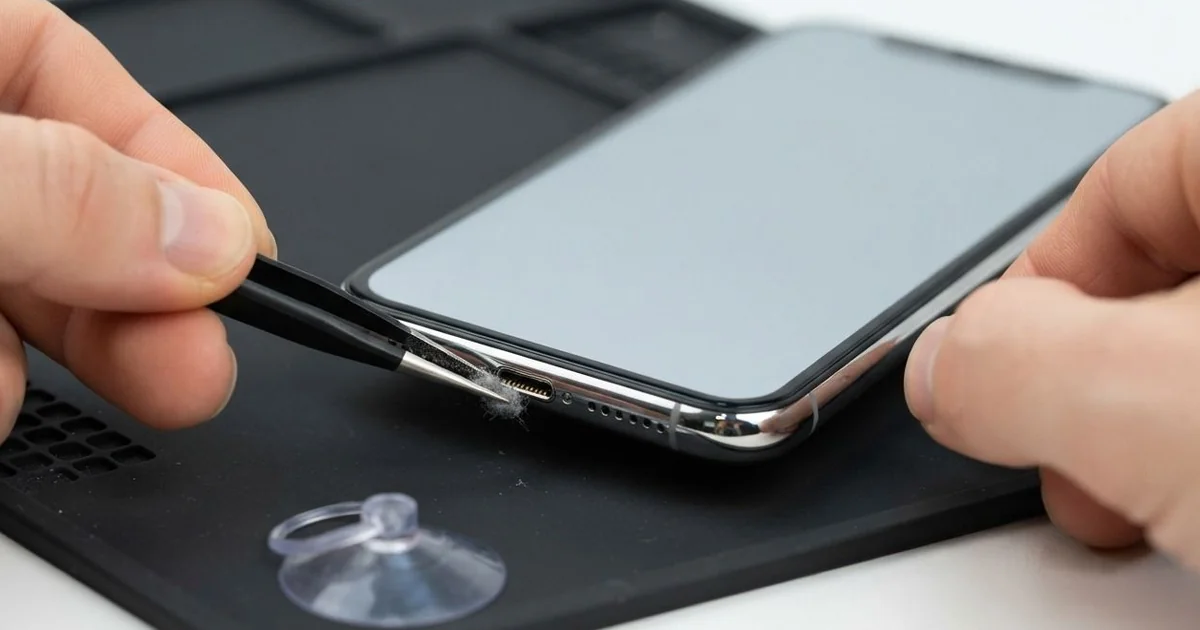
iPhone XS Charging Port Repair in Al Khobar fixes a phone that charges loosely, slowly or not at all. We check the Lightning port free, then clean it or fit a new port cable. We test charging, the plug fit and the bottom mics, and most jobs are done the same day.
An iPhone XS not charging usually shows clear signs. The plug feels loose or falls out with a small knock. Sometimes the phone warns that liquid is in the port, even when it has been dry for days.
The phone can also charge on a wireless pad, and that gives a quick test. If the pad works but the cable doesn't, the battery is fine and the fault is in the port. A new cable from the shop rarely changes that.
It's better not to wait. A loose plug makes small sparks that burn the pins, and rust spreads quickly in humid air. The battery also wears out faster when it keeps running flat.
Many port faults need only a careful clean with fine plastic tools. Lint and dust come out, and the plug clicks in again. When pins are bent, burnt or rusted, we replace the iPhone XS charging port cable.
How Kabayan Center Repairs an iPhone XS Charging Port
We fix these charging faults on the iPhone XS.
- A plug that is loose or falls out
- No charging on the cable, while a wireless pad works
- A liquid warning that won't go away
- Slow charging or charging that keeps stopping
- Muffled calls, because the bottom mics sit on the port cable
- Bent, dark or crusty pins
This is how an iPhone XS charging port repair goes on our bench.
- We check the port under a lamp and test it with our own cable and pad.
- We tell you what it needs, and you decide before any work starts.
- We clean out lint and dust with plastic tools, never metal ones.
- If the port is damaged, we open the screen from the front and disconnect the battery.
- We remove the loudspeaker and the small parts covering the port cable.
- We fit the new port cable and test charging, the plug fit and the mics.
- We close the phone with a fresh seal and let you check it yourself.
Got another phone that won't charge? Our charging port repair service covers most other models. Our shop is on King Fahd Road, and we see customers from Dammam and Dhahran too.
Why an iPhone XS Stops Charging: 3 Real Cases
Knocked off a desk while plugged in
One afternoon a phone came in from an accountant with a plug that hung at an angle. The phone had been charging on the edge of a busy desk. An elbow knocked it off, and it landed on the plug.
"Now the cable won't stay in at all," the accountant said. They had searched for iPhone Charging Port Repair in Al Khobar that same afternoon.
When a phone falls on its plug, the plug works like a lever. It can bend the port and crack its cable inside the phone. A new cable won't help, because the damage is in the port itself.
We checked it on our wireless pad, and it charged fine. That told us the battery and the board were healthy. Under the lamp, the port was bent slightly to one side.
We opened the phone and did the iPhone XS charging port repair. The plug went in straight and clicked firmly. Both mics worked well on a test call.
We suggested charging the phone flat in the middle of the desk. A short cable and a small stand also keep the plug clear of elbows.
Sweat and humid air on outdoor shifts
This one starts with long outdoor shifts in the humid summer months. A site inspector kept the phone in a trouser pocket all day. By evening, the phone was warm and damp with sweat.
One day the phone began warning about liquid in the port every time it was plugged in. The inspector had looked up mobile repair in Al Khobar when the warning would not stop. Sweat is salty, and in a warm pocket it slowly rusts the pins.
We found a green crust on the pins and on the board just behind them. So we did a water damage repair, cleaning the board in a special bath.
Then we did the iPhone XS charging port repair, and the warning was gone. Charging came back strong. But the salt had also reached the bottom speaker, and it now sounds a little quiet.
The inspector chose to keep the speaker for now, since calls through the earpiece were clear. We noted it on the job card.
Now the phone rides in a chest pocket with a thin pouch. It stays drier there on the hottest days.
A hairpin used to clean the port
We often see this after a home cleaning goes wrong. A customer tried to dig lint out of the port with a hairpin.
The tip snapped off and stuck inside. "I only wanted to clean it," the customer told us, a little embarrassed.
The customer then plugged in a cable to check it. There was a small pop, and the phone went dead on the cable. The iPhone XS not charging was now a much bigger problem.
Metal inside the port can touch several pins at once. That causes a short, and power goes where it shouldn't. We pulled out the broken tip and found two pins burnt black.
We did the iPhone XS charging port repair, but the phone still would not charge on a cable. So we moved on to a motherboard repair and found a burnt part near the port connector. We replaced it with a fine soldering tip.
After that, the phone charged at full speed again, and both mics passed the test call. Never clean a port with metal of any kind. A torch to look and a quick visit are much safer.
How to Keep Your iPhone XS Charging Port Working
- Never put a pin, a needle or a hairpin into the port.
- Charge the phone flat, away from desk edges and busy elbows.
- Keep the phone in a dry pocket or pouch on hot, sweaty days.
- Unplug and wait if the phone warns about liquid in the port.
- Pull the plug out by its head, never by the wire.
- Look into the port with a torch every few weeks.
- Book phone repair in Al Khobar as soon as the plug feels loose.
Related services
- Phone battery replacement for a phone that drains fast after months of running flat
- Phone screen replacement for a cracked or dark screen
Questions about this repair
Ask us anything else on WhatsApp
we answer during shop hours.