iPhone XS Max LCD Display Replacement in Al Khobar
iPhone XS Max LCD Display Replacement in Al Khobar for a cracked or blank large screen. We check your phone free and tell you what it needs. You decide before any work starts, and your photos and chats stay on the phone.
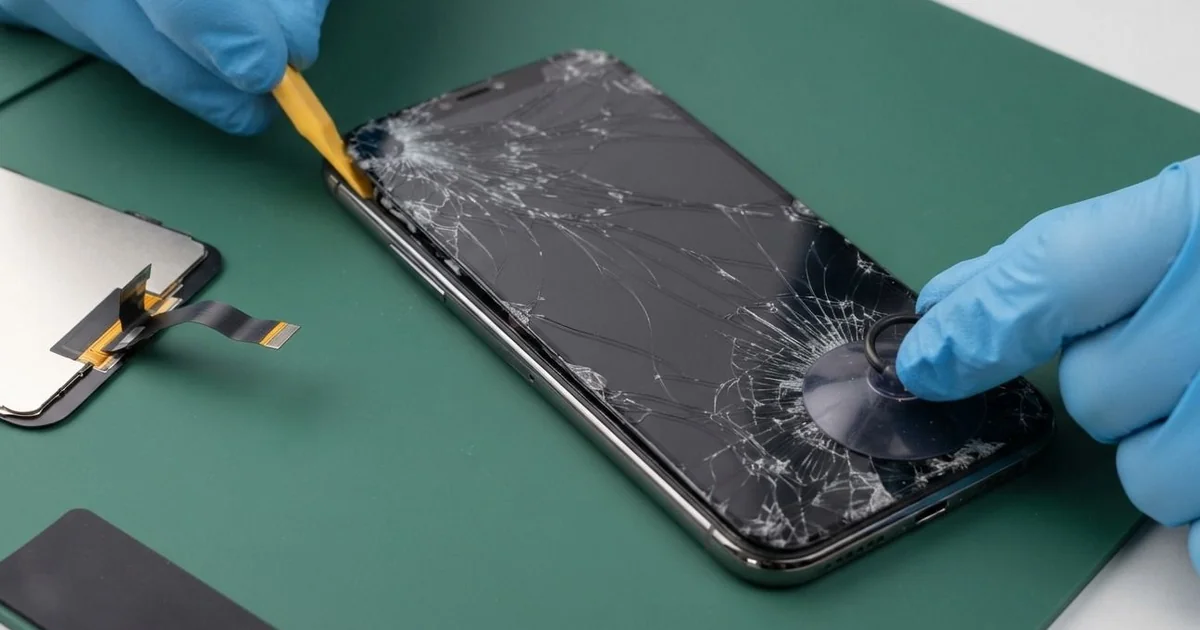
iPhone XS Max LCD Display Replacement in Al Khobar fixes a cracked, dark or striped screen on this big phone. We check it free, then fit a complete new screen with the glass and display as one part. We move the sensor cable so Face ID works, and most jobs are done the same day.
An iPhone XS Max broken screen is hard to ignore on such a big display. The crack often starts at a corner and runs right across. Some screens show a green line or a black patch, while others stop answering your touch.
It's better not to wait. A large cracked screen sheds tiny glass splinters, and they catch on your thumb as you scroll. This is an OLED screen, so dark patches tend to grow, and cracks let in sweat and steam.
Some faults need no new part. After a fall, the screen cable can work loose, and refitting it brings the picture back. A lifted protector can also block touch in one strip.
True cracks, lines and dark areas need an iPhone XS Max screen replacement. The glass and display are joined here, so we change them as one. The earpiece and its sensor cable move across, since Face ID depends on them.
How Kabayan Center Replaces an iPhone XS Max LCD Display
We fix these screen faults on the iPhone XS Max.
- Cracked glass running across the large screen
- A green or pink line, or a flickering picture
- Black patches, or a dark screen while sound still works
- Touch that dies in one strip or taps on its own
- A screen bent or lifted from the frame
- A dull, low-grade screen from an earlier repair
On this phone, an iPhone XS Max LCD display replacement goes step by step.
- We check the phone free and test Face ID, cameras, sound and charging first.
- We tell you what it needs, and you decide before any work starts.
- We remove the two tiny screws by the Lightning port and warm the long edges.
- We lift the screen with a suction cup and a thin pick, then disconnect the battery.
- We move the earpiece and its sensor cable to the new screen.
- We connect the new screen and test touch, colour, brightness and Face ID.
- We fit a fresh seal, press the screen evenly and let you check the phone yourself.
Have a different phone? Our phone screen replacement service covers most other models. Our shop is on King Fahd Road, and many customers come from Dammam and Dhahran.
How an iPhone XS Max Screen Breaks: 3 Real Cases
Slipped from a shirt pocket at the supermarket
A shopper came to us after bending down to reach a low shelf. The big phone slid out of a shirt pocket and hit the tiled floor face first. "It still rings, but I can't see anything," the shopper said.
They had searched for iPhone Screen Replacement in Al Khobar on the way home. A large phone in a shirt pocket tips out easily when you bend. Tiles give no softness at all, so the display takes the full blow.
We opened it and found the display cracked under a wide black area. We did the iPhone XS Max LCD display replacement and moved the sensor cable across. Face ID worked at once.
Then we turned the phone over for the final check. The glass back had cracked across the middle too, with sharp bits near the camera. So we also did an iPhone back glass replacement.
The phone went home whole on both sides. We suggested a trouser pocket or a bag for shopping trips.
A case with a good grip makes a big phone less likely to slide, too. The shopper picked one with textured sides before leaving.
Bent in a tight back pocket
We often see this with big phones in slim jeans. An office worker kept the phone in a back pocket and sat in the car every day.
One morning, a crack appeared from the middle of one side. "I never dropped it, not once," the worker told us.
The worker had looked up mobile repair in Al Khobar, sure the phone had just worn out. A large, thin phone flexes a little each time you sit on it. Over weeks, that bending cracks the glass and the display beneath.
We found a long crack and a thin line on the display. We did the iPhone XS Max LCD display replacement, and the picture was clear and even again.
During the charging test, the plug would not click in fully. Pocket lint had packed the bottom of the port into a hard layer. So we did a charging port repair, picking it out with plastic tools.
The plug now clicks in firmly, and charging is steady again on the first try. The worker now keeps the phone in a front pocket or on the car mount.
Steam and a splash while cooking
This one starts in a busy kitchen. A home cook kept the phone propped beside the stove for recipes.
The screen already had a small crack near the top. It had been there for weeks, and it seemed harmless.
One evening, a pot boiled over and hot water splashed across the phone. Within minutes, the iPhone XS Max broken screen began tapping by itself.
Steam and hot water had pushed in through the crack. We opened the phone and found water marks under the display and a white crust near the earpiece. So we did a water damage repair on the board first.
Then we did the iPhone XS Max LCD display replacement and moved the sensor cable. Touch was steady again, with no more ghost taps or random typing. Face ID worked well.
But the earpiece mesh had rusted, and calls now sound a little muffled. A new earpiece would fix that, but the cook chose to wait for now.
We noted the earpiece on the job card, so it is quick to sort out later. The phone now sits on a stand across the room from the stove.
How to Keep Your iPhone XS Max Screen Safe
- Use a case with a good grip and a raised lip.
- Keep the phone out of shirt pockets and tight back pockets.
- Keep it away from the stove, the sink and boiling pots.
- Fix small cracks quickly, before steam or water get in.
- Change a lifted screen protector straight away.
- Back up your photos while the screen still works.
- Bring it for phone repair in Al Khobar at the first line or dark patch.
Related services
- Phone battery replacement for a phone that drains fast or lifts its screen
Questions about this repair
Ask us anything else on WhatsApp
we answer during shop hours.