Samsung Galaxy S10 5G Charging Port Repair in Al Khobar
Samsung Galaxy S10 5G Charging Port Repair in Al Khobar for a phone that charges loosely or not at all. We check your phone free and tell you what it needs. You decide before any work starts, and nothing on the phone gets deleted.
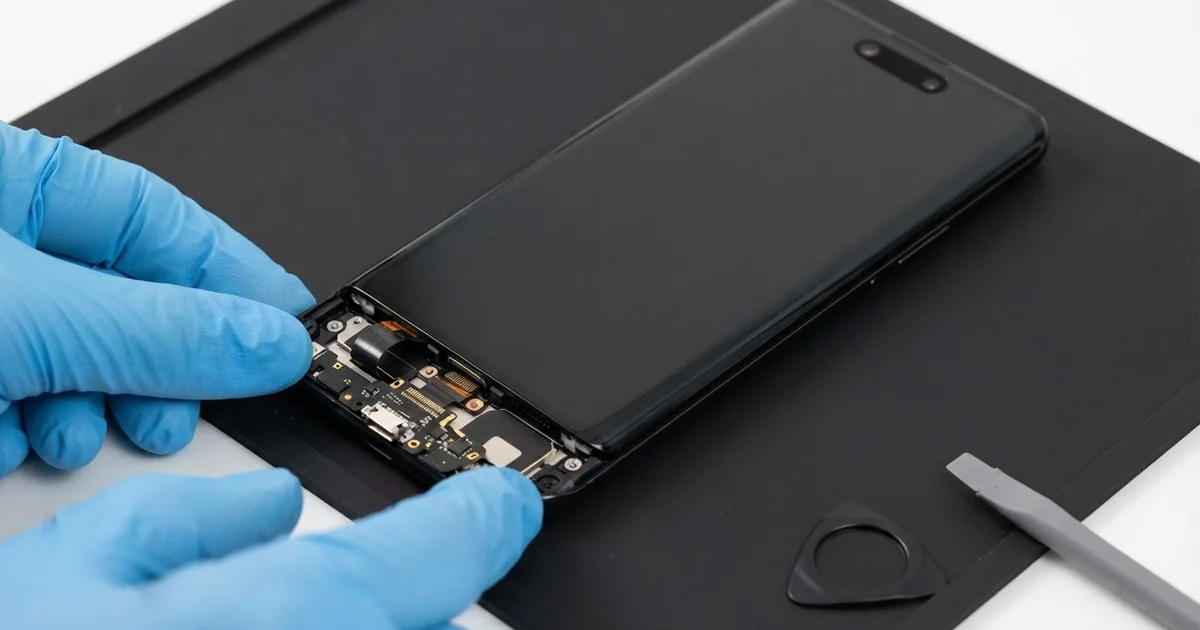
Samsung Galaxy S10 5G Charging Port Repair in Al Khobar fixes a phone that won't charge properly. We check it free, then clean the port or fit a new one. We test charging, fast charging and data, and most jobs are done the same day.
A Samsung S10 5G not charging shows up in a few ways. The cable feels loose and slips out easily, or charging keeps starting and stopping. Some phones show a water drop warning and refuse to charge, even when they look completely dry.
It's better not to wait. A loose plug sparks a little each time it connects, and that slowly burns the pins. Dirt and moisture inside also turn to rust, which can spread to the main board over time.
Not every fault needs a new part. Lint from pockets often packs into the port, so the plug can't go all the way in. We clean that out gently, and the phone charges normally again.
A worn, bent or rusted port is different. The Samsung S10 5G charging port sits on a small board at the bottom of the phone. We can replace that small board alone, so the main board stays untouched and safe.
How Kabayan Center Repairs a Samsung Galaxy S10 5G Charging Port
We fix these charging faults on this phone.
- A cable that feels loose or falls out
- Charging that works only at a certain angle
- A moisture warning that won't clear, even when the port is dry
- Slow charging, or fast charging that has stopped working
- A computer that doesn't see the phone over the cable
- Green or white crust inside the port
Here is how the repair works with us, step by step:
- We check the phone free with our own cable, and look inside the port under a magnifier.
- We tell you what it needs, and you decide before any work starts.
- We clear out lint and dirt with soft tools and dry the port carefully.
- If the port is worn or rusted, we warm the back glass, lift it and disconnect the battery.
- We replace the small charging board and check the thin cable that links it to the main board.
- We seal the back and test cable charging, fast charging, data and wireless charging.
- You check the phone yourself before you take it home.
Own a different model? Our charging port repair service covers other phones and laptops, with much the same steps. Customers come to our shop on King Fahd Road from Dammam and Dhahran too.
Why a Galaxy S10 5G Stops Charging: 3 Real Cases
Steam from a gym bag next to the showers
A customer came to us after a morning at the gym. The phone had sat in a bag beside a wet towel, near the showers. Then it refused to charge and showed a small water drop on the screen.
"It says moisture, but it looks completely dry," they told us. Steam gets into the tiny port and settles on the pins. The phone senses it and blocks charging to protect itself.
That warning is a safety feature, not a fault. The customer had tried blowing into the port and pushing the cable in harder. Blowing adds more moisture, and forcing the plug can bend the pins.
We looked inside and found damp lint pressed at the back of the port. We dried it slowly and lifted the lint out with soft tools. The pins were clean and straight, with no sign of rust.
The warning cleared, and the phone charged at full speed again. No new part was needed this time.
Now the phone rides in a side pocket of the bag, away from the wet towel. The customer also lets the phone cool before charging after a workout.
A car mount with the cable pulling down
We often see this with drivers who charge in the car all day. A taxi driver kept the phone in a mount on the air vent. The cable hung down and pulled on the port with every bump in the road.
Over time, that weight wore the port loose from the inside. "I have to hold the cable up with my finger," the driver said. The phone charged only at one angle, and it dropped the charge on rough roads.
The driver found us by searching Samsung Charging Port Repair in Al Khobar during a break between rides. Under the magnifier, the port was wide and worn at the edges. Cleaning would not help, so we replaced the charging board.
During the tests, the battery also drained far too fast. Months of charging in a hot car had worn it out, so we did a phone battery replacement as well.
The plug now clicks in firmly and charges at full speed. We suggested a short cable with an angled end, so it doesn't pull down on the port. The driver now fits the phone in the mount with the cable resting on the dash.
Months of wireless charging to avoid a loose port
This one starts on a construction site in the summer heat. A site supervisor noticed the cable charging getting weak. Instead of fixing it, the supervisor switched to a wireless charging pad and forgot about the port.
All that time, the phone rode in a sweaty shirt pocket. Sweat is salty, and it slowly ate into the open port. When wireless charging also turned slow, the supervisor finally looked up mobile repair in Al Khobar.
We found green crust packed inside the port. Sweat and water left in a port keep eating the metal, even when you don't use it. We replaced the charging board, but the crust had also reached a small part on the main board.
We cleaned it and did a motherboard repair on that one spot. After that, cable and wireless charging both worked well again.
The bottom speaker sits right beside the port, though, and it stayed quiet and muffled. The supervisor chose to leave the speaker for now, and uses the earpiece for calls. The phone now lives in a closed chest pocket with a zip, away from sweat.
How to Keep Your Galaxy S10 5G Charging Port Healthy
- Clean the port gently with a wooden toothpick, never a metal pin.
- Keep the phone out of sweaty pockets and wet gym bags.
- Don't charge while the moisture warning shows. Let the phone dry first.
- Push the plug in straight, and pull it out by the plug, not the cable.
- Use a short cable in the car, so its weight doesn't hang on the port.
- Use a proper charger and cable that fit firmly.
- Bring it for phone repair in Al Khobar as soon as the cable feels loose.
Related services
- Water damage repair for a phone that fell in water or stays wet inside
- Phone screen replacement for cracked glass, lines or a dead touch
Questions about this repair
Ask us anything else on WhatsApp
we answer during shop hours.