Samsung Galaxy S10 Motherboard Repair in Al Khobar
Samsung Galaxy S10 Motherboard Repair in Al Khobar for a phone that is dead, stuck restarting or without signal. We check it free and tell you what it needs. If we cannot fix it, you pay nothing.
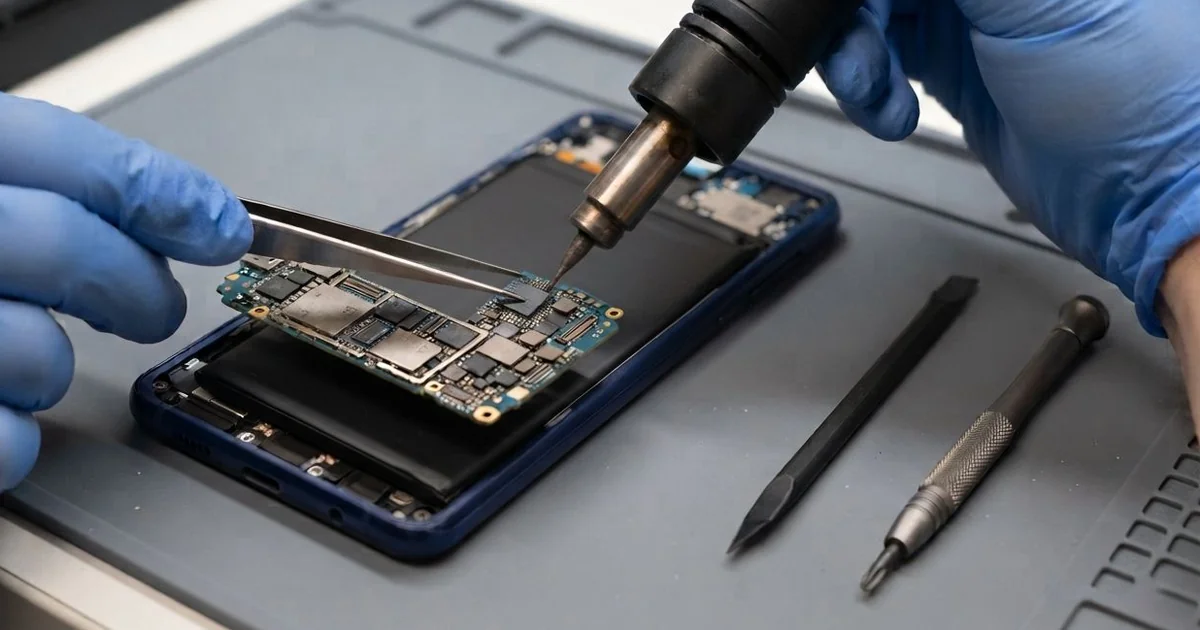
Samsung Galaxy S10 Motherboard Repair in Al Khobar fixes a phone that won't turn on, keeps restarting or loses signal. We check the board free and find the faulty part. We repair it, then test power, charging and signal, and many jobs are done the same day.
A board fault can look like many things. Often it's a Samsung S10 not turning on at all, even on the charger. Other phones restart again and again, get hot in your hand or show no signal bars at all.
Don't keep pressing the power button or leaving it on charge. A short on the board can get hot and damage more parts nearby. The sooner we look, the better the chance of saving the phone and your files.
Not every dead phone has a bad board. A worn battery or a broken charging port can look exactly the same from the outside. We test those two first, because they are simpler and quicker fixes.
When the fault is on the Samsung S10 motherboard, we find the exact part that failed. Tiny power parts and chips can be replaced one by one. That saves the board, instead of throwing the whole phone away.
How Kabayan Center Repairs a Samsung Galaxy S10 Motherboard
We fix these board faults on this phone.
- A phone that won't turn on, even on the charger
- Restart loops that never reach the home screen
- No signal or no Wi-Fi after a drop
- A board that gets hot in one spot, even when idle
- Charging faults that stay after a new port or battery
- Water or drink damage on the board
This is how we repair the board on this model, step by step.
- We check the phone free and test the battery and the port first.
- We open the phone and measure the power on the board with a meter.
- We find the hot or shorted part with a heat camera, which shows warm spots on the board.
- We tell you what we found, and you decide before any work starts.
- We replace the failed part under a microscope, or fix a cracked joint with fresh solder.
- We clean the board and test power, charging, signal, cameras and sound.
- We reseal the phone with fresh glue, and you check it yourself.
Laptops and other phones get board faults too. Our motherboard repair service covers them, with the same careful checks. Customers bring phones to our King Fahd Road shop from Dammam and Dhahran too.
Why a Galaxy S10 Board Fails: 3 Real Cases
No signal after a drop onto tiles
We often see this after a fall onto a hard floor. A shop assistant dropped the phone on the tiled floor at work. The screen was fine, but the signal bars vanished within the hour.
"It shows no service, and Wi-Fi keeps dropping too," the owner said. They had tried a new SIM card, and even a reset, with no change. Without calls, the phone was almost useless for work.
Before visiting, they searched for Samsung Motherboard Repair in Al Khobar and read that the board might be finished. Under the microscope we found one tiny part near the antenna area, lifted from the board. The shock of the fall had cracked its solder.
We fixed it back in place with fresh solder and cleaned the area. Then we tested calls, mobile data and Wi-Fi in several spots around the shop.
The bars came back, and calls were clear again. The owner now uses a case with thick corners, because the corners take most of a fall. A small part like this is a quick fix once it is found.
A restart loop after a no-name wireless charger
This one starts with a no-name wireless charger from a market stall. A nurse left the phone on it overnight, every night, for months. The pad often felt warm by the morning.
Then one morning the phone kept showing the logo, again and again. "It turns on, then off, all by itself," the nurse told us. It never reached the home screen, even after a long wait.
The nurse had searched for mobile repair in Al Khobar and tried a reset first, which didn't help. The pad had been sending power badly and heating the back of the phone. Night after night, that heat worked on the board and the battery.
The battery was swollen and could not hold steady power, so we did a phone battery replacement. Near the power chip, heat had cracked a solder joint, and we fixed it with fresh solder.
The loop stopped, and the phone started normally with all its files. We left it running for hours to be sure the fix held. The no-name pad went in the bin, and a proper one took its place.
Tea spilled on it and left for weeks
A customer came in with a phone that had been dead for weeks. "It was only a little tea," they said, a bit embarrassed.
Hot, sweet tea had spilled over the phone at a family gathering. It worked for a day, then went black, and it sat in a drawer after that. Nobody thought to switch it off or open it.
Sugar and water together are hard on a board. The sugar stays sticky, and the water rusts the metal under it. We opened it and found brown crust over a large part of the board.
We did a water damage repair to clean it, but several parts had rusted through. The board was too far gone to work as a phone again. The owner was sad, but asked about the photos from the gathering.
So we moved on to data recovery, powering the board just long enough to copy the files. Most of the photos came back safely, though a few were lost to the rust. The owner chose a new phone, and the old memories went onto it.
How to Protect Your Galaxy S10 Board
- Switch the phone off at once if a drink spills on it, and don't charge it.
- Bring a wet phone in quickly, because rust keeps growing for days.
- Use a good charger and wireless pad, and take the phone off if it feels hot.
- Use a case with thick corners to soften falls.
- Don't keep pressing the power button on a dead phone.
- Back up your photos and chats often, so a board fault never costs you memories.
- Get phone repair in Al Khobar at the first restart loop or strange heat.
Related services
- Charging port repair for a phone that stopped charging after a fall
Questions about this repair
Ask us anything else on WhatsApp
we answer during shop hours.