Samsung Galaxy S10+ Charging Port Repair in Al Khobar
Samsung Galaxy S10+ Charging Port Repair in Al Khobar for a loose cable that only works at an angle. It also fixes a phone that doesn't charge at all. We look at the port free and tell you what it needs. You decide before any work starts.
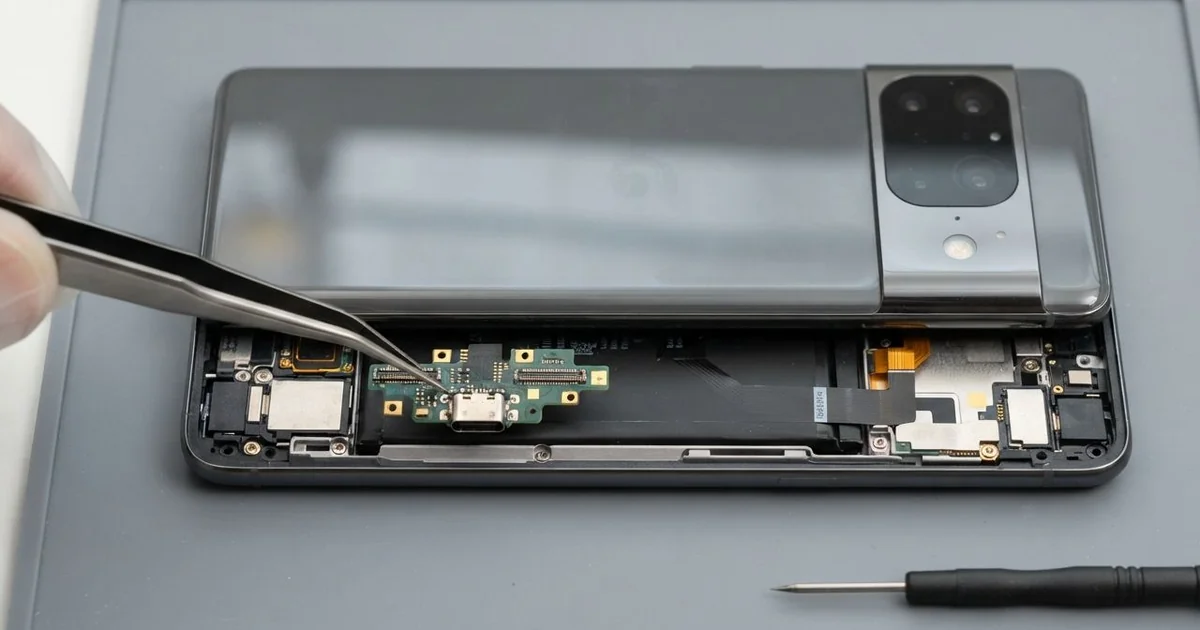
Samsung Galaxy S10+ Charging Port Repair in Al Khobar gets a loose or dead port charging properly again. We check it free, often clean it, and fit a new charging board only when it's worn. We test fast charging and data before you leave, and most jobs are done the same day.
When you find your Samsung S10 Plus not charging, the port is usually the reason. The cable feels loose, or it charges only when you hold it at an angle. Some phones show a warning about moisture, even when the phone is dry.
It's better not to wait. Wiggling the cable every day wears the small pins inside the port. Dirt that stays in there can also heat up and burn the pins, and then cleaning is no longer enough.
Many port problems need no new part. Pocket lint, sand and dust pack into the bottom of the port over time. The plug can't go all the way in, so we remove the dirt carefully and the port works again.
A bent, burnt or worn port is different. On this phone the Samsung S10 Plus charging port sits on a small board at the bottom. We open the back glass and replace that board, which also holds the microphone.
How Kabayan Center Repairs a Samsung Galaxy S10+ Charging Port
These are the port faults we fix on this phone.
- A cable that is loose or falls out on its own
- Charging only at one angle, or stopping when you move
- A moisture warning on a dry phone
- Slow charging even with the right charger
- A computer that doesn't see the phone over the cable
- Bent, dark or burnt pins inside the port
Here is how the repair works, step by step:
- We check the port free under a lamp and test the phone on wireless charging too.
- We tell you if it needs cleaning or a new part, and you decide first.
- For a dirty port, we lift out the lint with thin plastic tools and clean the pins.
- For a worn port, we warm and lift the back glass and disconnect the battery.
- We remove the bottom speaker, swap the charging board and reconnect its cable.
- We test fast charging, data and the microphone, then seal the back glass.
Own a different model? Our charging port repair covers other phones and laptops too. Customers come to our shop on King Fahd Road from Dammam and Dhahran as well.
How a Galaxy S10+ Charging Port Fails: 3 Real Cases
Pocket lint packed into the port
We often see this with phones that live in trouser pockets. A security guard on long shifts said the cable now worked only when bent upwards. "I keep it propped on a book to charge," the guard said.
The guard had searched for Samsung Charging Port Repair in Al Khobar, expecting to need a new part. Every time a phone goes into a pocket, a little lint goes into the port. The plug then presses it down into a hard layer.
Under the lamp, we saw a grey felt pad at the bottom of the port. The plug was stopping short of the pins. Wireless charging still worked fine, so the battery and board were healthy.
We lifted the lint out in one piece with a thin plastic pick. Then we cleaned the pins and tested fast charging with the guard's own cable. The plug clicked in firmly again.
No part was needed, and the job was done while the guard waited. Never clean a port with a metal pin or a needle. It can scratch or short the pins, while a soft wooden toothpick is much safer.
Sand after a day at Half Moon Bay
This one starts on the beach. A family spent the weekend at Half Moon Bay, and the phone sat on a towel all day. The next morning it showed a moisture warning and refused to charge.
A parent brought it in after looking up mobile repair in Al Khobar. Fine sand gets into the port, and sea spray leaves salt behind. Salt holds moisture, so the phone thinks the port is still wet.
We found sand in the port and white salt marks on the pins. Some of the pins had already started to turn dark. When we opened the back, a little salt had also reached the edge of the board.
So we did a water damage repair on that area first, cleaning it before the salt could spread. Then we fitted a new charging board, since the old pins were too corroded to clean.
The phone charged normally, and the moisture warning was gone. The family now keeps phones in a zip bag at the beach. Salt and sand do far less harm when they can't get inside the port.
Charging in bed with the cable bent
A common case: a student charged the phone every night while scrolling in bed. The cable was bent sharply against the pillow for hours. Slowly the port became loose, and one day it stopped charging at all.
"It charges if I hold it very still," the student said. That is a sign the metal inside the port is bent or worn. Cleaning can't fix a worn port.
We opened the back glass and replaced the charging board with the Samsung Galaxy S10+ charging port repair. The new port held the cable firmly, and fast charging came back. We also tested the microphone, since it sits on the same board.
Then our battery test showed the battery itself was weak. The phone was losing charge quickly even with a good port. We suggested a phone battery replacement while the back was open.
The student chose to wait on the battery for now. So the phone charges well again, but it still drains faster than it should. We noted on the job card that the battery can be swapped on a later visit.
How to Keep Your Galaxy S10+ Charging Port Healthy
- Keep the cable straight while charging, and don't use the phone with a bent plug.
- Turn the phone port side up in your pocket, so lint falls out instead of in.
- Clean the port gently with a wooden toothpick, never a metal pin.
- Use wireless charging at night, so the port rests.
- Keep the phone in a zip bag at the beach and away from sand.
- Take it for phone repair in Al Khobar as soon as the cable feels loose.
Related services
- Motherboard repair for a phone that won't charge or start even on wireless
- Phone screen replacement for a cracked or dark screen
Questions about this repair
Ask us anything else on WhatsApp
we answer during shop hours.