Samsung Galaxy S10+ LCD Display Replacement in Al Khobar
Samsung Galaxy S10+ LCD Display Replacement in Al Khobar for a cracked curve or black ink. It also fixes coloured lines and a screen that ignores your finger. We look at your phone free and explain what it needs. You decide before any work starts, and your photos and chats stay as they are.
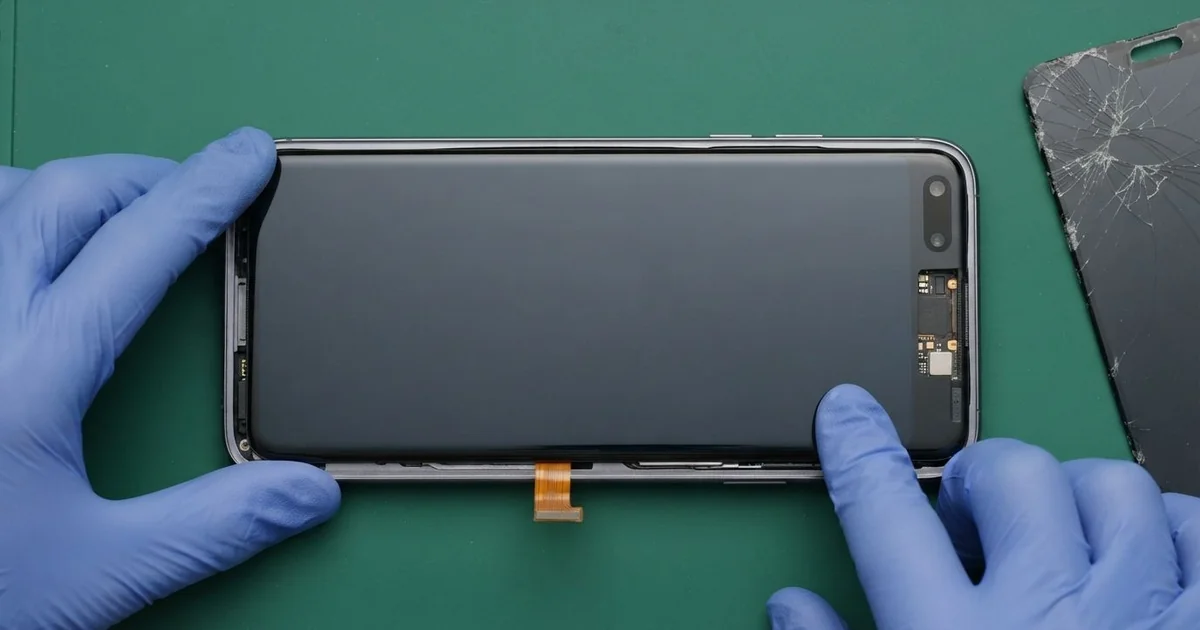
Samsung Galaxy S10+ LCD Display Replacement in Al Khobar fixes a cracked, dark or striped curved screen. We check the phone free, then fit a complete new screen with the glass and display joined. We set up the fingerprint again, test touch on both edges, and most jobs are done the same day.
A Samsung S10 Plus broken screen doesn't always look broken. Sometimes the glass is perfect, but black ink spreads from one corner. Other times a pink line runs down the middle, or touch stops working near the curved edges.
Waiting makes it worse. The ink grows a little each day until the whole display goes dark. The fingerprint reader sits under the screen too, so a dead screen can lock you out of the phone.
Some faults don't need a new part. A lifted screen protector can cause false touches. A loose connector after a knock can blank the display, and we fix that by cleaning and refitting it.
Cracks, ink, lines and dead touch are different. On this phone the glass and the display are one glued part, so they can't be split. A Samsung S10 Plus screen replacement means a whole new screen, and that clears all four faults at once.
How Kabayan Center Replaces a Samsung Galaxy S10+ LCD Display
These are the screen faults we fix on this phone.
- Cracked front glass, often along one curved edge
- Black ink that spreads, or a dark screen while calls still ring
- Green, pink or white lines across the display
- Touch that stops working, or ghost taps that open apps alone
- A fingerprint reader that no longer reads through the glass
- Cracks around the front camera holes at the top
Here is how the repair works, step by step:
- We check the phone free and test sound, cameras, charging and buttons first.
- We tell you what it needs, and you decide before any work starts.
- We warm and lift the back glass, then disconnect the battery before touching the screen.
- We soften the front glue and ease out the broken screen, keeping the frame straight.
- We clean off old glue and glass, connect the new screen and test touch and colour.
- We seal the screen and back glass with fresh glue and press them evenly.
- We help you set up your fingerprint again, and you check the phone before leaving.
Own a different model? Our phone screen replacement covers other phones in much the same way. People bring phones to our shop on King Fahd Road from Dammam and Dhahran too.
How a Galaxy S10+ Screen Breaks: 3 Real Cases
Crushed in a back pocket while driving
This one starts in a car seat. A sales rep kept the phone in a back trouser pocket while driving between clients. "There's no crack, but half the screen is black," the rep told us.
The rep had searched for Samsung Screen Replacement in Al Khobar, sure that a scratch was hiding somewhere. Sitting on a phone bends it a little. The glass often survives, but the thin display layer behind it cracks inside.
We found black ink spreading from the lower edge and two thin purple lines. The connector was tight and clean. So the display itself was broken, even though the glass looked perfect.
The rep also mentioned the phone died every afternoon. The battery tested weak, so we did a phone battery replacement while the phone was already open. That saved opening the back glass a second time later.
With the new screen fitted, the lines and ink were gone, and touch worked on both curves. Keep the phone in a front pocket or a bag while you sit. The rep now uses a holder on the car air vent.
Slipped off a shopping trolley
A customer came to us straight from the supermarket. The phone had been resting on the trolley handle and slid onto the hard floor. It landed on one curved edge.
A crack ran across the curve and up past the front cameras. The customer had put clear tape over it to stop it spreading. It didn't help, and touch began missing taps on that side.
We replaced the screen and cleaned the tape glue from the frame. The new curve sat flush, with no gap you could catch a nail on. Touch worked right to the edge again, even with a thumb resting on the curve.
During the final test, photos from the back cameras looked hazy. The small glass over the rear cameras had cracked in the same fall. So we also did a phone camera repair before the customer went home.
The phone left with a clear screen and sharp photos again. We suggested a case with a raised lip, so the curve doesn't take the next hit. Phones resting on trolley handles fall more often than people think, usually at the checkout.
A liquid-glue screen protector seeped under the edge
We often see this after a quick fix at a mall kiosk. A student had a thick liquid-glue protector fitted and hardened under a small lamp. Some of the glue ran under the curved edge before it set.
Soon the phone was typing letters by itself. "And my finger won't unlock it any more," the student said. They had looked up mobile repair in Al Khobar late one night during assignments.
This phone reads your fingerprint with sound waves through the glass. A thick glue layer blocks those waves. The glue under the edge also pressed on the display and caused the ghost taps.
We tried to lift the protector first, but the glue had bonded into the display edge. So we did a Samsung Galaxy S10+ LCD display replacement and set up the fingerprint again. Touch and unlock both worked normally.
Not everything came back, though. Some glue had run into the earpiece mesh, and calls stayed a little quieter. The student chose to leave it and now uses a thin film protector that the fingerprint reader works through.
How to Keep Your Galaxy S10+ Screen Safe
- Keep the phone out of your back pocket when you sit or drive.
- Use a case with a raised lip, so the curved edges don't hit the floor first.
- Choose a thin film protector made for curved screens and in-screen fingerprint readers.
- Don't rest the phone on a trolley handle, a car roof or a chair arm.
- Back up your photos while the screen still works, so a dark screen never costs you your files.
- Take it for phone repair in Al Khobar at the first black spot, because the ink keeps spreading.
Related services
- Water damage repair for a phone that got wet through a crack
- Charging port repair for a phone that charges loosely or not at all
Questions about this repair
Ask us anything else on WhatsApp
we answer during shop hours.