Samsung Galaxy S10+ Motherboard Repair in Al Khobar
Samsung Galaxy S10+ Motherboard Repair in Al Khobar for a phone that is dead or stuck on the logo. It also fixes phones that keep restarting. We check it free and explain what we find. You decide before any work starts. If we cannot fix it, you pay nothing.
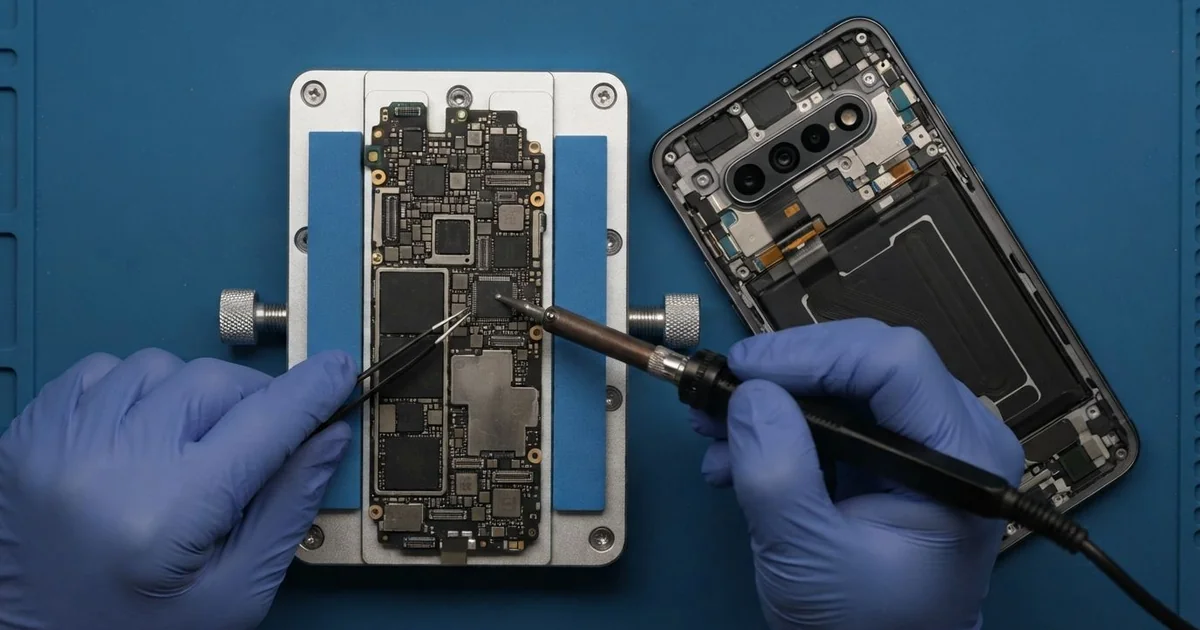
Samsung Galaxy S10+ Motherboard Repair in Al Khobar fixes phones that won't start, keep restarting or died after a splash. We check the board free and find the faulty part under a microscope. Then we fix or replace that small part, and we save your data first where we can.
A Samsung S10 Plus not turning on is the most common sign. The screen stays black, even on the charger, and the phone doesn't vibrate. Other phones get stuck on the logo, restart in a loop, or get hot while doing nothing.
It's best to bring it in soon. A short on the board can drain and heat the battery. Rust from water keeps growing slowly, and it can reach the parts that hold your photos.
Not every dead phone has a bad board. A fully drained battery, a broken screen or a faulty charger can look the same. We test those first, because they are simpler and faster to fix.
When the Samsung S10 Plus motherboard itself is at fault, it's usually one small part. A tiny chip, a burnt filter or a rusted connector can stop the whole phone. We find that part and repair it, so the rest of the board stays as it is.
How Kabayan Center Repairs a Samsung Galaxy S10+ Motherboard
These are the board faults we fix on this phone.
- No power at all, even on the charger
- Stuck on the logo, or restarting in a loop
- A phone that gets hot while doing nothing
- No charging after using a damaged cable or charger
- Rust and green crust after water or sweat got in
- No signal, no sound or no camera after a drop
Here is how the repair works, step by step:
- We check the phone free and rule out the battery, the screen and the charger first.
- We tell you what we found, and you decide before any work starts.
- We open the back glass, remove the board and look at it under a microscope.
- We power the board from a bench supply, a tool that shows how much power it pulls.
- We find the hot or damaged part, then replace it or clean away the rust.
- We rebuild the phone and test calls, charging, cameras, sound and signal.
- You check the phone yourself before you take it home.
Own a different model? Our motherboard repair covers other phones and laptops too. Customers reach our shop on King Fahd Road from Dammam and Dhahran as well.
How a Galaxy S10+ Board Fails: 3 Real Cases
A damaged cable shorted the charging circuit
A customer came to us after the phone died on a poor-quality cable from a petrol station. The cable's plug was bent and scorched on one side. "It got hot, then it just went off," the customer said.
They had searched for Samsung Motherboard Repair in Al Khobar after a new charger did nothing. A damaged cable can send power the wrong way into the phone. The part that controls charging then burns to protect the rest.
On the bench supply, the board pulled power the moment we connected it. That told us something was shorted. Under the microscope, a tiny filter near the charging circuit had a dark burn mark.
We replaced the burnt part, and the board stopped pulling power. The phone started up with all its photos and chats in place. The port pins were also scorched from the same cable.
So we did a charging port repair before closing the phone. It then charged normally on the customer's own charger. Throw away any cable with a bent or burnt plug, since it can harm a phone in seconds.
A hard drop and a restart loop
This one starts at a building site in the industrial area. An engineer dropped the phone from a scaffold onto concrete. After that, it showed the logo, went dark and started again, over and over.
The engineer had looked up mobile repair in Al Khobar that evening. A hard fall can crack the tiny solder joints under a chip. The phone then starts, loses power to that chip and restarts.
We found a small bend in the frame near the main chips. Under the microscope, one corner of the board had a hairline crack. We worked on it carefully, but the damage went through the inner layers of the board.
The board was too far gone to run normally again. But the engineer had never backed up the phone. So we used our data recovery service and kept the board running long enough to copy the photos and contacts.
The phone itself couldn't be saved, and we said so honestly. The engineer left with the files on a new phone and a strong case. Now the phone backs up every night on Wi-Fi.
A splash of AC water, then rice
We often see this after a quiet splash that seems harmless. An office worker left the phone under an AC unit that dripped onto the desk. The phone got wet, so the worker put it in rice for a few days.
It worked at first, which made the worker think it was fine. But weeks later, the Samsung S10 Plus stopped turning on during a meeting. Rice only dries the outside of a phone.
Inside, the water had left minerals on the board. Over the weeks, they turned into green crust around a power connector. The crust slowly ate the metal until the power stopped.
We did a water damage repair first, cleaning the whole board to remove the crust. Then we replaced one rusted part as part of the Samsung Galaxy S10+ motherboard repair. The phone turned on, and calls, cameras and charging worked again.
The worker was lucky that the rust hadn't spread further. Next time, the worker said, the phone comes straight to us after a splash. Switch a wet phone off at once and don't charge it.
How to Keep Your Galaxy S10+ Board Safe
- Use a good charger and cable, and throw away any with a bent or burnt plug.
- Switch a wet phone off at once and don't try to charge it.
- Skip the rice and bring the phone in soon after it gets wet.
- Keep the phone off desks under AC units that drip.
- Use a strong case if you work at height or on hard floors.
- Back up your photos often, and take the phone for phone repair in Al Khobar at the first restart loop.
Related services
- Phone battery replacement for a phone that dies fast or shuts off early
Questions about this repair
Ask us anything else on WhatsApp
we answer during shop hours.