Samsung Galaxy S10e Charging Port Repair in Al Khobar
Samsung Galaxy S10e Charging Port Repair in Al Khobar for a loose, slow or dead charging port. We check it free and show you what's wrong. You say yes before we start any work, and your photos and chats stay untouched.
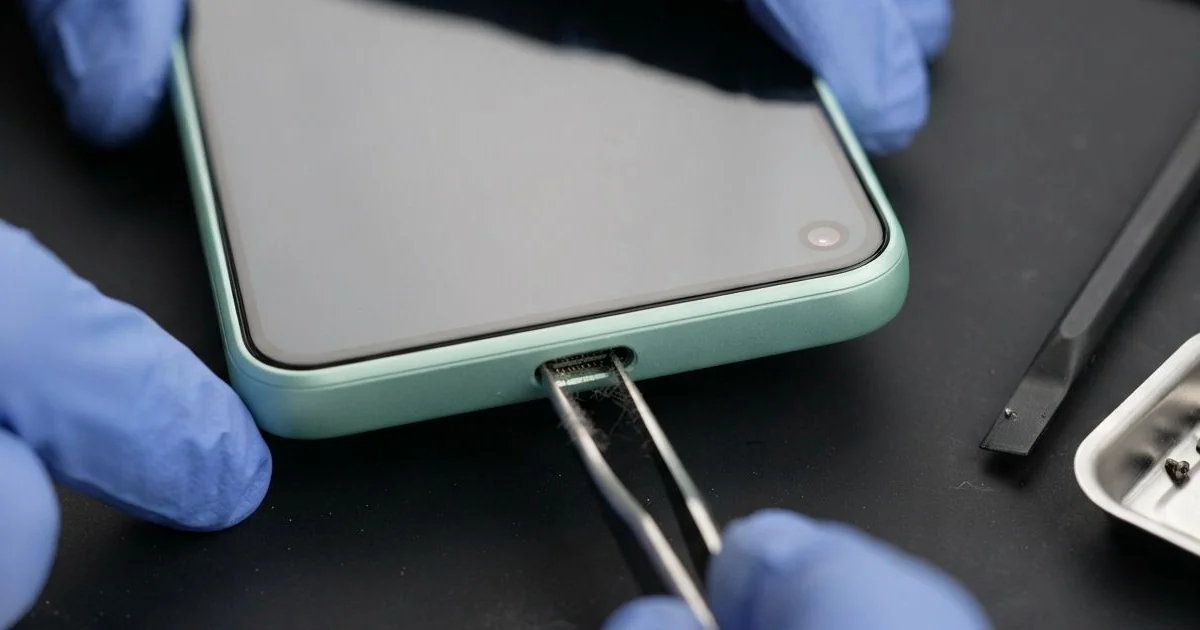
Samsung Galaxy S10e Charging Port Repair in Al Khobar fixes a phone that won't charge by cable. We check the USB-C port free, then clean it, fix it or fit a new one. We test charging speed and data before you go, and most jobs are done the same day.
A Samsung S10e not charging can mean many things. The cable may feel loose, or charge only when you hold it still. Some phones show a water drop warning that says moisture was found in the port.
Wireless charging is a useful test you can do at home. If the phone charges on a pad but not by cable, the port is the likely problem. If it charges on neither, the battery or the board may be at fault.
It's worth fixing early, even if the phone still charges some of the time. A loose plug makes small sparks on the pins, and those burn them slowly. Pushing the cable in harder only bends the pins further.
Many port faults need no new part. Dirt and lint inside can block the plug, and careful cleaning fixes it. A Samsung S10e charging port with bent pins or rust needs a new port at the bottom.
How Kabayan Center Repairs a Samsung Galaxy S10e Charging Port
We fix these charging faults on this phone.
- A cable that feels loose or falls out
- Charging only when the cable is held at an angle
- Very slow charging, or fast charging that no longer starts
- A moisture warning that won't go away
- No charging and no computer connection by cable
- Green or white crust inside the port
This is how we repair the port, step by step:
- We check the phone free with a tester that shows the charging power.
- We look inside the port with a light and a magnifier.
- We tell you what it needs, and you decide before any work starts.
- We clean the port with plastic tools and cleaning fluid, never metal pins.
- If the port is damaged, we open the phone, disconnect the battery and fit a new port.
- We reseal the phone with fresh glue and test cable charging, fast charging and data.
Need this for another phone? Our general charging port repair service covers other models too. Our shop is on King Fahd Road, close for customers from Dammam and Dhahran.
How a Galaxy S10e Charging Port Fails: 3 Real Cases
Food crumbs from a lunch bag
This one starts in an office canteen. An accountant carried the phone in a lunch bag every day, next to bread and biscuits. "The cable just won't click in," the accountant told us.
Crumbs had worked their way into the port over many weeks. Each time the plug went in, it pressed them deeper. In the end, the plug touched only half the pins.
The accountant had tried blowing into the port, which only moved the crumbs around. For a while, the phone charged if it lay perfectly still on the desk.
The accountant had typed Samsung Charging Port Repair in Al Khobar and walked in after work. Under the magnifier, we saw a hard brown layer at the back of the port. We picked it out slowly with a plastic tool.
The cable clicked in firmly again, and fast charging came back. But the battery test showed heavy wear. Months of short, broken charges had tired it out.
The accountant agreed to a phone battery replacement while the phone was with us. Now it charges fully overnight and lasts the working day. The phone travels in a jacket pocket, and the lunch goes in the bag alone.
Sweat during gym workouts
We see this often with people who train hard. A fitness coach kept the phone in a tight waist pouch for every class. Sweat soaked the pouch every single day.
Then the moisture warning started showing up, even when the phone was dry. The coach had heard a hair dryer would fix it. Luckily, the coach came to us first.
Hot air from a dryer can soften the glue and the seals around the port. It also dries the salt into a harder crust.
Inside the port, we found green crust on several pins. Sweat is salty, so it eats metal slowly once it gets in. The damage had also reached the small board at the bottom of the phone.
So we did a water damage repair on that area and fitted a new port. The warning disappeared, and the phone charged at full speed again. We tested it with a cable and a wireless pad to be sure.
Don't charge a phone while the moisture warning shows. Let it dry in open air first. The coach now uses a sweat-proof armband and wipes the phone after each class.
Plugged into a car USB over speed bumps
A common case for drivers. A courier kept the phone charging from the car's USB socket all day. Every speed bump made the heavy cable jerk in the port.
"It charges, then stops, then starts again," the courier said. The courier had looked for mobile repair in Al Khobar between deliveries. The phone was needed for maps, so every stop cost time.
Some days the phone reached the evening at almost empty, even after charging all day. The courier had already bought two new cables, and neither helped.
We found the port slightly loose in its seat, with two pins bent. The on and off charging had also made tiny sparks. One small part next to the port on the board was burned.
We fitted a new port and did a motherboard repair on the burned part. Cable charging now works again. But fast charging from the car stayed slow, because the car socket itself gives little power.
We suggested a short cable and a proper car charger instead of the old socket. The phone charges steadily now, just not as quickly in the car as at home.
How to Keep Your Galaxy S10e Charging Port Clean
- Keep the phone away from crumbs, sand and pocket lint.
- Plug the cable in straight and gently, never at an angle.
- Use a short cable in the car, so it doesn't swing over bumps.
- Wait for the moisture warning to clear before charging.
- Never clean the port with a pin, a needle or a toothpick.
- Wipe the phone after the gym or the beach, and keep it in a dry pocket.
- Take it for phone repair in Al Khobar if the cable feels loose, before the pins bend.
Related services
- Phone screen replacement for a cracked or dark display
Questions about this repair
Ask us anything else on WhatsApp
we answer during shop hours.