Samsung Galaxy S20 Charging Port Repair in Al Khobar
Samsung Galaxy S20 Charging Port Repair in Al Khobar fixes a phone that won't charge. It also fixes a loose plug or a moisture warning. We check your phone free and tell you what it needs, and you decide before any work starts.
Samsung Galaxy S20 Charging Port Repair in Al Khobar gets a slow or dead port working again. We check it free and find the real cause, then clean or replace the port. We test fast and wireless charging, and most jobs are done the same day.
A Samsung S20 not charging shows up in small ways first. The cable feels loose, or charging stops when you move the phone. Some phones show a water drop warning and refuse to charge at all, even with a brand new cable.
It's better not to wait. A loose plug makes tiny sparks inside the port, and they burn the pins over time. If the battery runs flat and stays flat, even saving your photos and chats gets much harder.
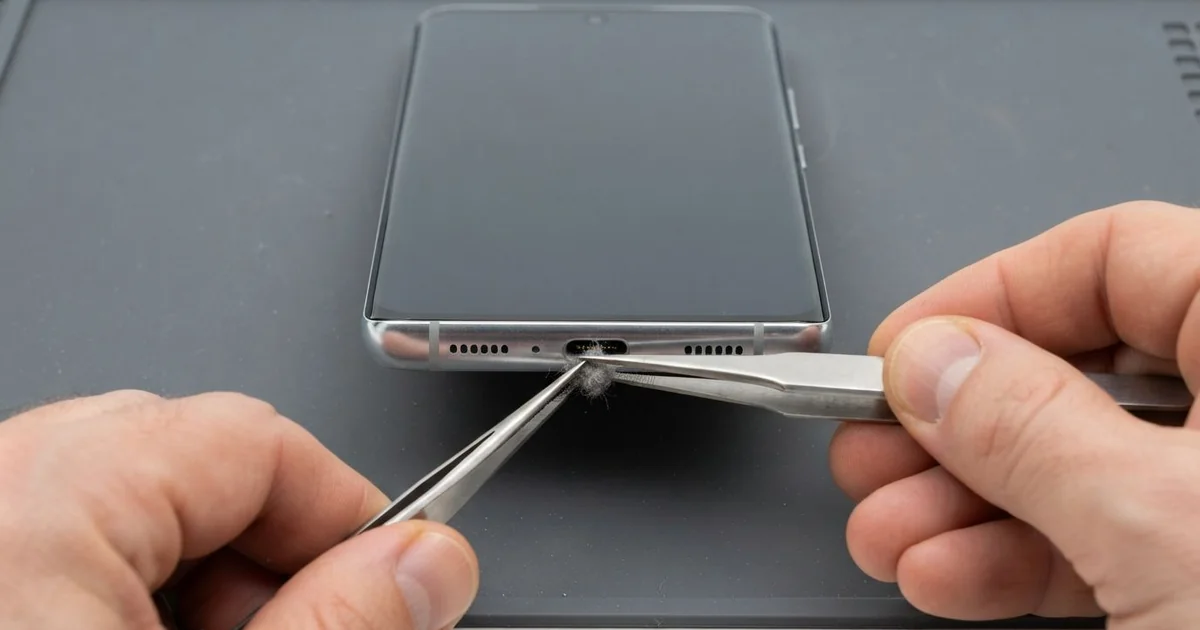
Many faults need only a careful cleaning. Pocket lint and sand pack into the port, so the plug can't go in fully. We remove the dirt with fine plastic tools, never a metal pin that scratches the pins.
Bent or burnt pins are different, and then the Samsung S20 charging port itself needs replacing. On this phone the port sits on a small board at the bottom. We swap that small board and keep the rest of the phone.
How Kabayan Center Repairs a Samsung Galaxy S20 Charging Port
We fix these charging faults on this phone.
- Charging only when the cable is held at an angle
- A loose plug that slips out of the port
- A moisture warning when the phone is already dry
- Slow charging, or fast charging that never switches on
- Burnt, bent or green pins inside the port
- A phone that charges on a wireless pad but not by cable
Here is how the repair works with us, step by step:
- We check the port under a bright light and test it with our own cable and charger.
- We tell you what it needs, and you decide before any work starts.
- For dirt, we clean the port with fine tools and a safe cleaning liquid.
- For damaged pins, we warm the back glass, open the phone and disconnect the battery.
- We swap the small charging board and check the cable that joins it to the main board.
- We seal the back glass with fresh glue, then test cable, fast and wireless charging.
- You try it with your own charger before you take it home.
Own a different model? Our charging port repair service covers other phones and laptops too. Customers come to our shop on King Fahd Road from Dammam and Dhahran as well.
How a Galaxy S20 Charging Port Stops Working: 3 Real Cases
Pool water, then a cable pushed in hard
One afternoon a phone came in straight from a water park. A parent had taken the kids swimming, and the phone got splashed at the pool. "It keeps saying moisture detected," they told us.
That warning is there to protect the phone. Charging a wet port makes the pins rust within days. But the parent kept pushing the cable in harder, hoping it would charge anyway.
Under the light, we saw white chlorine marks on the pins. One pin was bent to the side by the force of the plug. Pool water had also crept past the port toward the main board inside.
We cleaned and dried the port, then replaced the charging board because of the bent pin. A little water had reached the edge of the main board. So we did a water damage repair clean on that area too.
The phone charged fast again, and the warning was gone. When the moisture warning shows, unplug and let the phone dry first. Open air works well, but never use a hair dryer, since its heat pushes water deeper.
A poor cable melted one pin
We often see this in summer. A taxi driver bought a low-quality cable at a petrol station after losing the original. After a long day on the road, the plug felt hot in the hand and smelled of burnt plastic.
"Now nothing charges it," the driver said. They had searched for Samsung Charging Port Repair in Al Khobar between rides. Poor cables often skip the safety parts that stop too much power.
We found one pin melted into a dark spot, with black marks around it like soot. Cleaning can't fix a melted pin, however careful it is. So we opened the phone and replaced the charging board.
We also tested the battery, because heat and bad charging wear it down. It had lost much of its strength after many hot days in the car. The driver chose a phone battery replacement at the same visit.
The phone went home charging normally and staying cool. We suggested a good cable and a charger made for the car socket. A plug that feels hot is always a sign to stop using that cable.
The port was fine, but a surge hit the board
This one starts with a car charger bought online. A nurse charged the phone on the drive to night shifts. One evening the phone got very hot on the car seat and went dead.
The nurse looked up mobile repair in Al Khobar and expected a simple port swap. The port looked clean, and every pin was straight. Yet the phone showed no sign of charging at all.
We tried our own cable, then a wireless pad, and neither worked. That told us the problem was deeper than the port.
Our test showed the power stopped at the main board. A power surge from the charger had damaged the small chip that controls charging. So the job became a motherboard repair instead of a new port.
We replaced the damaged chip, and cable charging worked again. Wireless charging stayed off, though, because a second part near it was also burnt.
The nurse chose to charge by cable only for now, and to fix the wireless part later. We explained that the surge could have done far worse. A poor charger can end up costing more than a good one.
How to Keep Your Galaxy S20 Charging Port Healthy
- Pull the plug straight out, never at an angle or by the cable.
- Use a good cable and charger with proper safety marks. Poor ones heat up and burn the pins.
- Let the phone dry fully when it shows a moisture warning. Don't force the cable in.
- Keep the port clear of lint and sand, and never clean it with a pin.
- Keep the phone off a hot car seat or dashboard while it charges.
- Take it for phone repair in Al Khobar at the first loose feeling, before the pins burn.
Related services
- Phone screen replacement if the same phone was dropped and the screen cracked
Questions about this repair
Ask us anything else on WhatsApp
we answer during shop hours.