Samsung Galaxy S20 FE 5G Charging Port Repair in Al Khobar
Samsung Galaxy S20 FE 5G Charging Port Repair in Al Khobar for a plug that won't hold. We test the phone free and show you what we find. You choose before we start, and if we can't fix it, you pay nothing.
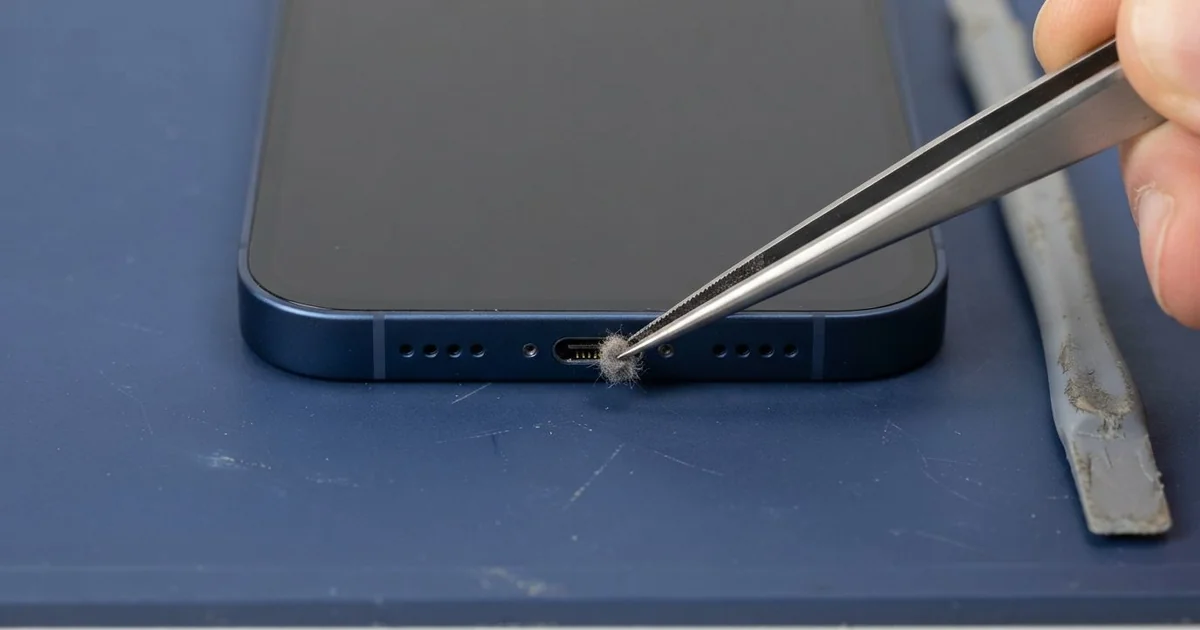
Samsung Galaxy S20 FE 5G Charging Port Repair in Al Khobar solves loose, slow or dead charging. We check the phone free and find out why power isn't getting in. Rust or dirt is cleared, a worn port is replaced, and charging is tested before you leave.
A Samsung S20 FE 5G not charging tells you in small ways first. The cable goes in, but you have to press it down for the charging sign. At other times the phone only charges when it lies still on a table.
Many people also notice the phone gets warm near the bottom edge while charging. That warmth comes from a bad contact inside the port, not from the battery.
It's worth fixing early. A weak contact makes heat, and heat slowly burns the tiny pins. Damp and salt in the port also build rust, and rust can travel along to the board.
Not every case needs a new part. Lint and sand come out with a careful clean, and a wet port only needs drying. Rusted, burnt or bent pins mean the port has to be replaced.
The Samsung S20 FE 5G charging port is fixed to a small separate board at the bottom. A flex cable links it to the main board. So we can change the port and leave your data and main board alone.
How Kabayan Center Repairs a Samsung Galaxy S20 FE 5G Charging Port
These are the charging faults we see and fix on this model.
- A cable that must be pressed or held for the phone to charge
- Fast charging missing, so a full charge takes hours
- A moisture warning on a phone that feels dry
- Rust, salt or a dark burn mark on the pins
- A warm bottom edge during charging
- No connection to a computer or car screen by cable
These are the steps of the repair.
- We charge your phone with our tested cable and charger to rule them out.
- We light up the port and look for lint, rust or bent pins.
- We clean it with a plastic pick and dry it if needed.
- If it needs a new port, we tell you first and wait for your yes.
- We heat the back cover gently, open it and unplug the battery.
- We fit a new charging board and connect its flex cable.
- We test cable and wireless charging, data and the bottom microphone, then close the phone.
Have a different phone? Our general charging port repair covers other models too. People reach our King Fahd Road shop from Dammam and Dhahran in a short drive.
How a Galaxy S20 FE 5G Charging Port Fails: 3 Real Cases
Sea air slowly rusted the pins
A hotel worker near the Corniche brought the phone in after weeks of slow charging. "It takes all night and it's still not full," they said. There was no drop and no spill.
The worker's room was close to the sea, with the window open most evenings. Humid sea air carries salt, and it settles inside an open port. Over time, the salt and damp turn the pins green.
In our light, the port had a thin green line along the pins. When we opened the phone, there was light rust on the charging board but none on the main board. We cleaned the frame too, the same way we do in a water damage repair.
The worker had been using a hair dryer on the port to dry it. That pushes damp deeper and can melt the plastic inside. We explained that a soft, dry place and time work better.
After a new charging board, the phone charged fully in a normal time again. The worker now keeps the phone in a closed drawer at night. A small dust plug in the port also helps keep sea air out.
A market-stall cable burnt one pin
This one starts with a thin cable bought on the way to work. A taxi driver used it with a car charger through long, hot shifts. One afternoon the plug felt very hot, and a faint burnt smell came from the phone.
"Now it won't charge in the car or at home," the driver told us. They had searched for mobile repair in Al Khobar while parked outside a mall. We saw a black mark on one pin inside the port.
A poor cable can let too much power through one pin. That pin burns, and the damage can reach the charging chip on the main board. We replaced the charging board first, and slow charging came back.
Fast charging did not return, because the chip was hurt too. We explained that a motherboard repair could bring it back. The driver chose to keep the phone charging slowly for now, overnight at home.
We gave one clear piece of advice. Throw away any cable that gets hot or smells burnt. It will harm the next port as well, and the phone after that.
Cleaned with the SIM tool
A customer came to us after a home fix went wrong. A university student had dug lint out of the port with the metal SIM tool. "It worked for a day, then stopped completely," the student said.
That evening they searched for Samsung Charging Port Repair in Al Khobar and came straight in. The phone showed no sign of charging at all.
Lint in the port is very common, since the phone sits in a pocket all day. Cleaning it is a good idea, but a metal tool is not. It can scratch the pins, bend them or short two of them together.
Under the light, two pins were scratched and one was bent flat. Some lint was still packed at the very bottom. We explained that the port couldn't be saved, and the student agreed to a new one.
We fitted a new charging board and tested fast charging and data to a laptop. The student's lecture recordings copied across without trouble. The bottom microphone sounded clear on a test call too.
We showed the student how to clean the port safely with a wooden toothpick. It is soft enough to leave the pins unharmed.
How to Protect Your Galaxy S20 FE 5G Charging Port
- Clean the port only with a wooden toothpick or a soft dry brush.
- Keep a small dust plug in the port if you live or work near the sea.
- Throw away any cable that gets hot, feels loose or smells burnt.
- Let a wet port dry in open air, and skip the hair dryer.
- Keep the phone away from open windows on humid nights.
- Take it for phone repair in Al Khobar if the bottom edge gets warm while charging.
Related services
- Phone battery replacement for a phone that still drains fast after a new port
- Phone screen replacement for a cracked or blank display
Questions about this repair
Ask us anything else on WhatsApp
we answer during shop hours.