Samsung Galaxy S20 FE Charging Port Repair in Al Khobar
Samsung Galaxy S20 FE Charging Port Repair in Al Khobar when the cable wiggles or charging keeps stopping. We look at your phone free and explain what is wrong. Nothing is done until you say yes, and we never go through your files.
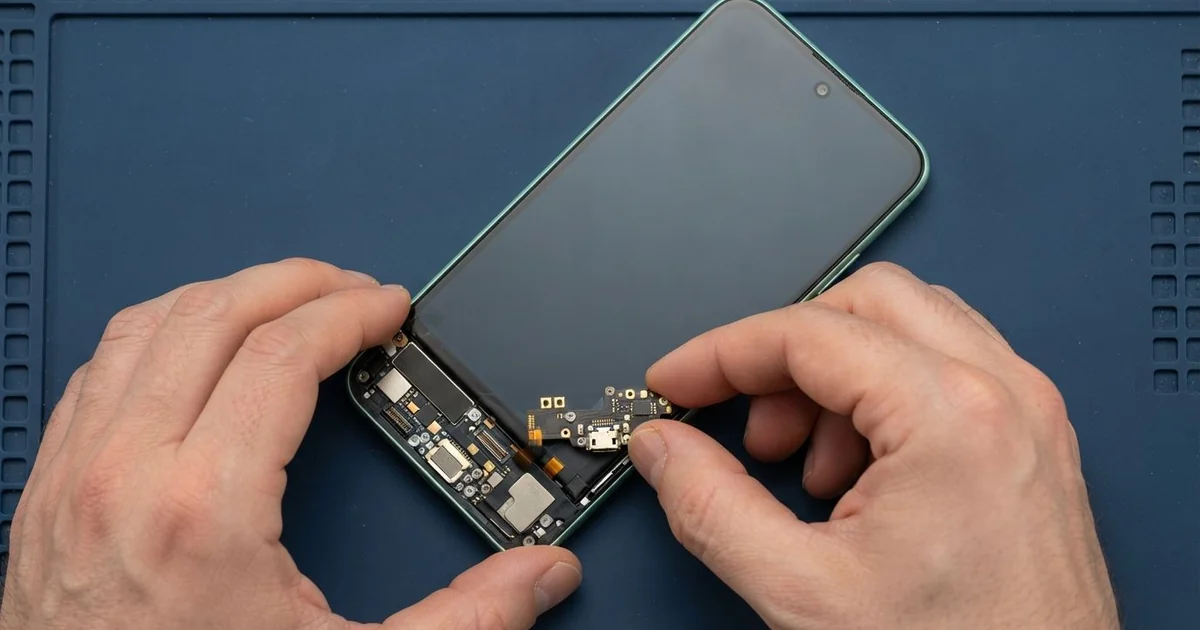
Samsung Galaxy S20 FE Charging Port Repair in Al Khobar brings back steady, fast charging. First we check the phone free and find the real cause. Then the port is dried, cleaned or replaced, and we test charging and data before you take it home.
A Samsung S20 FE not charging often starts small. You notice the plug has to sit just right. Later a warning about moisture pops up, or the charging sign flashes on and off all night.
Some people see it in the morning, when the phone is still low after a whole night on the cable. Others notice the phone won't show up on a computer anymore.
These faults rarely fix themselves. Each loose connection heats the pins a little and wears them down. Damp in the port slowly turns into green rust, and rust keeps spreading.
Some causes are simple. Pocket lint, a bad cable or a wet port only need cleaning, drying or a better cable. A port with bent, burnt or rusted pins needs a new part.
The Samsung S20 FE charging port sits on a small board of its own at the bottom of the phone. A thin flex cable joins it to the main board. That means we can replace the port without touching your data.
How Kabayan Center Fixes a Samsung Galaxy S20 FE Charging Port
We fix these charging problems on this phone.
- A plug that feels loose or drops out on its own
- Charging that stops and starts, or only works at one angle
- A moisture warning that won't go away
- Rust, green crust or dark marks inside the port
- Slow charging, with no fast charging sign
- A computer that won't connect to the phone by cable
- A muffled bottom microphone, which usually sits on the same small board
This is how the repair works with us.
- We try your phone with a known good cable and charger.
- We check inside the port with a light and a magnifier.
- We dry a wet port and remove lint with a plastic pick.
- If a new part is needed, we explain why and you decide.
- We warm and lift the back cover, then disconnect the battery for safety.
- We swap the small charging board and reconnect its flex cable.
- We test fast charging, wireless charging, data and calls, then seal the back.
For other phones, our main charging port repair page explains the same care. Customers visit our shop on King Fahd Road from Dammam and Dhahran as well.
What Breaks a Galaxy S20 FE Charging Port: 3 Real Cases
Sweat from the gym got into the port
A fitness trainer came in holding the phone and a towel. "It keeps saying there's water, but I never dropped it," they said. The warning came back every time they plugged in, even on a dry day.
The phone spent long hours in a pocket while the trainer worked out with clients. Sweat is salty water, and it runs straight down into the port. When it dries, it leaves salt behind, and salt pulls in more damp.
Inside the port we saw white salt and a hint of green on two pins. The trainer had been charging through the warning, which speeds up rust. A moisture warning means stop charging and let it dry.
We opened the phone to check how far it had gone. There was light rust on the charging board and none on the main board. We still cleaned the area as part of a water damage repair, so no salt was left behind.
With a new charging board and a clean frame, the warning stopped for good. The trainer now keeps the phone in a gym bag pocket, away from the body.
Pulled sideways while charging in bed
We often see this with phones used for videos late at night. A night-shift security guard liked to watch shows in bed with the charger in. The cable bent sharply each time they rolled over.
"It only charges if I hold it up with a pillow," the guard told us. They had searched for Samsung Charging Port Repair in Al Khobar on the way home from work. The plug was loose even with our own cable, and it dropped out when we tilted the phone.
Under the light, the thin tongue inside the port was bent to one side. That tongue holds the pins, so a bent one means poor contact. Straightening it would not last, so we replaced the charging board.
We then tested fast charging and a video call with the new board. The guard's voice came through clearly, since the bottom microphone had been renewed too. The whole job was done the same day.
We suggested a short right-angle cable for use in bed. It puts much less strain on the port, because the wire runs along the phone instead of out from it.
Charging stopped, but the port was fine
This one looked like a port problem at first. A teacher's phone kept showing that charging had paused because it was too hot. "The port must be dying," the teacher said.
They had looked up mobile repair in Al Khobar during a lunch break. The phone often sat on a sunny classroom window ledge. Heat ages a battery fast, and an old battery can swell.
When it swells, the phone gets warm and stops charging to protect itself. From the outside, that looks just like a bad port.
The port tested perfectly with our cables. But the back cover had a slight bump in the middle, and the battery was clearly swollen. We did a phone battery replacement straight away, because a swollen battery is a fire risk.
The phone charged normally again, with no heat warnings. But the battery had pressed on the display from behind and left a pale patch near the centre. It shows most on a white background.
The teacher chose to keep the screen for now, since touch still worked. We noted that a phone screen replacement can be done later if the patch grows.
How to Look After Your Galaxy S20 FE Charging Port
- Blow gently or use a soft brush to clear lint from the port now and then.
- Keep the phone away from sweaty pockets during sport, and wipe the bottom edge after.
- Stop charging when a moisture warning appears, and let the phone dry in open air.
- Use a right-angle cable if you often use the phone while it charges.
- Keep it out of direct sun, on window ledges and on the car dashboard.
- Pull the plug out straight by its head, never by the wire.
- Visit a shop for phone repair in Al Khobar if charging keeps stopping.
Related services
- Motherboard repair for a phone that won't charge or turn on even with a new port
Questions about this repair
Ask us anything else on WhatsApp
we answer during shop hours.