Samsung Galaxy S20 FE Motherboard Repair in Al Khobar
Samsung Galaxy S20 FE Motherboard Repair in Al Khobar when your phone is dead, hot or stuck on the logo. We check it free, show you what failed, and only start after you agree. If we can't fix it, you pay nothing.
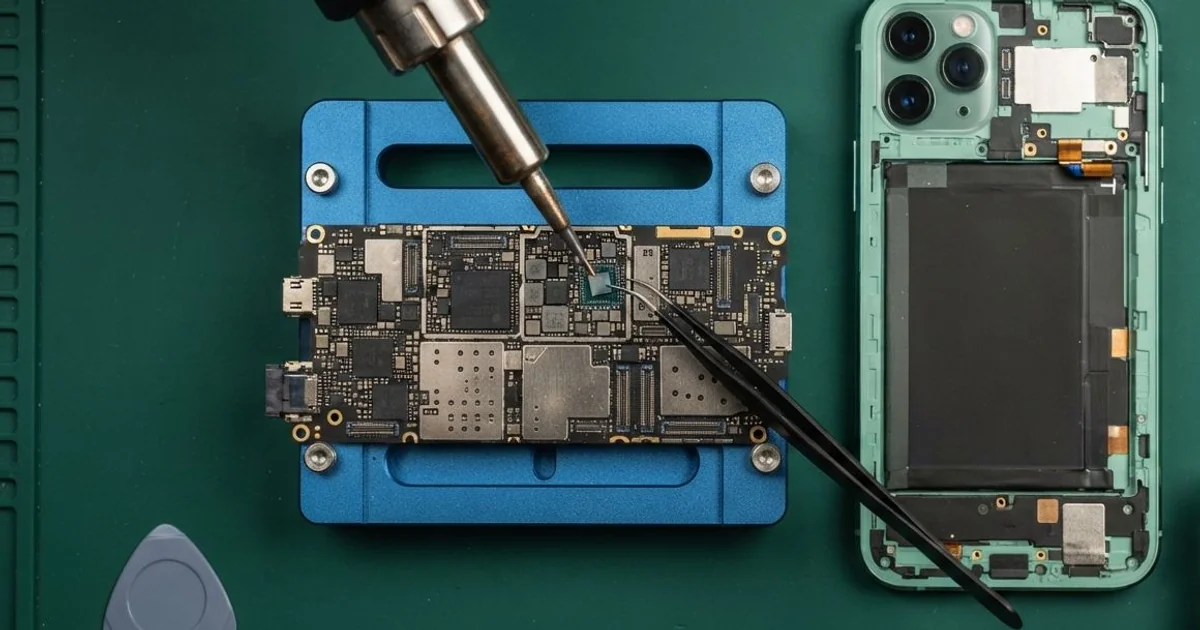
Samsung Galaxy S20 FE Motherboard Repair in Al Khobar helps a phone that won't start or runs hot. We examine it free, find the faulty board part and replace it under a microscope. Every function is tested before you take the phone home.
Most customers describe a Samsung S20 FE not turning on after a normal night. It was fine at bedtime, and in the morning the screen stayed black. A few phones still ring or vibrate, but show nothing on the screen.
It pays to act early, before the damage spreads. A shorted part drains the battery fast and can burn the parts next to it. The longer a phone sits dead, the harder it is to wake the battery again.
Many problems turn out smaller than they look. A deeply drained battery, a lifted connector or a broken software update can all look like a dead board. Those need a slow charge, a refit or a clean install, not soldering.
Real board faults need more care and much more time. The Samsung S20 FE motherboard is two layers pressed together, with metal covers hiding the parts. We repair it with micro-soldering, replacing tiny parts by hand under a microscope.
How Kabayan Center Repairs a Samsung Galaxy S20 FE Motherboard
These are the board problems we repair on the S20 FE.
- No power, no vibration and no charging light
- A phone that gets hot while it is switched off
- Stuck on the logo, or restarting on its own
- Not charging, even with a new cable
- Lost signal, Wi-Fi or Bluetooth
- A screen, sensor or button that stopped after a drop
Our board repair follows these steps:
- We check the phone free and read its power draw on a USB meter.
- We try a slow rescue charge, in case the battery is only drained very deep.
- We open the back and lift the metal covers to reach the board.
- We find hot spots with a heat camera and check each connector and joint.
- You hear what we found and decide before we begin the repair.
- We replace the faulty part with micro-soldering, then clean the board with alcohol.
- We close the phone and test the screen, touch, fingerprint, charging and signal.
Need help with a board in a laptop or tablet? See our motherboard repair page for how we handle them. Plenty of our customers drive in from Dammam and Dhahran, straight to King Fahd Road.
How an S20 FE Board Gets Damaged: 3 Real Cases
A battery that swelled against the board
We often see this with older phones left on the charger all night. A security guard noticed the back glass lifting at one corner. "The back is opening by itself," the guard told us, and soon the phone would not start.
An old battery can swell with gas as it wears out. It presses on the board and strains the connectors and tiny joints around it. Heat from all-night charging makes the swelling happen faster.
We found the battery puffed up and its connector pushed half out of the socket. One tiny joint beside it had cracked from the pressure. We did a phone battery replacement first, since a swollen battery is a fire risk.
Then we reflowed the cracked joint, which means melting the solder again so it grips properly. We pressed the connector home and tested the board under power. Everything read normal on the meter after that.
The phone started straight away and charged normally. The guard now unplugs it once it's full, instead of leaving it on all night. A lifting back glass is a warning, not a small problem.
Left in a drawer for months
One morning a phone came in that had not been used for a long time. A teacher had kept it in a drawer as a spare for many months. Now it showed no sign of life on any charger.
"It was working when I put it away," the teacher said. A battery left empty for that long drops so low that the phone refuses to charge it. The phone then treats the battery as unsafe.
Our meter showed no current at all. We gave the battery a slow rescue charge on the bench, and it slowly woke up. Even so, the phone still wouldn't charge from a cable.
The port held fine dust and a green crust from the humid air in the room. We did a charging port repair and cleaned the nearby board contacts with alcohol. Even a little crust can block the power.
We also checked the board for rust, since humid air had been at work for months. Apart from the port area, it was clean.
The phone came on and charged normally again. The teacher had searched for Samsung Motherboard Repair in Al Khobar, expecting the worst. Now the spare phone gets a charge once a month.
Thrown from a delivery bike
This case starts on a busy road near a roundabout. A delivery rider had the phone on a handlebar mount for maps, and it flew off over a bump. It hit the road face down.
"The screen works, but my finger doesn't unlock it," the rider told us. Wi-Fi had also been dropping now and then since the fall.
The hit had torn a tiny connector pad from the board, and a Wi-Fi joint had cracked. We rebuilt the pad with micro-soldering and reflowed the joint. Wi-Fi came back strong and steady.
We tested the screen, cameras and buttons next. All of them worked normally after the repair.
The fingerprint reader was another story. Its line ran through the inner layer and had broken there. That layer can't be reached without harming the rest of the board.
We explained this before closing the phone. The rider agreed, since the rest of the phone was fine.
So the phone works well again, but without the fingerprint reader. The rider now unlocks it with a PIN and uses a stronger mount. They'd found us by looking for mobile repair in Al Khobar between orders.
How to Keep Your Galaxy S20 FE Board Safe
- Unplug the phone once it's full, instead of charging it all night.
- Charge a spare phone every month, so its battery never drops to empty.
- Use a mount with a strong grip if you ride a bike or scooter.
- Check the back glass now and then, since a lifting corner means a swelling battery.
- Keep the charging port clean and dry, and never dig into it with a pin.
- Save your photos to the cloud or a computer on a regular schedule.
- Book a phone repair in Al Khobar at the first sign of heat, restarts or lost signal.
Related services
- Water damage repair for a phone that got wet
- Data recovery for pictures and chats stuck on a dead phone
Questions about this repair
Ask us anything else on WhatsApp
we answer during shop hours.