Samsung Galaxy S20+ Charging Port Repair in Al Khobar
Samsung Galaxy S20+ Charging Port Repair in Al Khobar for a loose, slow or dead charging port. We check your phone free and tell you what it needs. You decide before any work starts, and nothing is replaced without your yes.
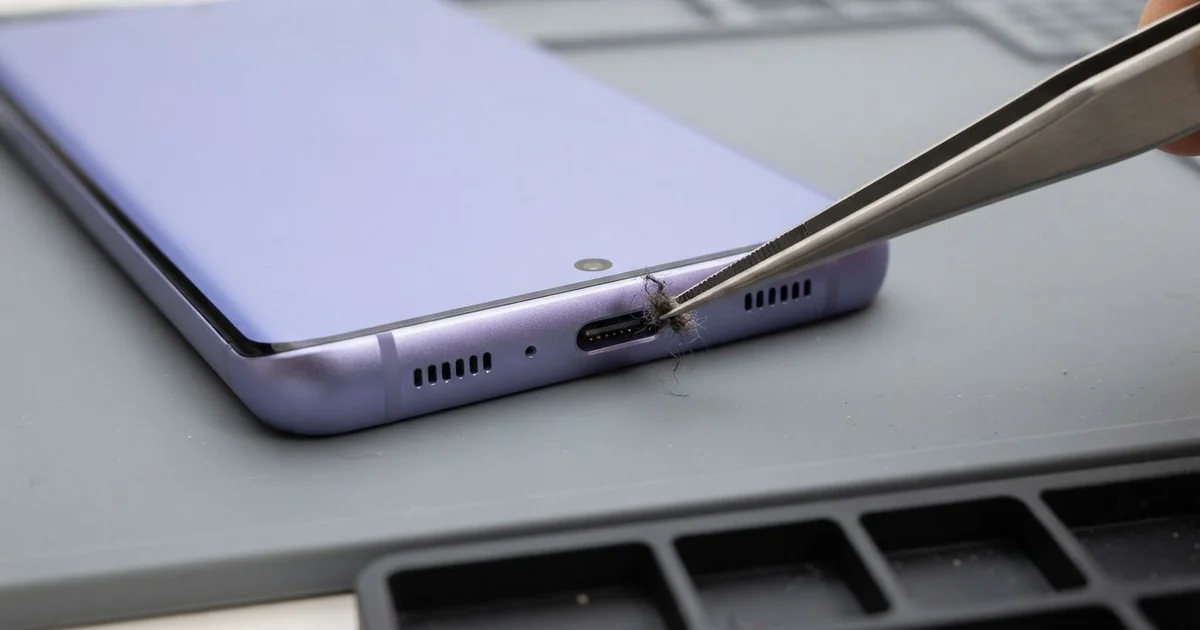
Samsung Galaxy S20+ Charging Port Repair in Al Khobar sorts out a phone that won't charge properly. We check the port and your cable free, because the cable is sometimes the only problem. Then we clean or replace the port and test charging before you leave.
A Samsung S20 Plus not charging rarely stops all at once. First the plug feels loose, or you have to hold the cable a certain way. Then fast charging disappears, and the phone takes hours to fill, even overnight.
It's better not to wait. A loose contact heats the pins every time you charge, and they slowly turn dark. In the end the phone may stop charging completely, on the day you need it most.
Many ports only need a careful, gentle clean. Dust, sand and lint get packed into the bottom, so the plug can't reach the pins. We clear it with thin plastic tools that don't scratch the pins or the port.
Burnt or broken pins are a different story, and then the Samsung S20 Plus charging port has to be replaced. The port sits on its own small board at the bottom. We change that board and leave the rest untouched.
How Kabayan Center Repairs a Samsung Galaxy S20+ Charging Port
We fix these charging port faults on this phone.
- A plug that feels loose or falls out easily
- Charging that works only at one angle
- Fast charging that no longer switches on
- Dark, burnt or broken pins inside the port
- Sand, dust or lint packed at the bottom of the port
- A phone that charges wirelessly but not by cable
Here is how the port repair works with us, step by step:
- We test the phone with your cable and ours, to rule out a bad cable first.
- We look inside the port with a magnifier and a bright light.
- We tell you what it needs, and you decide before any work starts.
- For dirt, we clean the port with plastic tools and a safe cleaning liquid.
- For damaged pins, we open the back glass with gentle heat and replace the small charging board.
- We seal the phone and test cable, fast and wireless charging before you take it home.
Own a different model? Our charging port repair service covers other phones and laptops too. Customers come to our shop on King Fahd Road from Dammam and Dhahran as well.
How a Galaxy S20+ Charging Port Fails: 3 Real Cases
Sand and dust from a building site
This one comes from a construction site. A site engineer kept the phone in a trouser pocket all day, walking through dust and fine sand. After a few weeks, the cable would only go in halfway.
"It charges for a second, then stops," the engineer said. They had searched for Samsung Charging Port Repair in Al Khobar during a lunch break. Sand packs down hard each time the plug is pushed in.
We found a solid layer of grey dust and sand at the bottom of the port. The pins themselves were still clean and straight. So the port needed a careful clean, not a new part.
While testing, we noticed a crack along the edge of the screen. The engineer said the phone had slipped from a ladder earlier. The crack was spreading, so they asked for a phone screen replacement in the same visit.
The phone left charging fast and with a clear screen. We suggested a small rubber port cover for work days on site. It keeps the sand out and saves the pins from wear on dusty days.
Only the cable was broken
A customer came to us sure the port was finished. The phone charged only when the cable was bent upward. "The port is loose, I can feel it," they said.
They had looked up mobile repair in Al Khobar and expected a part to be replaced. But our first step is always to try another cable, even when the port looks worn. With our cable, the phone charged fast at every angle.
Their cable had a broken wire inside, right where it meets the plug. The outside looked fine, but bending it moved the broken ends together. That's why only one angle worked, and only for a moment.
We checked the port anyway, under the light. It was clean, the pins were straight, and the plug sat firmly. The phone needed no repair at all, and we charged nothing for the check.
The customer left with a new cable and the same phone. We often see this, so it's worth trying another cable before any repair. A cable that works only at an angle is usually worn out near the plug.
Burnt pins from a copy fast charger
We see this more and more. A food delivery rider bought a fast charger online that looked like the original one. It was a copy, without the safety parts that control the power.
After a hot afternoon of charging on the bike, the plug smelled of burning. "It won't charge with anything now," the rider told us. The rider needs the phone for every order, so a dead phone meant no work that evening.
Inside the port, two pins had burnt black and one had melted. We replaced the charging board, and normal charging came back. But fast charging still wouldn't switch on, with any charger we tried.
We tested further and found the surge had also hurt the board. A small part that talks to fast chargers was damaged by the extra power. That needed a motherboard repair, which the rider chose to leave for later.
The phone now charges normally, only slower than before, and the rider can work again. Use an original or well-known charger, never a copy. A copy can burn more than the port, as this case shows.
How to Keep Your Galaxy S20+ Charging Port Healthy
- Try a second cable before you decide the port is broken.
- Use a port cover when you work in dust or sand.
- Buy chargers from a trusted shop, and avoid copies of original chargers.
- Pull the plug out straight, and never yank it by the wire.
- Switch to wireless charging if the port feels loose, until you bring it in.
- Take it for phone repair in Al Khobar if the plug ever smells of burning.
Related services
- Phone battery replacement if the phone charges well but still drains fast
- Water damage repair if the port shows green crust after the phone got wet
Questions about this repair
Ask us anything else on WhatsApp
we answer during shop hours.