Samsung Galaxy S20+ LCD Display Replacement in Al Khobar
Samsung Galaxy S20+ LCD Display Replacement in Al Khobar for cracked glass, lines or dead touch. We check your phone free and tell you what it needs. You decide before any work starts, and your photos stay where they are.
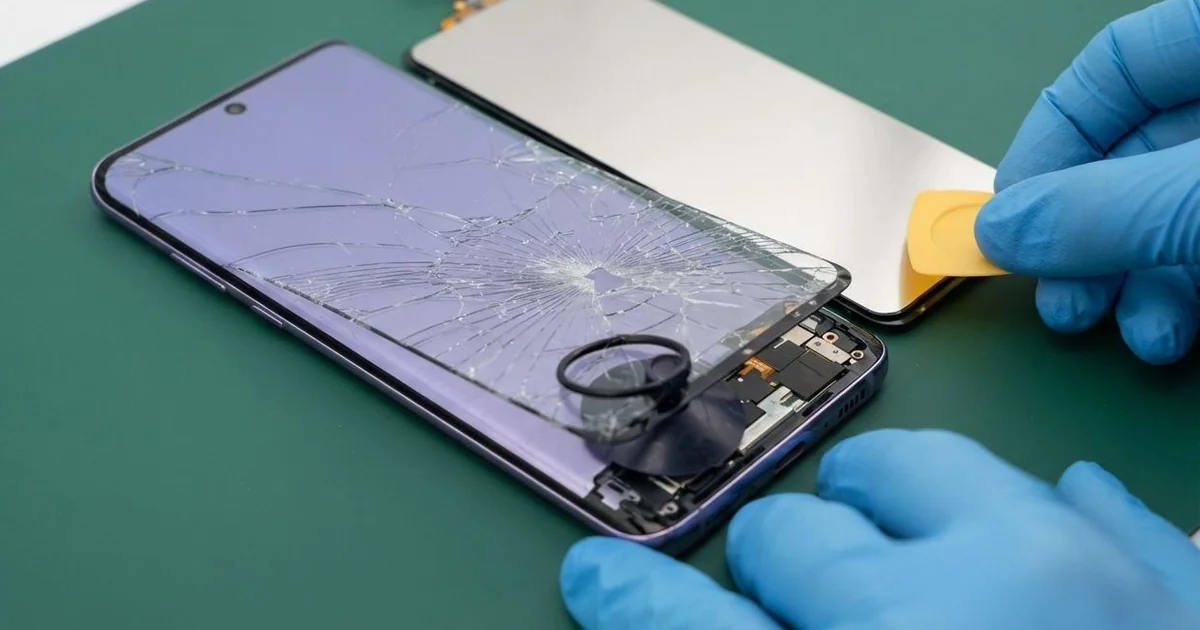
Samsung Galaxy S20+ LCD Display Replacement in Al Khobar fixes a cracked, dark or unresponsive screen. We check it free, then fit a complete new screen as one part. We test touch, colour and the fingerprint reader, and most jobs are done the same day.
A Samsung S20 Plus broken screen shows up in different ways. The glass cracks into a web, or a bright line runs across the display. Some screens look fine but ignore your finger, or the fingerprint reader stops working.
It's better not to wait. Cracks let in dust and sweat, and dark spots on the display keep growing each week. Once the screen goes fully black, even backing up your photos and chats gets much harder.
Not every fault needs a new part. A thick screen protector can stop the fingerprint reader and cause false touches. A loose connector after a drop can also turn the screen black, and refitting it fixes that.
Cracked glass, lines and dark spots are different. On this phone the glass and the display are glued together as one part. So a Samsung S20 Plus screen replacement means fitting the whole new screen, which fixes all of these at once.
How Kabayan Center Replaces a Samsung Galaxy S20+ LCD Display
We fix these screen faults on this phone.
- Cracked or shattered front glass
- Green, pink or white lines across the display
- Dark spots that spread, or a black screen while sound still works
- Touch that is slow, dead in one area, or tapping by itself
- A fingerprint reader that no longer reads through the screen
- A dim or flickering screen after an earlier poor-quality repair
Here is how the screen replacement works with us, step by step:
- We check the phone free and note what still works: sound, cameras, charging and buttons.
- We tell you what it needs, and you decide before any work starts.
- We warm the back glass, open the phone and disconnect the battery first.
- We remove the broken screen and clean all old glue and glass from the frame.
- We connect the new screen and test touch, colour and the front camera hole.
- We seal it with fresh glue, then help you register your fingerprint again.
- You check the phone yourself before you take it home.
Own a different model? Our phone screen replacement service covers other phones, with much the same steps. Customers come to our shop on King Fahd Road from Dammam and Dhahran too.
How a Galaxy S20+ Screen Breaks: 3 Real Cases
Slipped off a gym bench onto a hard floor
This one starts at a gym. A fitness trainer rested the phone on the edge of a bench between sets. A heavy weight bumped the bench, and the phone fell face down onto the rubber and concrete floor.
"The top half works, the bottom half is just lines," the trainer said. They had searched for Samsung Screen Replacement in Al Khobar on a friend's phone. This phone is large and heavy, so it lands hard even from a low height.
We found a crack running from one corner and a wide band of green lines. The fall had also bent the frame slightly near the bottom. That was why the charging cable now felt loose in the port.
We fitted a new screen and tested touch across every corner. For the loose cable, we also did a charging port repair, since the port had shifted in its seat.
The phone went home with a clear screen and a firm charging plug. A drop can hurt more than the glass, so test charging after every fall. The trainer now keeps the phone in a zip pocket during training.
Pressed in a tight bag with a water bottle
We often see this with students. A university student carried the phone in a tight backpack, next to a heavy metal water bottle. There was no drop at all, and the phone even had a case on.
Over a long day of walking between classes, the bottle kept pressing on the phone. "I just took it out and it was cracked," the student said. The student had looked up mobile repair in Al Khobar before the last lecture.
The crack started from the middle, not the edges. That's the sign of pressure, not a fall. We also noticed the bottle lid had leaked, and the bag had been damp for hours.
Water had reached the screen connector through the crack. So before the new screen, we did a water damage repair clean on that area. Green crust had already started to form, and soon the connector could have rusted through.
Once it was clean, we fitted the new screen, and the phone worked normally. The student now keeps the phone in a separate front pocket, away from bottles and books.
A poor screen from an earlier repair
A customer came to us after a screen replacement at another shop. The new screen looked dim, touch felt slow, and the fingerprint reader never worked. "It's like a different phone," they told us.
A low-quality screen often can't read the fingerprint sensor under it. It also shows duller colours and uses more battery to stay bright. The customer had lived with it for a while, hoping it would get better.
It didn't, and the battery drained faster each day. The phone felt old, even though only the screen was wrong.
We opened it and found a thick, poorly fitted screen with extra glue on the edges. Dust had also got under the front camera hole. We fitted a proper new screen and helped register the fingerprint again.
Colours, touch and the fingerprint all worked well afterwards. But the front camera lens had a fine scratch from the earlier repair. We offered a phone camera repair for it.
The customer decided to leave the camera as it was for now. Selfies stayed slightly soft, but the screen itself was finally right again. The camera can still be fixed on a later visit.
How to Keep Your Galaxy S20+ Screen Safe
- Use a case with a raised edge, so the glass doesn't meet the floor first.
- Choose a screen protector that works with an under-screen fingerprint reader.
- Keep the phone away from heavy bottles, keys and books in a tight bag.
- Fix small cracks early, before sweat, water or dust get inside.
- Ask for a good-quality screen, so colours, touch and fingerprint all work.
- Back up your photos while the screen still works, so a dark screen never costs you files.
- Take it for phone repair in Al Khobar at the first line or dark spot.
Related services
- Phone battery replacement if the screen is lifting or the phone drains fast
Questions about this repair
Ask us anything else on WhatsApp
we answer during shop hours.