Samsung Galaxy S20+ Motherboard Repair in Al Khobar
Samsung Galaxy S20+ Motherboard Repair in Al Khobar for a dead, looping or non-charging phone. Our technicians check it free and explain the fault in plain words. Nothing is repaired until you say yes.
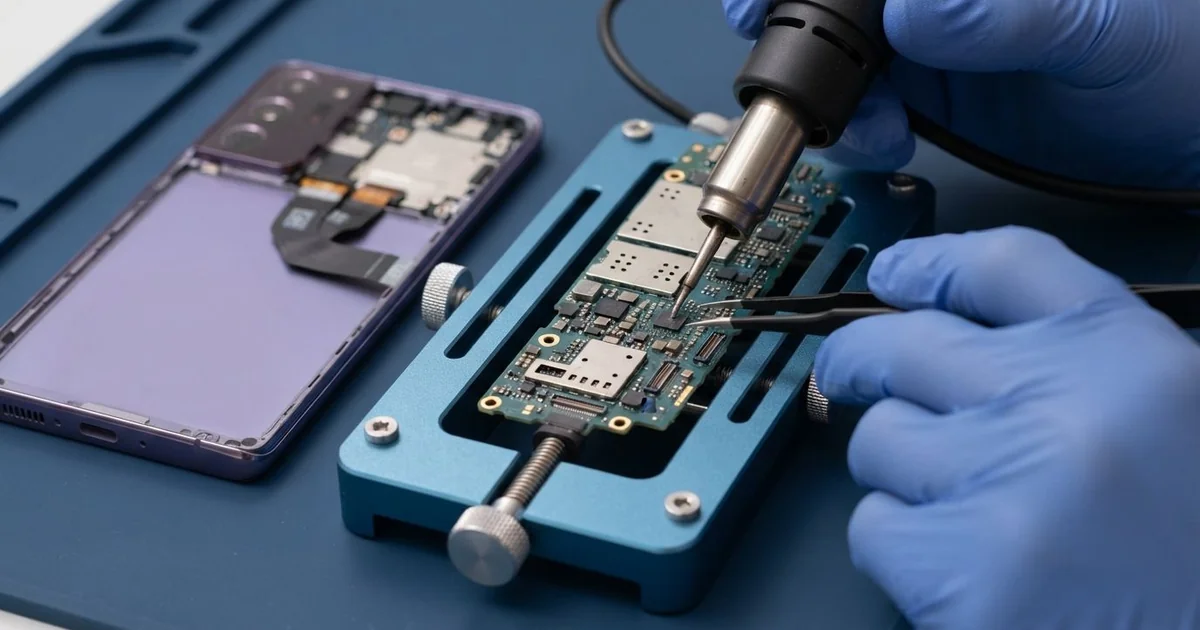
Samsung Galaxy S20+ Motherboard Repair in Al Khobar brings a dead or restarting phone back to life. We check it free and find the faulty part on the main board. We repair it under a microscope, test every function, and you decide before any work starts.
A Samsung S20 Plus not turning on is the most common sign we see. The screen stays black, even on the charger, and the buttons do nothing. Some phones get warm in one spot, or show the logo and restart again and again.
Waiting often makes a board fault worse. A short circuit keeps pulling power and slowly heats the parts around it. If water or sweat caused the fault, rust keeps growing under the metal covers.
Some faults need no soldering at all. A failed update can be fixed with a clean software install, and a loose connector only needs refitting. Our first job is to find out which case yours is.
Other faults sit on the board itself, and they need a steady hand. The Samsung S20 Plus motherboard is built as two layers pressed together, packed tight under metal covers. We fix it with micro-soldering, which means replacing tiny parts by hand under a microscope.
How Kabayan Center Repairs a Samsung Galaxy S20+ Motherboard
These are the board faults we fix on this phone.
- No power at all, even on the charger
- Restarting at the logo, again and again
- Charging that stopped, or a phone that gets hot while charging
- No signal, no Wi-Fi or a SIM card that isn't read
- A short circuit that empties the battery overnight
- Damage from water, sweat or a hard drop
Here is how a board repair on this model works, step by step.
- We check the phone free and read how much current it pulls on a USB meter.
- We open the back glass gently and lift the metal covers over the board.
- We look for a short circuit with a heat camera, since a shorted part warms up first.
- We look under the covers for rust, burn marks or cracked solder.
- We tell you what we found, and you decide before any work starts.
- We replace the faulty part, such as a small capacitor, the charging chip or the power chip.
- We clean the board with alcohol, close the phone and test calls, charging, cameras and Wi-Fi.
Have a laptop or another phone with a dead board? Our motherboard repair service covers those too. Customers reach our shop on King Fahd Road from Dammam and Dhahran as well.
Why a Galaxy S20+ Board Fails: 3 Real Cases
A fall down the mall stairs
A customer came to us after the phone bounced down a row of stairs at a shopping mall. "It showed the logo once, then nothing," they told us. At home they had held the power button down again and again.
A hard fall bends the board for a split second. On a board made of two layers pressed together, that can crack the tiny joints between them.
The meter showed the phone pulling almost no power. Under the microscope, we found a hairline crack running through the inner layer, close to the main chip. A crack like that can't be soldered back.
We showed the customer the crack on our microscope screen. That helped them see why a new board part would not help here.
The board was too far gone to save. The customer mostly wanted the family pictures, which had no backup. So we moved the job to data recovery, working on the memory chip directly.
Most of the pictures came back, but some recent videos did not. The customer now backs up the new phone every night, and keeps it in a case with raised corners.
A car charger from a petrol station
This one starts on a long drive across the desert. A sales rep bought a car charger at a petrol station after the usual one broke. Within an hour, the phone was too hot to hold, and then it went black.
Low-quality chargers often send uneven power. The charging chip takes the hit first. It controls all the power coming in through the port.
The USB meter showed power going in, but the screen stayed dark. The heat camera lit up one small chip near the port. We replaced the charging chip with micro-soldering, and the phone started at once.
Our battery test then showed the battery had lost much of its strength from the heat. So we did a phone battery replacement in the same visit.
We tested the finished phone on our own charger for a long while. It stayed cool, and the charge level climbed steadily.
The rep had searched for Samsung Motherboard Repair in Al Khobar from the car park. They left with a phone that charges normally and lasts through work again. The petrol station charger went in the bin.
An update that stopped halfway
We often see this after an overnight update. A nurse on night shifts let the phone update during a break, with very little battery left. The battery died halfway through.
After that, the phone showed the logo, went black and started again, over and over. "I thought the board was dead," the nurse said. Another shop had already said it needed a new board.
The meter showed normal power use, and the heat camera found no hot spot. That told us the hardware was fine and only the software was broken. A failed update often looks like a dead board, but the parts are fine.
We first saved the data through a safe repair mode, and it worked. Then we put a clean copy of the phone's software back on, without any soldering. That way, nothing on the phone was put at risk.
The phone started normally, with photos, chats and apps still in place. Never start an update with a low battery, and keep the charger in until it finishes. The nurse had looked for mobile repair in Al Khobar expecting bad news, and left smiling.
How to Keep Your Galaxy S20+ Board Healthy
- Use a good charger and cable, and skip unknown chargers from petrol stations or kiosks.
- Charge the battery above half before you start any update.
- Put the phone in a case with raised corners, so drops don't bend the board.
- Keep it off the car dashboard, where summer heat cooks the chips.
- Switch it off at once if it gets wet, and don't charge it until it's checked.
- Back up photos and chats every week, so a dead board never costs you your memories.
- Bring it in for phone repair in Al Khobar as soon as it gets hot in one spot.
Related services
- Water damage repair for a phone that got wet or sweaty
- Charging port repair for a loose or dead port
Questions about this repair
Ask us anything else on WhatsApp
we answer during shop hours.