Samsung Galaxy S20 Ultra Charging Port Repair in Al Khobar
Samsung Galaxy S20 Ultra Charging Port Repair in Al Khobar for slow, loose or dead charging. We check it free and tell you what it needs. You decide before any work starts, and your photos and chats stay on the phone.
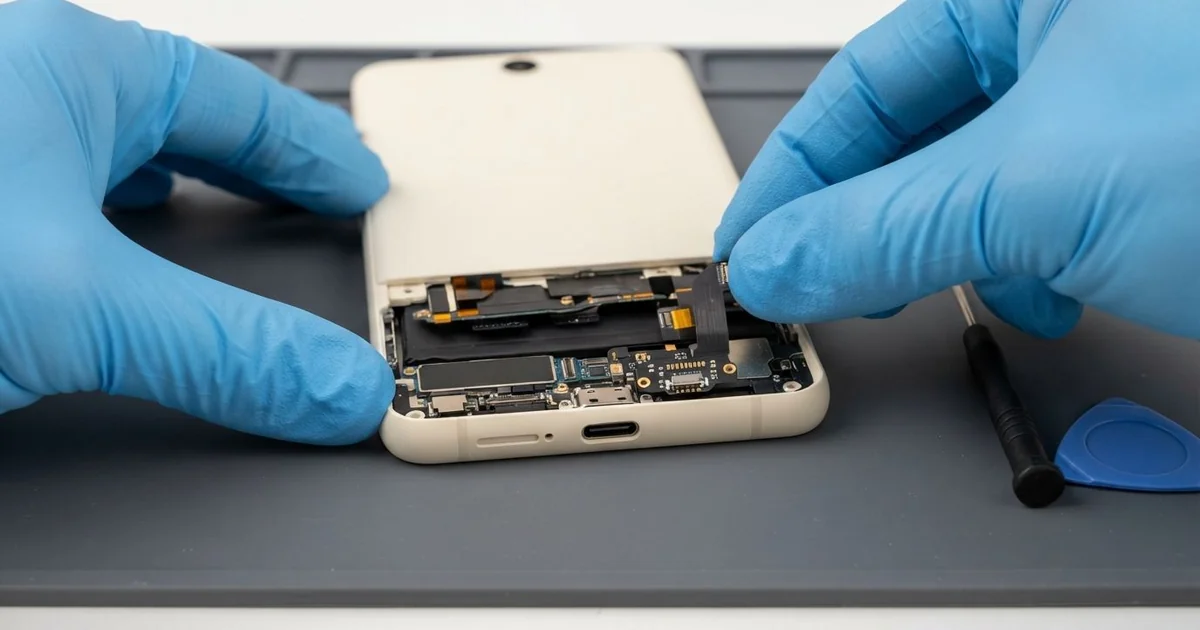
Samsung Galaxy S20 Ultra Charging Port Repair in Al Khobar gets your phone charging properly again. We check the port free and clean it first, since dirt is the usual cause. If the port is worn, we replace the small charging board and test fast charging and data.
A Samsung S20 Ultra not charging can show it in different ways. The cable feels loose and falls out with a light touch. Sometimes charging starts and stops, or it only works when you hold the plug at an angle.
Waiting usually makes it worse. A loose plug makes poor contact, so the tiny pins get hot and turn dark over time. Dirt and damp inside the port can also turn into rust that creeps onto the board.
Many ports only need a careful clean. Lint packs into the bottom, so the plug can't go all the way in.
A warning about moisture needs drying, not a new part. A worn, bent or rusted port needs the small charging board replaced.
The Samsung S20 Ultra charging port is not soldered to the main board. It sits on its own small board at the bottom, joined by a thin flex cable. So a new port doesn't mean touching your data or the main board.
How Kabayan Center Repairs a Samsung Galaxy S20 Ultra Charging Port
These are the charging faults we fix on this phone.
- Charging only at an angle, or a cable that falls out easily
- Very slow charging, or fast charging that no longer shows up
- A moisture warning that keeps coming back on a dry phone
- Green or white crust inside the port
- A computer that no longer sees the phone over the cable
- Callers who can't hear you well, because the bottom microphone usually shares the same small board
Here are the steps we follow, in order.
- We test your phone with our own cable and charger, to rule those out first.
- We look inside the port with a bright light and lift out lint with a non-metal pick.
- If it still won't charge, we tell you what it needs and you decide.
- We warm the back cover to soften the glue, lift it slowly and disconnect the battery.
- We take out the old charging board and fit a new one with its flex cable.
- We test cable charging, fast charging, wireless charging, data and the microphone.
- We seal the back with fresh glue and press it evenly.
Other phone models get the same care in our charging port repair service. Our shop is on King Fahd Road, and people drive over from Dammam and Dhahran too.
Why a Galaxy S20 Ultra Stops Charging: 3 Real Cases
Site dust packed into the port
A site engineer brought the phone in straight from work. "It charged fine before, but now the cable won't click in," they said. The plug only went in halfway, and the phone showed a charging sign for a second, then nothing.
The phone lived in a trouser pocket on a building site. Fine sand and cloth lint get pushed into the port each time the cable goes in. Every new plug presses the dirt deeper, until it forms a hard layer at the bottom.
The pins can't reach the plug, so the phone thinks nothing is connected. Under our light, the port looked grey instead of black.
We lifted out a flat cake of dust with a plastic pick, bit by bit. No new part was needed.
The engineer had tried a metal pin at home, but luckily it hadn't scratched the contacts. Never clean a port with metal, because it can short the pins. They had searched for Samsung Charging Port Repair in Al Khobar expecting a new part.
Instead, the phone took fast charging again before the engineer left the shop. It was a quick job done while they waited. We suggested a case with a small port cover for dusty work days.
A heavy phone hanging from a car charger
This one starts in a delivery van. The driver kept the phone in a dashboard mount, with the car charger cable always plugged in. The weight of this large phone pulled down on the plug over every bump.
Car chargers also shake a little at every stop and start. "Now it only charges if I tape the cable," the driver told us.
They had found us by searching for mobile repair in Al Khobar between deliveries. Months of rocking had worn the port loose. Under the light, the metal tongue inside was bent slightly downward.
We opened the back and fitted a new charging board. Then we saw the battery was puffing slightly at one end.
Constant charging in the summer heat had worn it out, so we also did a phone battery replacement. A swollen battery is not safe inside a hot car.
The plug now clicked in firmly, and the phone ran maps through a full shift again. The bottom microphone sounded clearer on calls too, since it sits on the new board. We suggested a mount that holds the phone from below, so the cable carries no weight.
A bad charger hurt the board, not the port
We often see this after a charger bought from a market stall. A student used one that got very hot while charging, even with the screen off. One evening the phone stopped charging, and wireless charging stopped working as well.
"I think the port is broken," the student said. But when cable and wireless charging fail together, the port is rarely the only problem. The charging chip on the main board usually is.
That chip controls how power reaches the battery, so we measured it next. The port tested fine with our meter, and the flex cable was clean.
Close up, there was a small brown burn mark near it. We confirmed a burnt charging chip on the main board, so the job moved to our motherboard repair bench. That work brought back normal cable charging, and the phone held its charge through the day.
Fast charging and wireless charging did not come back, because more of the board was damaged. The student chose to keep the phone as it is, charging it slowly overnight, and to back up often. An unknown charger is never worth the risk to the board.
How to Keep Your Galaxy S20 Ultra Charging Port Healthy
- Keep the phone in a clean pocket, or use a case with a port cover on dusty sites.
- Plug and unplug the cable straight, never at an angle.
- Use a car mount that holds the phone from below, so the cable carries no weight.
- Clean the port with a wooden toothpick or a soft brush, never with metal.
- Dry the phone and wait for a moisture warning to clear before you charge.
- Choose a known, good-quality charger and cable over an unknown one from a stall.
- Bring it for phone repair in Al Khobar as soon as the plug starts to feel loose.
Related services
- Water damage repair for a phone that got wet or sweaty
- Phone screen replacement for cracked or dark screens
Questions about this repair
Ask us anything else on WhatsApp
we answer during shop hours.