Samsung Galaxy S20 Ultra LCD Display Replacement in Al Khobar
Samsung Galaxy S20 Ultra LCD Display Replacement in Al Khobar for cracked glass, green lines or dead touch. We look at the phone free and explain what it needs. Nothing is done until you say yes, and your files stay untouched.
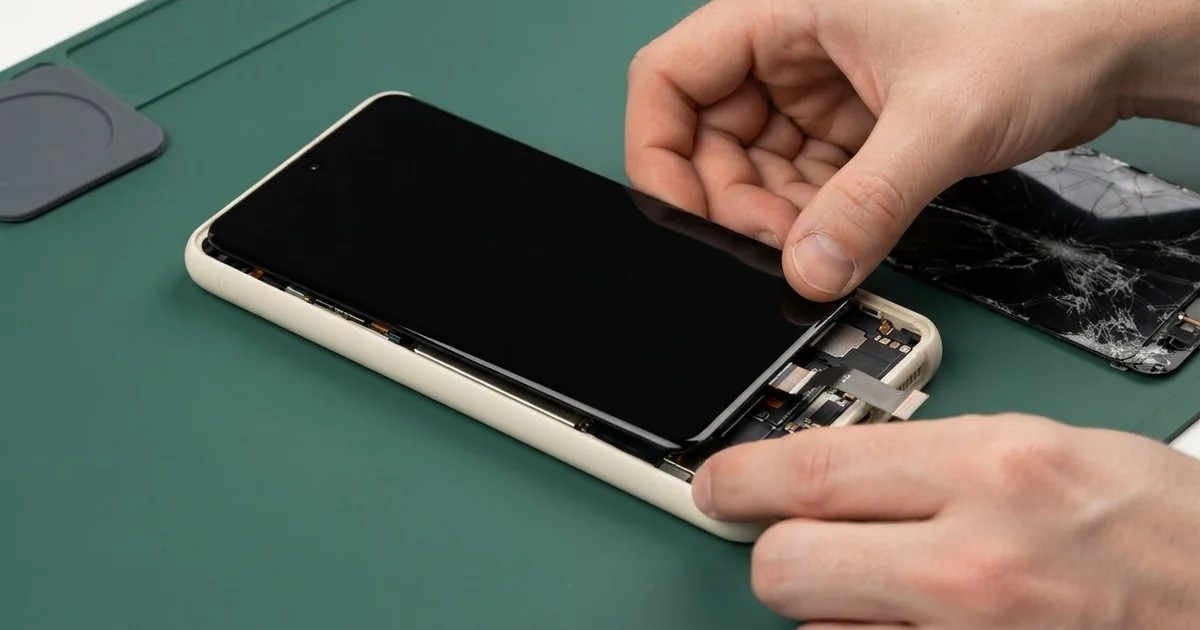
Samsung Galaxy S20 Ultra LCD Display Replacement in Al Khobar fixes a cracked, green-tinted or dead-touch screen. We check the phone free, then fit a complete new screen with the glass and display joined. Touch, colour, the fingerprint reader and the curved edges are all tested, and most jobs are done the same day.
A Samsung S20 Ultra broken screen does not always look smashed. Sometimes a thin green line appears, or the whole display turns slightly green. Other times the glass looks fine, but the bottom half ignores your finger.
Waiting usually makes it worse. A crack on a curved edge spreads each time the phone heats up and cools down. Loose glass also lets dust and sweat reach the display underneath, and a dark screen makes a backup much harder.
Some faults need no new part at all. A thick screen protector can block touch near the curves. A loose connector after a knock can turn the screen black, and refitting it fixes that.
Cracks, lines and a green tint are different. The glass and display on this model are one glued part, so they are swapped together. A Samsung S20 Ultra screen replacement puts in the full new unit and clears all three problems.
How Kabayan Center Replaces a Samsung Galaxy S20 Ultra LCD Display
These are the screen faults we fix on this phone.
- Cracked front glass, including the curved sides
- A green tint, or green and pink lines across the display
- Black patches, or a dark screen while calls still ring
- Dead touch in one area, or taps that happen by themselves
- A fingerprint reader that stopped reading after a crack
- A screen lifting away from the frame at one corner
This is how the repair works, step by step:
- We check the phone free and test sound, cameras, charging and buttons first.
- We explain what it needs, and you decide before any work starts.
- We warm the curved edges gently to soften the glue, then lift the screen slowly.
- We disconnect the battery before we touch the display cable.
- We clean old glue and glass from the frame, then connect the new screen.
- We test touch across the curves, colour and brightness, then seal the screen evenly.
- We help you register your fingerprint again, and you check the phone before leaving.
Have a different phone? Our phone screen replacement page covers other models too. Many customers drive to our shop on King Fahd Road from Dammam and Dhahran.
How an S20 Ultra Screen Gets Damaged: 3 Real Cases
A green line after a fall on tiles
We often see this after a small fall at home. A school teacher knocked the phone off a kitchen counter onto the tiled floor. It landed on one corner, and the glass showed only a tiny chip.
A few days later, a thin green line ran down the display. "Then the whole screen went slightly green," the teacher told us. They had searched for Samsung Screen Replacement in Al Khobar that same evening.
A hard knock on a corner can crack the display layer under the glass. That damage grows slowly over days, and a green line is often the first sign you see.
We opened the phone and found the display cable was fine. The fault was inside the screen itself, so it had to be replaced. We fitted a new screen and checked the colour on a plain white page.
We also tested the fingerprint reader twice, since it sits under the new glass. The green tint was gone, and touch worked right to the curved edges. The teacher left with a clear screen and a new case with thicker, softer corners.
Sat on in a back pocket all day
A common case with a big, heavy phone: a delivery driver kept it in a back trouser pocket while driving. Sitting on it again and again put steady pressure on the screen.
"It cracked while I was just sitting," the driver said. A crack ran from one corner, and part of the screen stayed black. They had typed mobile repair in Al Khobar into a friend's phone to find us.
We found the frame was slightly bent, and that bend had cracked the glass. We straightened it carefully before fitting the new screen. Otherwise the new one could crack the same way.
While testing, the zoom pictures looked blurry and spotted. The glass over the large rear camera block had cracked too. So we did a phone camera repair and fitted new camera glass.
The main camera came back sharp. The zoom lens itself was damaged, though, and still struggled to focus on far things.
The driver needed the phone back for work, so they chose to leave the zoom for later. The new screen was perfect, and the phone now rides in a front pocket.
A low-quality screen fitted somewhere else
This one came in with a screen that had already been replaced. A nurse on night shifts had a new screen fitted at a small stall after a crack. It looked fine at first, and the phone went straight back into daily use on the wards.
Within weeks, the colours looked washed out and the top of the screen felt warm. "The fingerprint stopped working too," the nurse said. Low-quality copy screens are often thicker, and many can't read a fingerprint through the glass.
We opened it and found the copy screen barely glued, with a gap along one side. Fine dust from the windy season had got in through that gap and settled on the display. We also saw the battery starting to swell under the loose screen.
We did a phone battery replacement first, because a swollen battery is a fire risk. Then we fitted a proper new screen and sealed it evenly all round.
The fingerprint reader worked again, and the colours looked deep and even. The nurse learned that a good seal matters as much as the glass itself. A loose screen lets in dust, sweat and heat.
How to Keep Your S20 Ultra Screen Safe
- Carry the phone in a front pocket or a bag, never a back pocket.
- Use a case with raised edges around both the screen and the camera block.
- Pick a screen protector made for curved screens, so touch still reaches the sides.
- Keep the phone out of direct sun in the car, where heat weakens the screen glue.
- Fix a small chip early, before it grows into a green line.
- Back up your pictures and chats while the screen still works.
- Bring it for phone repair in Al Khobar as soon as the screen lifts at a corner.
Related services
- Water damage repair for a phone that got wet through a crack
- Charging port repair for a phone that charges slowly or not at all
Questions about this repair
Ask us anything else on WhatsApp
we answer during shop hours.