Samsung Galaxy S20 Ultra Motherboard Repair in Al Khobar
Samsung Galaxy S20 Ultra Motherboard Repair in Al Khobar for a phone that runs hot or stays black. We look at it free and tell you what failed. You choose whether we go ahead, and we delete nothing without asking.
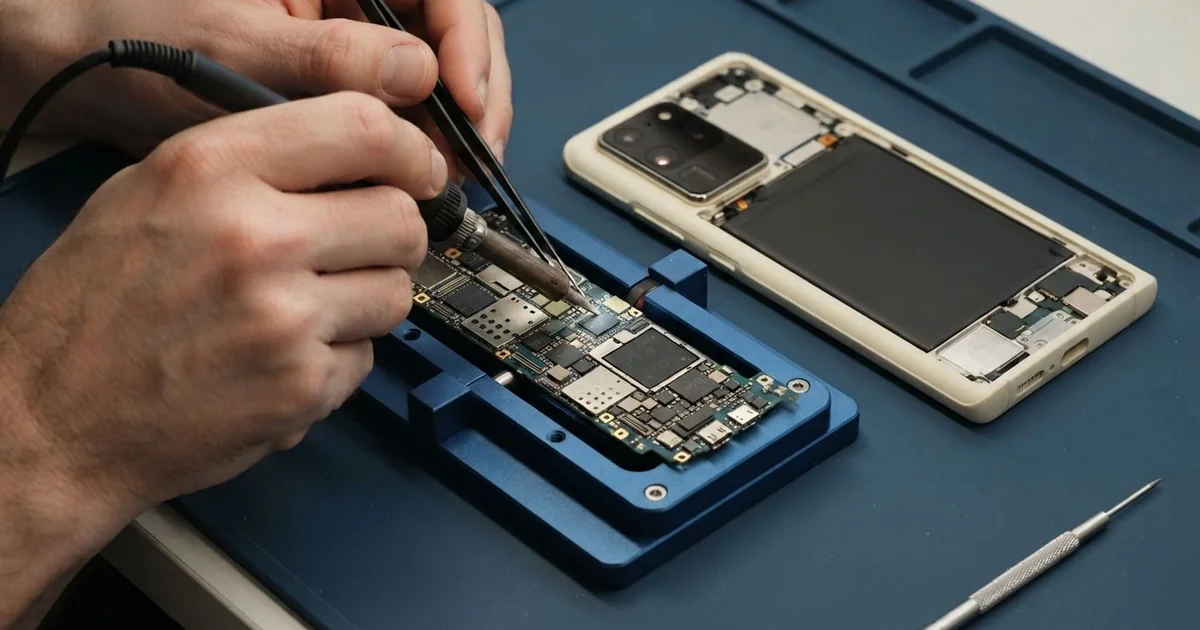
Samsung Galaxy S20 Ultra Motherboard Repair in Al Khobar fixes a phone that died, overheats or keeps restarting. We test the board free, trace the fault to one part, and replace it under a microscope. You approve the work first, and we test everything before you collect it.
A Samsung S20 Ultra not turning on is how most of these jobs begin. Sometimes the phone vibrates, but the screen stays dark. Other times it gets hot in the pocket while doing nothing at all.
This big phone has a powerful chip that makes a lot of heat. Long videos, games or maps in the summer push the board hard. A small fault can grow until the phone won't start, so an early check helps.
Not every dead phone has a broken board. A drained battery, a dirty port or a failed update can look exactly the same, and those are quick fixes. We rule them out before we open anything.
When the board itself is at fault, the work is careful and slow. The Samsung S20 Ultra motherboard is two layers pressed together, with metal covers on top. We use micro-soldering, which means changing tiny parts by hand under a microscope.
How Kabayan Center Repairs a Samsung Galaxy S20 Ultra Motherboard
We fix these board faults on this model.
- A dead phone that shows no sign of life
- Shutting down while filming, gaming or using maps
- A hot spot on the back, even when the phone is resting
- Charging that stops, or a charging icon that comes and goes
- No mobile signal, or a SIM card that isn't found
- Board damage after sweat, water or a drop
This is how we work on the board, one step at a time.
- We check it free and measure the current it draws with a USB meter.
- We ask what happened before it failed, since the story often points to the fault.
- We remove the back glass and the metal shields that cover the board.
- We find the short circuit with a heat camera and look under the shields for rust.
- We explain the fault, and nothing is repaired until you agree.
- We replace the failed part with micro-soldering and clean the area with alcohol.
- We rebuild the phone and test calls, signal, charging and all the cameras.
Is it a laptop or a different phone? Our general motherboard repair page explains how we handle those. We also get customers from Dammam and Dhahran, a short drive from our King Fahd Road shop.
What Kills an S20 Ultra Board: 3 Real Cases
Hours of filming in the summer heat
This one starts on the Corniche at noon. A content creator was filming long videos in the sun while the phone charged from a power bank. "It got really hot, then it just switched off," they said.
Filming, charging and strong sun together push the heat very high. The power chip on the board handles all of that at once, and heat slowly wears it out. Direct sun on the back glass makes it even worse.
The meter showed a steady power draw, but the screen never woke. Our heat camera found the power chip glowing hot within seconds. We replaced it with micro-soldering and cleaned the old flux away.
We checked the other chips around it too, since heat rarely hurts just one part. The rest of the board tested normal.
The phone came back, but the battery had puffed up slightly from the same heat. We did a phone battery replacement before closing it, because a swollen battery can catch fire.
Everything worked again, including the zoom camera the creator relies on. Now they film with the phone in the shade and charge it only between takes.
Gym sweat that crept under the shields
A fitness trainer brought the phone in after weeks of strange behaviour. It lived in the side pocket of a damp gym bag every evening. First the signal kept dropping, then one morning it would not start.
"It kept saying no service," the trainer said at the counter. The phone was already warm, with the battery draining fast.
Sweat is salty water. It slips in through tiny gaps and leaves a crust that eats the metal slowly. Heat from a workout makes it spread faster.
When we lifted the shields, we saw green and white crust along one edge of the board. We did a full water damage repair, cleaning each area with alcohol and a soft brush.
The phone switched on, and the screen, cameras and Wi-Fi all worked. Sadly, the part of the board that handles mobile signal was too corroded to rebuild. We explained that clearly before handing it back.
The trainer chose to keep the phone for Wi-Fi calls and music at the gym. They had found us by searching for Samsung Motherboard Repair in Al Khobar. Now the phone travels in a dry, zipped pocket.
A loose screw from an earlier repair
A common case: the phone had a screen repair at another shop not long before. Then it died on the charger and never started again. The owner, a shop cashier, thought the new screen had failed.
Inside, we found a small screw sitting loose between the board and the frame. A loose metal screw can touch the board and join two tiny points that should never meet. It's a small mistake with big results.
The heat camera showed a burnt capacitor, a very small part that smooths power, right beside the screw. We replaced the capacitor and put every screw back in its proper place. We cleaned the burnt area with alcohol before fitting the new part.
The same screw had also scratched the thin cable that runs to the port. It had worn through the outer layer in one spot. So we did a charging port repair in the same visit.
The cashier had searched for mobile repair in Al Khobar late at night, afraid of buying a new phone. It started, charged and worked normally again. We always check every screw before we close a phone.
How to Keep Your Galaxy S20 Ultra Cool and Healthy
- Film or game in the shade, and take breaks when the back feels hot.
- Avoid charging while you play games or record long videos.
- Keep the phone out of damp gym bags and sweaty pockets.
- Use a charger and cable made for your phone, not unknown ones.
- Ask any repair shop to put back every screw in its own place.
- Back up your photos often, since a dead board can lock them inside.
- Bring it for phone repair in Al Khobar if it shuts down from heat more than once.
Related services
- Data recovery for pictures and files stuck on a dead phone
Questions about this repair
Ask us anything else on WhatsApp
we answer during shop hours.