Samsung Galaxy S21 FE Charging Port Repair in Al Khobar
Samsung Galaxy S21 FE Charging Port Repair in Al Khobar for a phone that charges slowly or not at all. We check your phone free and tell you what it needs. You decide before any work starts, and nothing extra comes later.
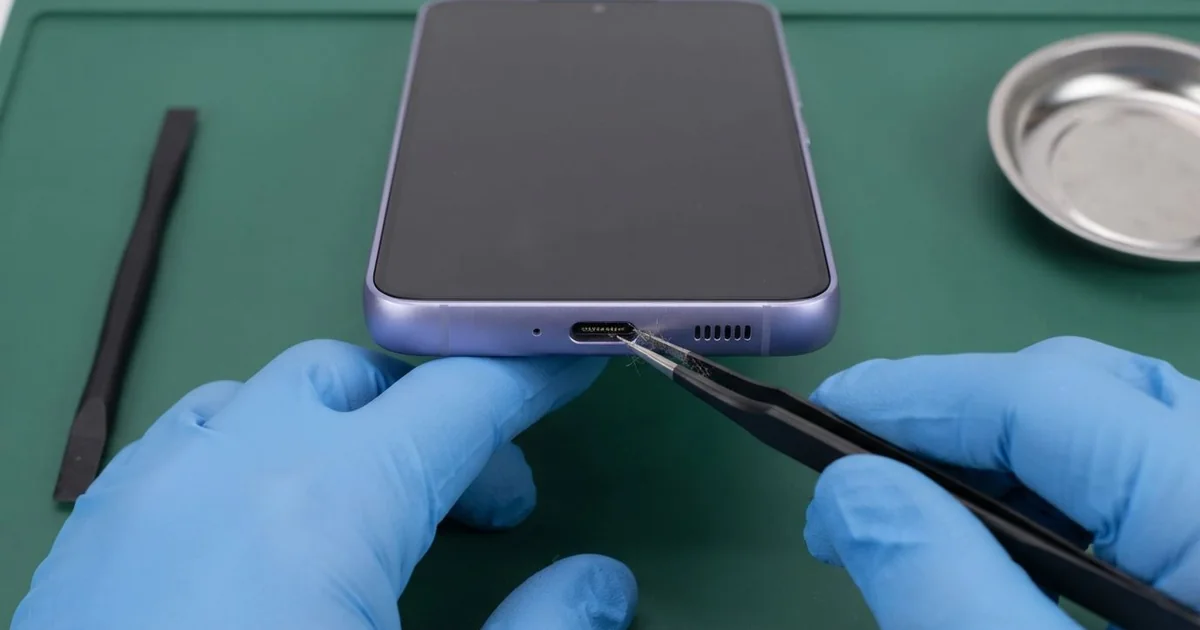
Samsung Galaxy S21 FE Charging Port Repair in Al Khobar fixes a phone that charges slowly or not at all. We check it free, then clean the port or replace the small charging board. We test normal and fast charging before you take it home, and most jobs are done the same day.
A Samsung S21 FE not charging shows up in a few ways. The cable feels loose and falls out when you move the phone. Or the phone charges only when you hold the cable at an angle, and the fast charging message is gone.
It's better not to wait. A loose connection makes the pins spark a little every time you charge. Over time they burn, and a simple cleaning job turns into a new part.
Many of these faults don't need a new part at all. Pocket lint packs into the port and stops the cable going in fully. We pick it out with plastic tools, and the phone charges normally again.
Some faults go deeper. The Samsung S21 FE charging port sits on a small charging board at the bottom of the phone. If its pins are bent, burnt or rusty, we replace that board with a new one.
How Kabayan Center Repairs a Samsung Galaxy S21 FE Charging Port
We fix these charging faults on this phone.
- A cable that feels loose, falls out or charges only at an angle
- Very slow charging, or fast charging that no longer switches on
- A moisture warning that stays on even when the port is dry
- Lint, sand or dirt packed deep inside the port
- Bent, burnt or green, rusty pins
- A computer or wired earphones that no longer connect through the port
Here is how the repair works with us, step by step:
- We check the phone free with our own cable and charger, so we know the fault is not your cable.
- We look inside the port with a bright light and a magnifier for lint, rust or bent pins.
- We tell you what it needs, and you decide before any work starts.
- For dirt, we clean the port with plastic picks and a little cleaning alcohol, never metal.
- For a damaged port, we warm and lift the glued back, remove the inner cover and disconnect the battery.
- We fit a new charging board, connect its flex cable (a thin ribbon to the main board) and seal the back.
- We test normal charging, fast charging and a computer connection before you take it home.
Own a different phone? Our charging port repair service covers other models too. Customers come to our shop on King Fahd Road from Dammam and Dhahran as well.
Why a Galaxy S21 FE Stops Charging: 3 Real Cases
Pocket lint packed into the port
A customer came to us after weeks of slow charging. "It only charges if I bend the cable down," they said. They had already bought two new cables, and neither one helped.
This cause is very common. The phone lives in a trouser pocket all day, and lint slowly builds up in the port. Every time the cable goes in, it presses the lint harder against the back.
They had searched for Samsung Charging Port Repair in Al Khobar and expected a big job. Under our light we saw a grey, felt-like layer at the bottom of the port. The cable could only go in halfway, but the pins were clean and straight.
We pulled the lint out in one thin piece with a plastic pick. No new part was needed. The cable clicked in firmly, and fast charging came back on at once.
During the final test, the battery dropped quickly under load. Its health was low after years of hot charging, so the customer also booked a phone battery replacement. We showed them how to check the port with a phone torch, and never with a metal pin.
Salty sweat and a moisture warning
We often see this in summer. A fitness trainer kept the phone in a tight armband during long outdoor sessions in the heat. After one hot evening, it showed a moisture warning and refused to charge.
Sweat is salty water, and it got into the port. The phone blocked charging to protect itself. The trainer searched for mobile repair in Al Khobar, but first tried to charge it on a wireless pad.
When we looked inside, the port was dry, but two pins had a thin white crust. Salt stays behind after sweat dries. The warning kept coming back because the crust held a little moisture.
Under the back cover we found a small green spot near the flex cable. So we did a water damage repair on that area first. One pin had already started to rust, so we also fitted a new charging board.
A moisture warning means stop charging and let it dry. The phone now charges with no warning at all, and fast charging works again. The trainer keeps it in a small zip bag during every workout.
A poor car charger and a burnt chip
This one starts with a low-quality car charger. A delivery driver used it every day to keep maps running. One afternoon the phone got very hot on the dashboard and stopped charging completely.
The driver was sure the port had broken and asked for a new one straight away. We tried a test charging board first, and nothing changed. So the fault was not in the port at all.
We found a damaged charging chip on the main board. A poor charger can send unsteady power, and the chip that controls charging takes the hit. That called for a motherboard repair, not a port job.
We replaced the chip, and the phone charged again, but only slowly. Fast charging did not come back, because a small part beside the chip was burnt too. The driver chose to use it this way rather than wait for another part.
The original port was fine, so it stayed in the phone. We suggested a good charger for the car, with a proper safety mark on the box. Unplug any charger when the phone gets hot to the touch.
How to Keep Your Galaxy S21 FE Charging Port Clean
- Check the port with a torch every few months, and look for grey lint or sand.
- Clean it with a wooden toothpick or a plastic pick, never a metal pin.
- Push the cable in straight, and pull it out by the plug, not the wire.
- Wait for a moisture warning to clear before you charge. Let the port dry in open air.
- Use a good charger and cable in the car, and keep the phone off the hot dashboard.
- Take it for phone repair in Al Khobar when charging needs an angle, before the pins burn.
Related services
- Phone screen replacement for a cracked, dark or unresponsive screen
Questions about this repair
Ask us anything else on WhatsApp
we answer during shop hours.