Samsung Galaxy S21+ Charging Port Repair in Al Khobar
Samsung Galaxy S21+ Charging Port Repair in Al Khobar for loose, slow or stopped charging. The check is free, and we explain the fault in plain words. You say yes before any work, and we delete nothing on your phone.
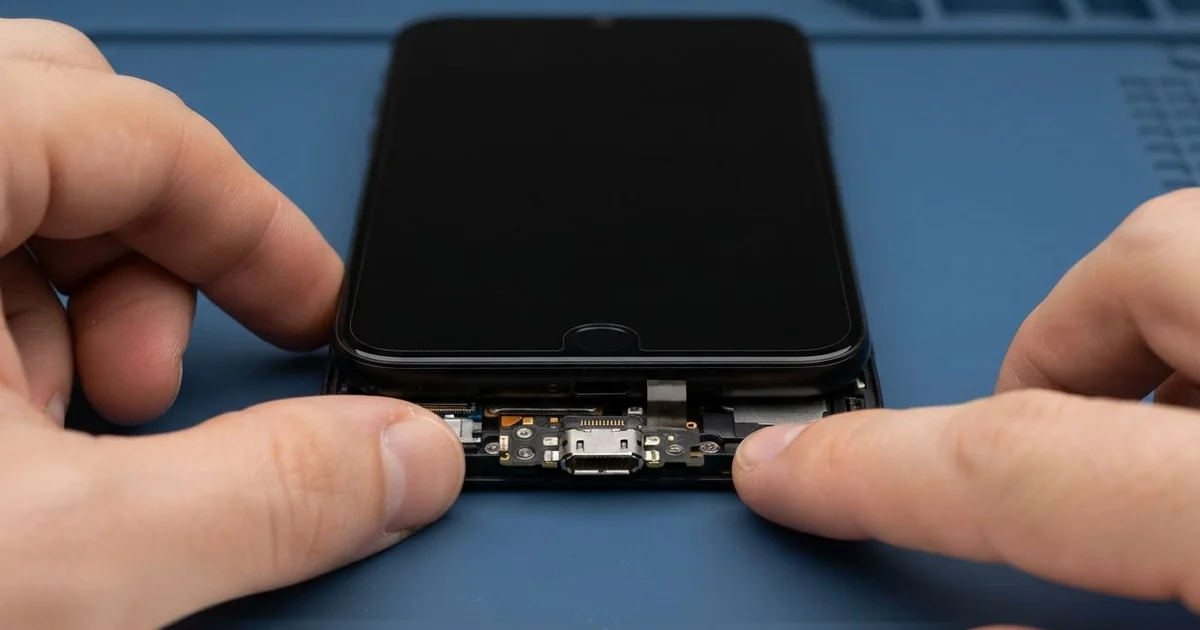
Samsung Galaxy S21+ Charging Port Repair in Al Khobar gets power flowing into your phone again. We check it free and find the real fault first. Sand and lint are cleaned out, or a new charging board is fitted and tested with fast and wireless charging.
A Samsung S21 Plus not charging usually gives warnings first. The plug may feel gritty going in, or it wobbles when you lift the phone. Some owners see the charging sign blink on and off with every small move.
Others find the phone lower in the morning than it was at night. Or the computer suddenly stops seeing the phone when they try to copy files.
It pays to fix it early. Grit and a loose plug both wear the pins down. Heat from a bad contact can also damage parts further inside the phone.
Sand, lint and damp can usually be cleared without any new part. Pins that are bent, burnt or green with rust mean the port must be replaced.
The Samsung S21 Plus charging port is part of a small board at the bottom of the phone. A flex cable connects it to the main board. So changing the port does not touch your data.
How Kabayan Center Repairs a Samsung Galaxy S21+ Charging Port
These are the charging faults we fix on this phone.
- A gritty or crunchy feel when the plug goes in
- A wobbly plug, or charging that cuts out when the phone moves
- No fast charging, even with a good charger
- A moisture warning on a dry phone
- Rust or burn marks on the pins
- A computer that won't see the phone by cable
- A weak or muffled microphone on calls
This is the order of the repair.
- We try a known good charger and cable, so we know the port is the problem.
- We inspect the port under a bright light and a magnifier.
- We clear sand and lint with a plastic pick and a soft brush.
- If the port still fails, we explain what it needs and you decide.
- We warm the glass back, lift it carefully and disconnect the battery.
- We fit a new charging board and connect its flex cable.
- We test cable charging, wireless charging, data and the microphone, then seal the back.
For other phones, see our charging port repair service. Our shop is on King Fahd Road, and customers come from Dammam and Dhahran too.
What Stops a Galaxy S21+ From Charging: 3 Real Cases
Beach sand in the port
A family trip to the beach started this one. A parent came in a few days later with a phone that would not charge. "The cable feels crunchy, like there's sugar in it," they said.
The phone had spent the day in a pocket on the sand. Fine sand gets into the port and sticks to any damp from sea spray. Each time the cable goes in, it packs the grains tighter.
They had searched for Samsung Charging Port Repair in Al Khobar and expected a new part. Under our light, the port was full of pale grains packed hard at the bottom. The pins were still clean and straight.
We cleared the sand slowly with a plastic pick and a soft brush. Rushing can scratch the pins, so this part takes patience. Then we tested charging with our cable, and the fast charging sign came up.
No part was needed, and they left while the kids were still in the car. For the next beach trip, we suggested a zip bag for the phone. A dust plug in the port helps too.
Landed on its bottom edge
We often see this after a fall from a car seat. A sales rep dropped the phone getting out of the car, and it hit the pavement on its bottom edge. "Now the plug won't go in straight," the rep said.
A fall on the bottom edge sends the whole shock into the port. The metal shell of the port can bend, and the board behind it can crack. That's exactly what we found on this phone.
We replaced the charging board and tested it with several cables. The plug now went in straight and held firm, even when we shook the cable. Fast charging and data both worked again.
While testing, we saw a thin crack running from the bottom corner of the glass. Touch still worked, but the crack was starting to spread. We did a phone screen replacement in the same visit, at the rep's request.
The rep had found us by searching for mobile repair in Al Khobar. They left with a working port and a clear screen. A case with a thick bottom lip is now on the phone.
Gaming while fast charging in the heat
This one starts with an engineer's long gaming sessions after work, always with the fast charger plugged in. The room had weak AC, and the phone often felt hot to hold. Sometimes the screen dimmed by itself to cool down.
"It just stopped charging, cable or wireless," the engineer told us. When both kinds of charging fail together, the port is often fine. We tested the port and the flex cable, and both were good.
So we looked at the main board under the microscope. One small chip near the battery connector had a dull, cooked look.
Heavy use, fast charging and heat together had worn out that charging chip. We sent it for motherboard repair, where the chip was replaced. Cable charging came back after that.
Wireless charging did not come back, since a second part on the board was also damaged. The engineer chose to use cable charging only and skip the extra repair.
We shared one simple rule. Don't play heavy games while the phone is fast charging. Let it charge first, or play with the charger out.
How to Keep Your Galaxy S21+ Charging Port in Good Shape
- Put the phone in a zip bag at the beach or in the desert.
- Use a case with a thick bottom edge to protect the port in a fall.
- Avoid heavy gaming while the phone is fast charging.
- Brush lint out of the port gently every few weeks.
- Charge in a cool room, not in direct sun or a hot car.
- Get phone repair in Al Khobar as soon as the plug feels gritty or loose.
Related services
- Phone battery replacement for a battery that drains fast or swells
- Water damage repair for a phone that got wet
Questions about this repair
Ask us anything else on WhatsApp
we answer during shop hours.