Samsung Galaxy S21 Ultra Charging Port Repair in Al Khobar
Samsung Galaxy S21 Ultra Charging Port Repair in Al Khobar for a plug that wobbles or won't charge. We look at it free and tell you honestly what it needs. You decide first, and if we can't fix it, you pay nothing.
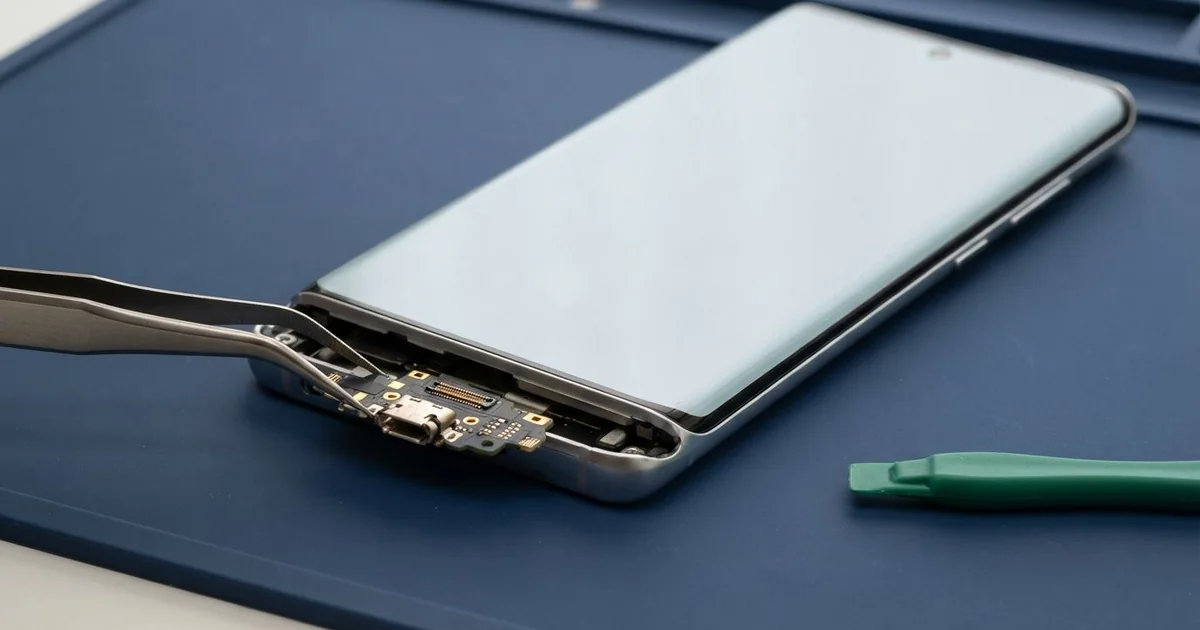
Samsung Galaxy S21 Ultra Charging Port Repair in Al Khobar begins with a free check to find the real cause. Sometimes it's damp or dirt, and sometimes it's a worn port. We clean it or fit a new charging board, then test fast charging, wireless charging and data.
A Samsung S21 Ultra not charging rarely fails all at once. First the cable needs a small push to connect. Then the fast charging sign goes missing, and a full charge takes most of the night.
Some owners get a moisture warning when the phone hasn't been near water. Others notice that the wireless pad still works, but the cable doesn't. That is a strong clue that the port itself is the problem.
Leaving it usually costs more. A loose plug heats the pins every time it moves, and they slowly burn. Damp in the port turns to rust, which can creep onto nearby parts.
Many faults need no new part. Lint comes out with a careful clean, and damp only needs drying. A bent, burnt or rusted port needs replacing.
The Samsung S21 Ultra charging port sits on a small board at the bottom, apart from the main board. A thin flex cable links the two. So we can change the port while your data stays where it is.
How Kabayan Center Repairs a Samsung Galaxy S21 Ultra Charging Port
These are the charging faults we fix on this phone.
- A plug that needs pushing or holding to charge
- No fast charging sign, with very slow charging
- Wireless charging that works while the cable doesn't
- A moisture warning on a phone that seems dry
- Green or dark marks on the pins
- A computer that won't find the phone by cable
- A quiet or muffled microphone on calls
This is how we carry out the repair.
- We charge the phone with our own tested cable and charger first.
- We check the port under a light and magnifier for lint, rust or bent pins.
- We clean the port with a plastic pick and dry any damp we find.
- If a new part is needed, we explain the fault and you decide.
- We heat the glass back gently, lift it and disconnect the battery.
- We replace the charging board and reconnect its flex cable.
- We test fast and wireless charging, data transfer and the microphone, then seal the back.
Using another phone? Our charging port repair service covers other models the same way. You'll find us on King Fahd Road, and many customers drive in from Dammam and Dhahran.
How a Galaxy S21 Ultra Charging Port Gets Damaged: 3 Real Cases
Cold office AC, then the summer heat
A customer came to us puzzled by a warning that appeared almost every afternoon. An engineer worked all day in a very cold office. "I never get it wet, but it keeps saying there's water," they said.
Walking from strong AC into the summer heat outside makes the cold phone fog up. Tiny drops form inside the port, just like on a cold glass of water. Day after day, that damp leaves marks on the pins.
The engineer searched for Samsung Charging Port Repair in Al Khobar when the warning blocked charging before a long drive. Inside the port, we saw light green spots on the pins and a thin white crust.
The engineer had also been blowing into the port to dry it. Breath is damp, so that only added more moisture.
We opened the phone and found the rust had stayed on the charging board. We cleaned the frame the way we do in a water damage repair, then fitted a new charging board. The warning did not come back.
We suggested keeping the phone in a bag for a few minutes after leaving the office. That lets it warm up slowly and stay dry inside.
A cable caught by passing feet
We often see this in busy shops and cafes. A barista charged the phone from a laptop at the counter, with the cable hanging over the edge. People walking past kept catching the wire and jerking it sideways.
"Only the wireless pad works now," the barista said. They had asked around for mobile repair in Al Khobar and a regular customer sent them to us. The cable dropped out of the port as soon as we tilted the phone.
Under our light, the port's metal shell was bent at one side. Each sideways pull had also loosened it from its small board. That kind of damage can't be cleaned or bent back safely, so a new port was needed.
We replaced the charging board and tested it with several cables. Fast charging came back, and the laptop found the phone again at once. The microphone on the same board sounded clearer on a test call too.
We suggested a short cable and a phone stand behind the counter. The wire then stays out of everyone's way, and the phone sits upright where it can be seen.
A swollen battery pulled on the charging cable
This one starts with a phone that charged less and less each night. A security guard noticed the glass back was lifting at one edge. "It charges for a minute, then stops," the guard said.
The phone had spent long shifts in a hot guard hut with the charger always in. Heat and constant charging make a battery swell. A swelling battery pushes on everything around it, including the thin charging flex.
We found the battery puffed up and the flex stretched tight across it. We did a phone battery replacement first, since a swollen battery can catch fire. Stop using a phone whose back or screen is lifting.
With a new battery and the flex reconnected, charging worked normally again. The port itself was fine and didn't need changing. We still tested fast charging, wireless charging and data before closing it.
But the pressure had cracked the glass back near the camera. The guard chose to keep it for now, with a tight case holding the cracked glass in place. We noted that the back glass can be replaced later, whenever the guard is ready.
How to Keep Your Galaxy S21 Ultra Charging Port Safe
- Let the phone warm up in a bag after leaving a cold room.
- Keep the cable short and out of the way when charging at a counter or desk.
- Unplug the charger once the phone is full, especially in hot rooms.
- Stop charging when a moisture warning shows, and let it dry.
- Clean lint out with a wooden toothpick, never a metal pin.
- Visit us for phone repair in Al Khobar if only the wireless pad still charges it.
Related services
- Motherboard repair for a phone that won't charge by cable or wireless
- Phone screen replacement for a cracked or dark display
Questions about this repair
Ask us anything else on WhatsApp
we answer during shop hours.