Samsung Galaxy S22 LCD Display Replacement in Al Khobar
Samsung Galaxy S22 LCD Display Replacement in Al Khobar when the glass cracks, lines appear or touch stops working. Bring the phone in and we check it free. We explain what it needs, you decide first, and your photos and chats stay where they are.
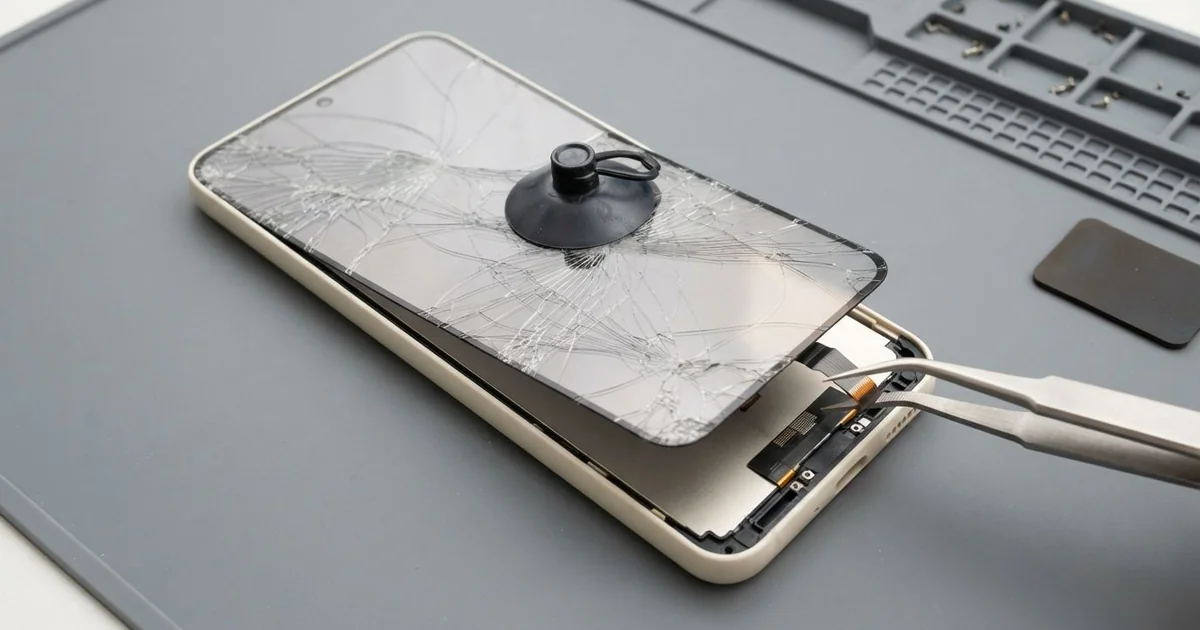
Samsung Galaxy S22 LCD Display Replacement in Al Khobar brings back a clear screen after a crack or knock. We check the phone free and fit a new complete screen, glass and display in one part. Then we test touch, colour and the fingerprint reader, and most jobs are done the same day.
A Samsung S22 broken screen shows up in different ways. You may see a web of cracks, a bright green line or a black patch that grows. Some screens look perfect but miss your taps, or tap by themselves.
Don't leave it too long. A crack lets dust, sweat and water reach the display and the board underneath. Black patches also spread slowly, and one day the screen stays dark.
Not every screen fault means a new screen. A lifted or bubbled screen protector often causes ghost taps and a fingerprint reader that fails. Sometimes a loose connector after a drop gives a black screen, and refitting it is enough.
Real damage is different. The glass and the display on this phone are glued into one part, so the glass can't be changed alone. A Samsung S22 screen replacement fits the whole new part, and that clears cracks, lines and dark patches together.
How Kabayan Center Replaces a Samsung Galaxy S22 LCD Display
We fix these screen problems on this model.
- Cracked or chipped front glass, including the corners
- A green, white or pink line that stays on the screen
- Black ink patches, or a dark screen while the phone still rings
- Touch that misses taps, or taps and types by itself
- A fingerprint reader under the screen that no longer reads
- A crushed corner where the screen has come away from the frame
This is how the screen replacement works, step by step:
- We check the phone free and note what still works, like sound, cameras and charging.
- We explain what it needs, and you decide before any work starts.
- We heat the phone gently to soften the glue and disconnect the battery first.
- We lift out the damaged screen and clean every bit of old glue from the frame.
- We connect the new screen and check touch, colour and brightness before sealing.
- We seal it with fresh glue and press it evenly so the edges sit flat.
- You set up your fingerprint again and test the phone before you leave.
Using another model? Our phone screen replacement covers most phones with the same care. Our shop is on King Fahd Road, and customers drive in from Dammam and Dhahran too.
How a Galaxy S22 Screen Gets Damaged: 3 Real Cases
Caught in a car door
This one starts at a car door. A parent was loading shopping bags with the phone in one hand. The door swung shut on the bottom corner of the phone.
"The bottom of the screen won't respond at all," they told us. They had searched for Samsung Screen Replacement in Al Khobar before driving over. The phone still rang and played music, so the parent hoped it was a small fault.
A car door squeezes the phone from the side. The glass cracked in a small star at the corner. Under it, the display had a black patch, and touch was dead along the bottom edge.
We fitted a new screen and checked the keyboard area carefully, since that's where people type most. Touch worked from corner to corner again.
The charging cable was another problem. It would not go all the way in, because the door had bent the metal around the port.
We checked the pins under a magnifier first. Then we did a charging port repair as well. The phone left with a clear screen, firm charging and a case with thick corners.
Ghost taps from a badly fitted screen protector
We often see this after a quick screen protector fit. A taxi driver had one put on at a street stall in a hurry. Within days the phone started opening apps and typing letters alone, often while the maps were open.
The driver had looked up mobile repair in Al Khobar and expected to need a new screen. The fingerprint reader had also stopped working. "I have to type my code every time," they said.
We took the protector off first. It was thick, with air bubbles and dust trapped at one edge.
The reader under this screen can't read well through bubbles, and the trapped dust caused false touches. A good protector sits flat, with no gaps at all.
With the protector gone, touch and fingerprint worked normally. But under it we found a thin crack across the top corner. The driver decided to wait on a new screen for now, since the phone worked well.
We fitted a thin protector that suits the fingerprint reader. We also explained that a crack lets water in, even when the screen still works. The phone left working, crack and all.
A single green line after a knock in a gym bag
A customer walked in with a phone that showed one bright green line and no crack at all. It had been loose in a gym bag with a heavy lock and a water bottle. "I didn't even drop it," they said.
Hard objects in a bag press on one small spot of the screen. The glass survives, but the display under it breaks at that point. That's why the line appears without any visible damage.
We first checked the connector, because a loose one can also cause lines. It was tight and clean, so the display itself was broken.
We fitted a new screen and tested it on plain white and black pictures. That shows any faint line or spot at once.
During testing, the zoom photos looked soft and hazy. The small glass over the back camera had a crack from the same bag. We did a phone camera repair too, fitting new camera glass.
The phone went home with a clean screen and sharp photos. Now it travels in its own pocket in the bag, away from the lock.
How to Keep Your Galaxy S22 Screen Safe
- Keep the phone in its own pocket, away from keys, locks and bottles.
- Choose a thin screen protector made to work with the fingerprint reader.
- Replace a protector that bubbles or lifts, before it causes false touches.
- Put the phone down before you close a car door or lift heavy bags.
- Use a case with thick corners, because corners take most falls.
- Fix a crack early, before water or sweat get under the glass.
- Visit a shop for phone repair in Al Khobar as soon as a line or patch appears.
Related services
- Phone battery replacement for a phone that drains fast or a screen that starts to lift
- Water damage repair for a phone that got wet through a cracked screen
Questions about this repair
Ask us anything else on WhatsApp
we answer during shop hours.