Samsung Galaxy S22 Motherboard Repair in Al Khobar
Samsung Galaxy S22 Motherboard Repair in Al Khobar for a phone that is dead, restarts by itself or runs hot. We check your phone free and tell you what it needs. You decide before any work starts, and your photos stay yours.
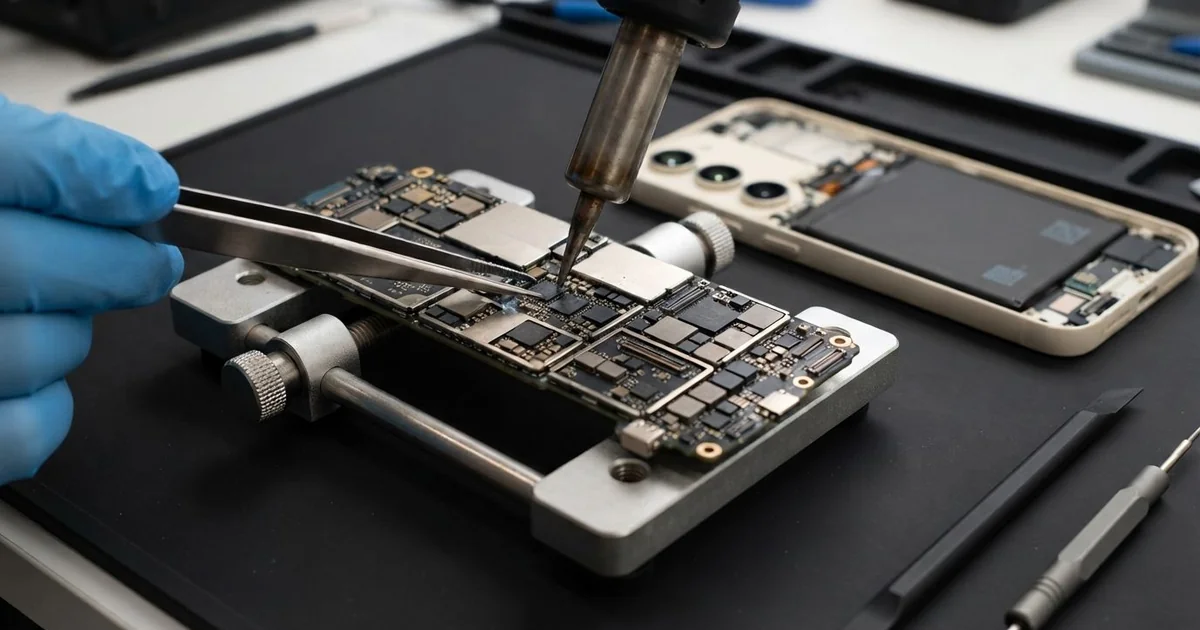
Samsung Galaxy S22 Motherboard Repair in Al Khobar is for phones that are dead, restarting or hot. We check the phone free and rule out the battery and charger first. Then we find the fault on the board, fix that part and test everything before you take it home.
The signs are easy to spot. A Samsung S22 not turning on shows a black screen and no charging sign at all. Other phones switch off by themselves, freeze on the logo or feel hot near the back camera.
Some phones also lose signal, sound or Wi-Fi without any clear reason at all. These faults often start small and come and go. Then one day the phone does not come back on at all.
It's better not to wait. A weak joint or a short circuit, where power leaks to the wrong place, heats the parts near it. Each hot restart makes the damage a little wider and harder to fix.
Not every fault needs board work. A worn battery or a dirty port can make a phone look dead, and those are simple fixes. When the board is at fault, we fix the small part that failed, not the whole board.
How Kabayan Center Repairs a Samsung Galaxy S22 Motherboard
These are the faults we fix on the Samsung S22 motherboard.
- A dead phone with no power and no charging sign
- Random restarts, or a phone stuck on the logo
- Heat near the camera while the phone sits still
- No signal or no Wi-Fi after a drop
- A board shorted by a swollen battery or water
- A charging chip burnt by heat or poor power
Here is how a board repair works with us, step by step.
- We check the phone free and test the battery, charger and port first.
- We explain the fault, and you decide before any work starts.
- We warm the glued back, open it slowly and disconnect the battery.
- We feed the board safe, measured power and check each power line with a meter.
- We find the hot part with a heat camera, which shows a short as a bright spot.
- We replace that part, or melt its tiny solder joints and set them again.
- We test power, signal, cameras and charging, then seal the back with fresh glue.
Need the same work on a laptop or another phone? Our motherboard repair service covers them too. Customers reach our shop on King Fahd Road from Dammam and Dhahran as well.
How a Galaxy S22 Board Gets Damaged: 3 Real Cases
Maps all day in a hot car
This one starts in a hot car. A delivery driver ran maps all day, with the phone on a dashboard holder in the sun. It charged from a car charger the whole time, even at noon.
"It keeps switching off in the afternoon, then it won't start," the driver told us. Heat and constant charging together push a small phone board very hard. After many hot days, the parts near the charging line began to fail.
The driver had searched for mobile repair in Al Khobar during a break between deliveries. On the bench, the heat camera showed a bright spot on the charging chip. It had cracked inside from being hot so often.
We replaced the chip and cleaned the area around it. The metal pins in the port had also turned dark from the heat. So we did a charging port repair at the same time.
The phone came back fully working and stayed cool on the charger. We suggested moving the holder to an air vent, where cool air keeps it safer. A phone in direct summer sun can get too hot to work safely.
Dropped on tiles, then random restarts
A customer came to us after the phone slipped off a kitchen counter onto hard tiles. The screen survived without a single crack. But from that day, the phone restarted by itself many times a day.
Drops like this bend the board for a moment. That can crack the tiny solder joints under a chip, even when the outside looks perfect. The joint touches, then loses contact, and the phone restarts.
The customer had looked up Samsung Motherboard Repair in Al Khobar and worried about the photos inside. Fixing a cracked joint means heating the board, which carries some risk. So first we used the few minutes the phone stayed on for a data recovery copy.
Then we set the cracked joints again under a small hot-air tool. The restarts stopped, and the phone stayed on through a long test.
But the fall had also torn a thin line to the fingerprint reader under the screen. That part could not be saved on this board. The customer now unlocks the phone with a PIN, and all the photos are safe.
A swollen battery pressed on the board
We often see this in phones that are a few summers old. The back had started to lift a little at one corner. "It still works fine," said the owner, a teacher, and kept using it.
One evening the phone went black and would not turn on again. An old battery can swell with heat and age, and our summers speed that up. As it grows, it presses on the board and the parts sitting near it.
When we opened it, the battery was puffed up like a small pillow. It had pressed a tiny part near the power line until it shorted. That short was why the phone looked completely dead, even on the charger.
We did a phone battery replacement first, because a swollen battery can catch fire. Stop using a phone when the back starts to lift. Then we replaced the tiny shorted part on the board and tested it.
After that the phone turned on and charged normally again. The back closed flat, and the teacher's files were all still there. The whole job was done the same day, while the teacher waited nearby.
How to Keep Your Galaxy S22 Board Safe
- Mount the phone on an air vent, not in direct sun on the dashboard.
- Use a case with raised corners, so drops hurt the board less.
- Stop using the phone if the back lifts or the phone swells.
- Use a good charger and cable, and unplug once it's full on hot days.
- Back up your photos often, since a board fault can come without warning.
- Take it for phone repair in Al Khobar when restarts begin, before it goes fully dead.
Related services
- Water damage repair for a phone that got wet and stopped working
Questions about this repair
Ask us anything else on WhatsApp
we answer during shop hours.