Samsung Galaxy S22+ Battery Replacement in Al Khobar
Samsung Galaxy S22+ Battery Replacement in Al Khobar for a phone that drains, heats up or switches off. We check the battery free and tell you what it needs. You decide before any work starts, and your files stay yours.
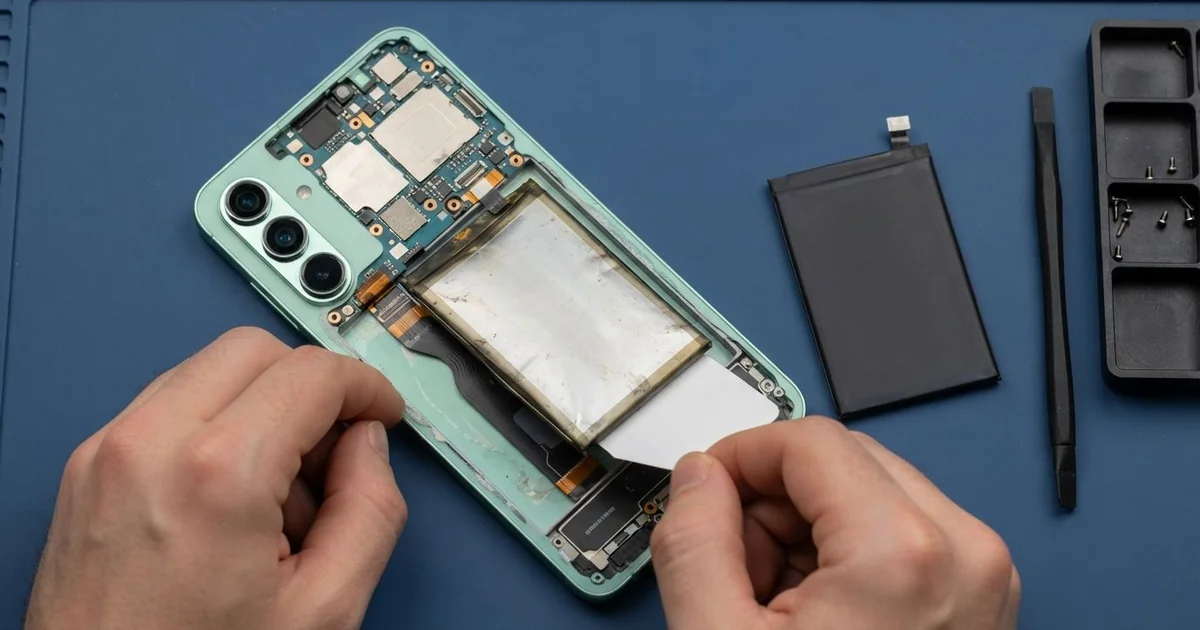
Samsung Galaxy S22+ Battery Replacement in Al Khobar fixes a big phone that no longer lasts. We start with a free battery health check, then fit a new battery if the old one is worn. We reseal the glass back, and most jobs are done the same day.
A Samsung S22 Plus battery draining fast is easy to spot. The charge drops while the phone sits in your pocket. Some phones get hot on a short call, or switch off with charge still left.
Waiting makes it worse. A worn battery gets hotter as it works, and the heat wears it out faster still. Old batteries can also swell, and a swollen battery must not stay in use.
Sometimes the battery is fine and something else drains it. An app that never sleeps, or a phone always hunting for signal, can do it. Even a very bright screen all day adds up.
That's why we check the battery health before we suggest any part. When the battery is truly worn, a Samsung S22 Plus battery replacement is the fix.
It sits under the glued glass back, held in with its own glue. We take it out without bending it and fit the new one with fresh glue strips.
How Kabayan Center Replaces a Samsung Galaxy S22+ Battery
We fix these battery faults on this phone.
- Charge that drops fast, even with the screen off
- Sudden shutdowns while charge still shows on screen
- A phone that heats up during calls, maps or charging
- A swollen battery that lifts the glass back or the screen
- Charging that stalls, restarts or takes much too long
- A battery level that jumps after a restart
Here is how a battery change works with us, step by step:
- We check the phone free and read the battery health in the device care settings.
- We tell you what we found, and you decide before any work starts.
- We warm the glass back to soften its glue and lift it slowly.
- We unplug the old battery first, then release its glue and lift it out flat.
- We clean the frame and fit the new battery with fresh glue strips.
- We connect it, test charging and heat, then reseal the back and press it evenly.
- You check the phone yourself before you take it home.
Using another phone? Our phone battery replacement service covers other models the same way. Customers come to our shop on King Fahd Road from Dammam and Dhahran too.
How a Galaxy S22+ Battery Goes Bad: 3 Real Cases
A drop that dented the battery
One morning a phone came in with a lifted back and a cracked corner. It had fallen out of a car door onto the road a few days before.
"It worked fine after the fall. Then the back started to open," the owner said.
A hard hit can dent a battery inside, even when the phone still works. Over the next days, that damaged battery slowly swells. The swelling then pushes the glass back away from the frame.
When we lifted the glass back, the battery had a clear bulge near the dent. We took it out first, because a damaged battery can overheat or catch fire.
The same fall had cracked the corner of the front glass, and touch was failing there. So after the battery, we also did a phone screen replacement. Doing both in one visit meant the phone was opened only once.
We sealed the back with new glue and tested charging, touch and heat. The phone came back to full working order.
The owner had searched for Samsung Battery Replacement in Al Khobar that same morning. They left with a thick case too, for the next fall.
A swim at the beach
A common case in summer: a phone taken into the sea for photos. A teacher on a family beach day did just that, trusting the phone to handle the water.
The phone worked that day, so nobody worried. But over the next weeks, the battery drained faster and faster. The phone also felt warm on the bedside table at night.
We opened it and found white salt marks near the battery connector. Salt water leaves crust that slowly eats the metal and leaks power. The seal had also aged, which let the water in.
Rinsing with tap water would not have helped, because salt hides deep inside.
We did a water damage repair first, cleaning the board and the connector. Then we fitted a new battery, since the old one had been drained and heated for weeks. A battery treated like that rarely recovers.
The phone now holds its charge normally and stays cool overnight. We told the teacher that a phone's water seal gets weaker with age. It's safer to keep it away from the sea, even if it survived before.
The drain that wasn't the battery
We often see this, too. An office worker asked for a new battery because the phone was empty by noon. They had looked up mobile repair in Al Khobar and came in on a lunch break.
We read the battery health first, and it was only a little worn. That alone couldn't explain such a fast drain. So we looked at the battery use screen instead.
An old app was running in the background all day, keeping the phone awake. We showed the worker how to find it and stop it. We also turned off a few settings that searched for signal nonstop.
None of this needed a part or opening the phone.
The phone lasted much longer the next day, but not like new. The battery was still a bit tired from its age. We said a new battery would help more, and the worker chose to wait.
So the fix was partly settings and partly time. The worker will come back when the battery health drops further. Until then, the phone gets through a normal workday with a short top-up at lunch.
How to Keep Your Galaxy S22+ Battery Healthy
- Check the battery use screen now and then, and stop apps you don't need.
- Keep the phone away from the sea and the pool, even if it survived before.
- Use a strong case, since a hard drop can damage the battery inside.
- Charge between 20% and 80% when you can, instead of always to full.
- Keep it off the car dashboard and out of the summer sun.
- Bring it for phone repair in Al Khobar at once if the back starts to lift.
Related services
- Charging port repair for a phone that charges loosely or not at all
- Motherboard repair for a phone that won't turn on even with a new battery
Questions about this repair
Ask us anything else on WhatsApp
we answer during shop hours.